Turn form data into revenue
Generated by Klaviyo AI
The article explains how to capture, store, and activate Klaviyo form data to create more relevant messaging beyond simple discounts. It covers practical steps for mapping form fields to profile properties, segmenting and personalizing flows, and measuring the revenue impact of zero-party data.
- Ask smarter questions: Use one or two optional form fields—like birth month, shopping intent, or channel preference—to collect data that meaningfully changes how you communicate.
- Store data correctly: Create clear profile properties in Klaviyo and map each form field to them consistently so the data is usable for segmentation and flows.
- Personalize with properties: Build segments and conditional splits based on profile properties to tailor welcome flows, campaigns, and suppressions to what subscribers say they want.
- Measure personalization impact: A/B test personalized messages against generic versions and track open rate, click rate, and revenue per recipient to see how much value each data point unlocks.
- Start with one field: Focus on a single high-impact property already collected in your forms, build a targeted experience around it, and iterate once the workflow is in place.
Most brands are already collecting more data than they realize.
Birthday fields. Shopping intent. Who someone is buying for. Preferred channel. All of that information is sitting inside Klaviyo forms. Yet for many teams, it never makes it into day-to-day messaging.
I know this because I’ve been there. As senior retention marketing manager at jewelry brand Mint & Lily, my team and I were capturing information in extra fields on our pop-up, feeling great about it, and then not doing much with it. There was simply so much else to do. We didn’t always know what to do with the data, and once we collected it, it was easy to forget it was even there.
That changed after one experiment that completely reframed how we think about forms.
The simple form question that became our top-performing campaign
At Mint & Lily, we started asking a simple question on our pop-up form: What month were you born in? Nothing fancy, just one extra field.
Using that data, we built a birthday campaign that sends subscribers a gift of a discount during their birth month. That campaign has been our top performer and has stayed strong all year long.
We don’t stop at one message, either. Throughout the subscriber’s birth month, we follow up with content tied to the moment:
- Birth flowers
- Zodiac signs
- Birthstones
It feels personal, timely, and relevant. People genuinely enjoy receiving it, and it gives them a reason to treat themselves.
That experience made one thing very clear: collecting meaningful information only matters if you actually use it.
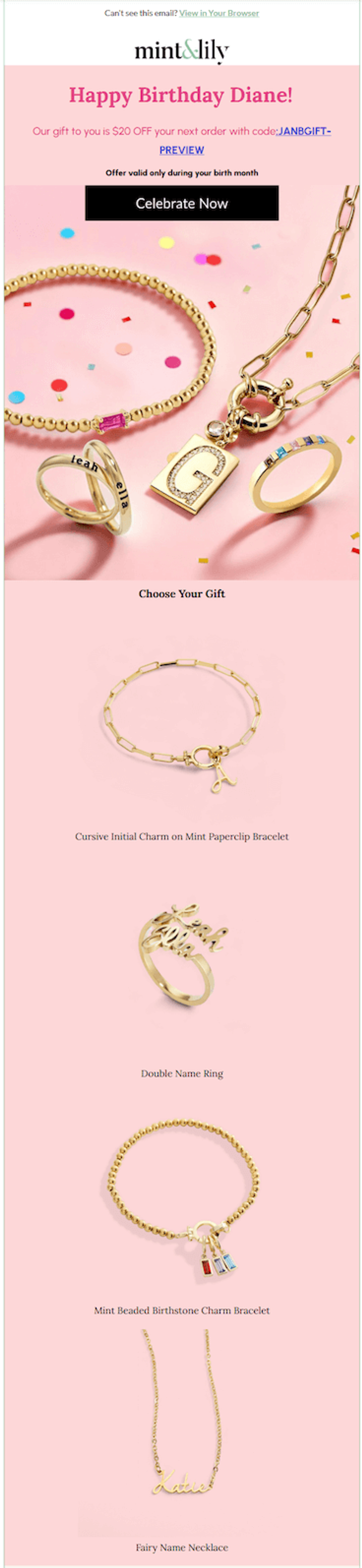
Image source: Mint & Lily
Using forms to understand what people actually want from you
Forms aren’t just for capturing email addresses or phone numbers. With one intentional question, you can learn what someone actually wants from your brand.
A few examples:
- Intent: Are they shopping for themselves or buying a gift?
- Category interest: What are they looking for? Tops, bottoms, accessories, or something else?
- Timing signals: What’s their birth month? Any other important dates to keep in mind?
- Channel preference: Do they prefer email, text messaging, or both?
These fields should be optional. The goal isn’t to turn your form into a quiz. It’s to identify the one piece of information that will meaningfully change how you talk to your audience.
Once you have that information, you can act on it immediately in a welcome flow, a browse abandonment flow, or a targeted campaign (more on that later).
Stefan Milicevic, strategy director at Underground Ecom, offers a technical tip around collecting data from forms. “Early on in your form creation process, you have to decide if this form will rely on data from existing subscribers or not (by making sure to not target existing Klaviyo profiles, and to merge profiles where they have the same data). If it does rely on that, your data may become inflated and you’ll find yourself solving problems for people that have already have them solved.”
How to store form data in Klaviyo without creating chaos
This is where many teams get stuck.
There are two essential steps to storing form data correctly in Klaviyo:
- Create the profile property.
- Map the form field to that property.
If either step is missing or mismatched, the data won’t be usable.
A few practical tips:
- Use clear, consistent naming for profile properties so they’re easy to recognize later.
- Decide upfront which fields are required vs. optional.
- Only create properties you actually plan to use.
Form-to-profile mapping is the trickiest part of this entire process. Once you set it up correctly, everything else becomes much easier. But it is worth double-checking before you launch.
Visit Klaviyo’s Help Center for a deeper understanding of profile properties.
Using profile properties to personalize with segmentation and conditional splits
The next step is simple: build segments and conditional splits based on those property values.
For example:
- Subscribers whose shopping intent is “gift”
- Subscribers who selected a specific product category
- Subscribers who prefer text message over email
You can use this information for:
- Personalized campaigns
- Suppressions
- Conditional splits in flows
This is where form data starts to pay off. Instead of sending one generic message, you’re sending content that aligns with what someone already told you they care about.
And you don’t have to wait weeks or months to use the data. One of the best places to apply it is your welcome flow. With a conditional split, you can:
- Send different content to gift buyers vs. self-purchasers.
- Highlight relevant products based on category interest.
- Adjust messaging based on channel preference.
Even small changes here can significantly improve engagement, especially when compared to a one-size-fits-all welcome series.
How to measure whether personalization is actually working
If you’re going to ask for more information, you should measure the impact.
The simplest way to do this is to A/B test personalized messaging against a generic version.
Look at:
- Open rates
- Click rates
- Revenue per recipient (RPR)
RPR by property is where things get especially interesting. You’re not just measuring whether a campaign performed well. You’re seeing how much value that specific piece of data unlocked.
When we tested tailored campaigns using form data, we saw up to a 10x increase in RPR compared to generic sends. Birthdays are just one example. You can apply the same approach to other properties as well.
There’s a lot of untapped potential here, especially for smaller teams that already have the data but aren’t using it yet.
"Before you measure the impact, try to also establish some clear form KPIs,” says Milicevic. “Is this form about collecting data, pushing new subscribers in, or both? Submission (conversion) rates will be significantly different depending on how many steps you have between data entry and submission."
Before you measure the impact, try to establish some clear form KPIs.
Why marketers are underutilizing Klaviyo form data
In retention marketing, bandwidth is always the limiting factor. I get it.
Form-to-profile mapping and segmentation can feel intimidating, especially if you’re newer to Klaviyo. But once you’ve set it up, it becomes repeatable, and the payoff is real.
Forms give you zero-party data directly from your subscribers. The more relevant your content is to what they actually want, the more impact it will have on your business.
If you’re only going to change one thing this year, start here: look at the data your forms are already collecting, pick one property, and build something with it.
You might be surprised by how much revenue is hiding in a single extra question.

Related content