Sign-Up Forms That Grow Lists
Generated by Klaviyo AI
Effective sign-up forms exchange clear value for contact information while matching offers and messaging to visitor intent. The examples show how targeting, concise design, expectation-setting, testing, and purposeful data collection can improve list growth and support personalized marketing.
- Match the incentive: Choose discounts, gifts, shipping offers, giveaways, or gated content based on revenue, margin, and subscriber-quality goals.
- Target visitor intent: Tailor forms by traffic source, landing page, customer journey stage, and real-time behavior instead of showing everyone the same message.
- Clarify the value: Feature the offer prominently and explain what subscribers will receive after signing up.
- Minimize friction: Ask only for essential information unless additional fields serve a clear personalization strategy and perform well in testing.
- Use collected data: Apply zero- and first-party data from forms to segmentation, dynamic messaging, product recommendations, and automated flows.
Think about the traffic that lands on your website for the first time. In most cases, people don’t just wander into your online store “off the street.” And whatever method you used to draw them in, it probably wasn’t cheap.
According to Klaviyo’s 2025 State of B2C Marketing Report, 73% of marketers report rising customer acquisition costs (CACs). Even if you’re driving most of your web traffic from organic search, social, and LLMs, “there is always a cost associated with getting those people onto your site,” points out Jacob Sappington, director of strategy at ecommerce growth marketing agency Homestead Studio.
That could mean:
- The immediate cost of paying for an ad that gets someone onto your site
- The human cost of creating the content that drives someone to your site
- The time cost of all of the above
Moral of the story: Once you’ve paid for someone’s attention, “if you’re relying on them coming back to you through their own just thinking about you, you’re going to struggle with that,” Sappington says. “You absolutely should be concerned about being able to communicate with those users whenever you want to.”
You can do this by gathering contact information for your owned marketing channels, and that’s exactly what an on-site sign-up form helps you accomplish.
Sign-up forms are essential infrastructure for your CRM strategy. They begin the process of gathering the data you need to set up a customer profile for each shopper, so you can personalize their experience with your brand, keep gathering valuable data in the future, and ultimately establish a deeper relationship with them.
But how do you use sign-up forms to collect useful information from your customers without turning them off? Here are 13 sign-up form best practices that can improve the customer experience and turn more of your website visitors into subscribers and customers.
1. Align your offer with your sign-up form goal
Think of the information you’re asking for on a sign-up form as a form of currency. Your visitor wants to get something of equal or greater value in return for giving you their name, email address, or phone number.
“It’s really important to have something that is going to get users interested in opting in,” says Ben Zettler, founder at digital marketing and ecommerce agency Zettler Digital. “What is the incentive? It doesn’t necessarily have to be a discount, but there needs to be a reason for a user to sign up.”
The first best practice to follow when you’re launching a sign-up form is to understand your goals, and adjust your incentive strategy accordingly. “There are all different kinds of offers you could try,” Sappington points out, such as:
- Percentage off
- Dollar amount off
- Free gift with purchase
- Chance to win a contest or giveaway
- Free shipping
If those options feel overwhelming, “think about impact,” Sappington advises.
How to weigh your sign-up incentive options
Most of Homestead’s clients, for example, are revenue-focused. “If you’re trying to acquire customers onto your list in a way that drives revenue,” Sappington says, “those discounts are what’s going to convert the most high purchase-intent customers.”
But if your primary concern is profit margin and you’re comfortable attracting a lower-intent visitor, you might think about offering access to a gated content resource: style tips if you’re a beauty or fashion brand, for example, or early access to a highly anticipated YouTube video.
“If you have really regular, common questions about your product and people might find a guidebook-type resource valuable, that’s a great margin-reducing option,” Sappington says.
If you operate in an industry like skincare, where your product costs very little to make and you can sell it for a high price, a free gift with purchase might be a smart alternative to a discount. In this sign-up form example, see how olive oil brand Brightland offers a free spout in exchange for contact information:
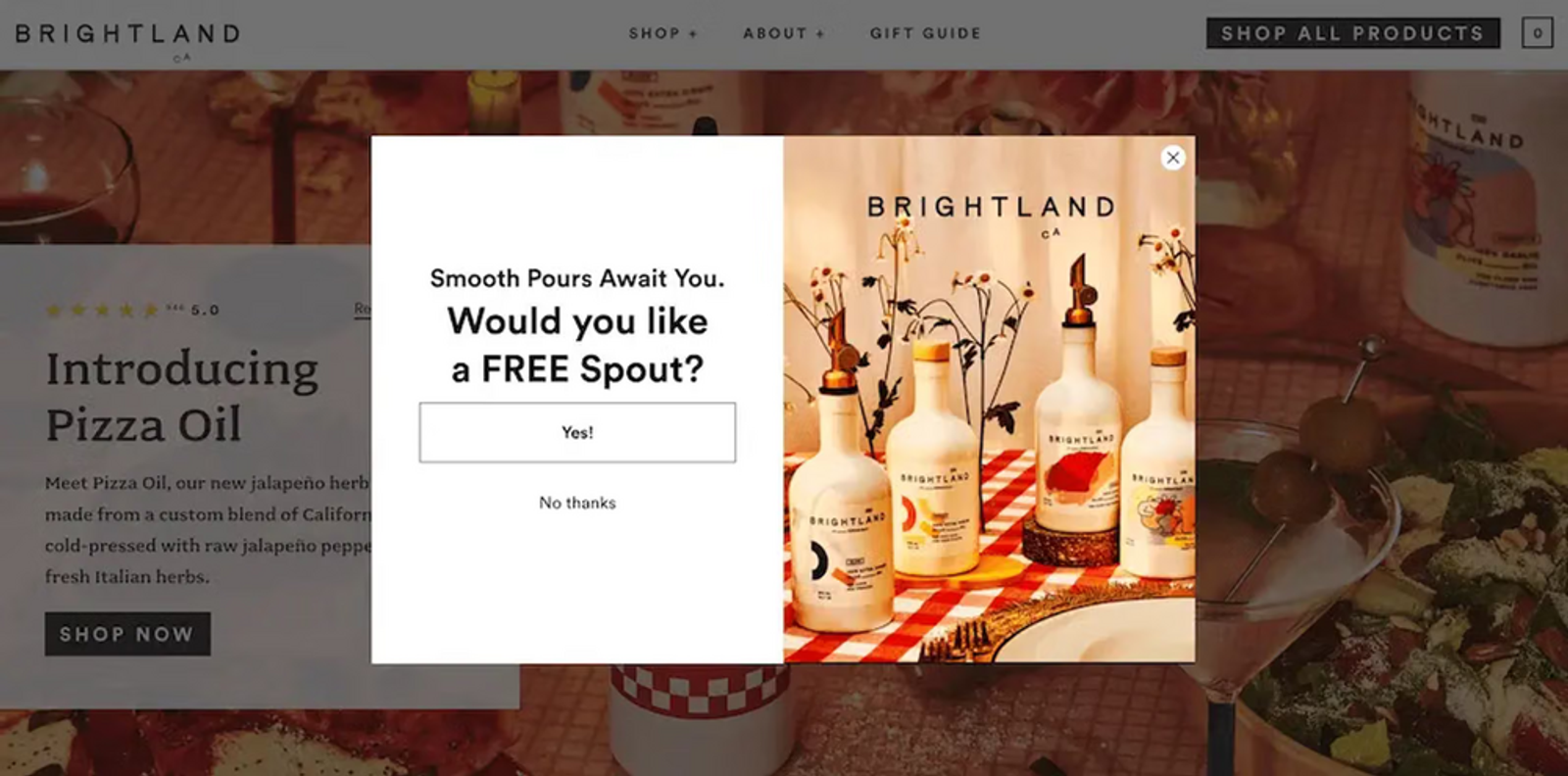
Brightland
Here’s another example from Our Place, the brand that developed a multi-functional non-stick pan that’s easy to clean and looks stunning in any kitchen. The headline clearly states the value of the prize in bold text at the top of the form, but the body copy is where things get really interesting:
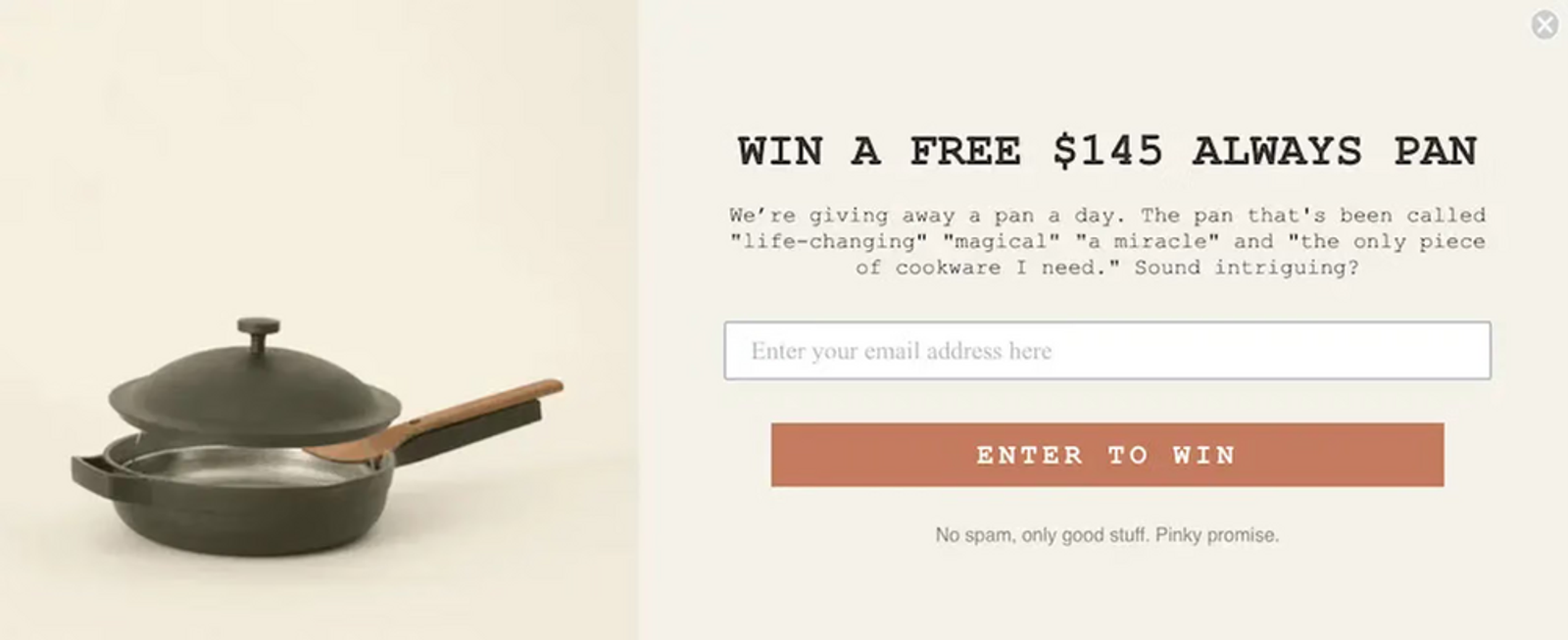
Our Place
The form includes not only essential information about the giveaway, including its monetary value, but also social proof in the form of testimonials from customers that promise the pan in question is “life-changing” and “a miracle.”
Ultimately, “you have to think about what the opt-in represents to the people who are opting in,” Sappington explains. “Someone who’s signing up for 10% off, they’re probably going to purchase. Someone who’s signing up for a giveaway, they want the chance to get free stuff, and they may or may not purchase.”
Always do the math, and test it
Let’s say you have a giveaway sign-up offer that converts at 10%, for example, but the revenue per user is 10 cents. As Sappington points out, “a 5%-off welcome offer that converts at a dollar is better than that.”
Or let’s say you run a free shipping offer that converts at 2%. Then, you flip it to a free gift with purchase: a product that costs you $2 to make. If free shipping costs you $8, the free gift with purchase is an attractive sign-up incentive that saves you 4x the money.
If this sounds like a lot of complicated bartering, Sappington advises focusing on 3 key questions when testing your sign-up forms:
- Can we save more money or margin with a different offer?
- Can we drive more or higher-quality opt-ins on the pop-up with a different offer?
- Can we drive higher revenue with a different offer?
Bottom line: “There has to be something,” Zettler says. “The generic ‘Sign up for news and releases’—that doesn’t work. You have to get creative.”
2. Don’t show the same sign-up form to every visitor
On a similar note: making your sign-up forms one-size-fits-all is a rookie mistake. “For the majority of brands, even brands that are at a certain level of scale, you’re always going to want to serve a pop-up to users coming to the site for the first time,” Zettler says.
But just as different incentives will motivate different people to sign up based on where they are in the customer journey, different sign-up forms will appeal to different people based on where they’ve landed on your site.
“The more targeted it is, the better the sign-up form tends to perform,” says Maria Trotta, senior digital strategist at Klaviyo. “A standard ‘Sign up for our newsletter’ pop-up asks a stranger for a lot with very little context. An exit-intent form or a phone number-specific ask, shown to someone who's already engaged, is more likely to convert.”
Let’s say you’re heavily focused on organic traffic and you’ve invested a lot of time and money into building out an amazing content program on your blog. In that case, Sappington might suggest showing one sign-up form to blog readers and a different one to store browsers.
“You have to think about the users that are there,” Sappington says. “With a user who’s on your blog, a completely separate part of your website—do they have the same intent as someone who’s actually on your website shopping? The answer is no.”
Or let’s say you’re investing significant social ad spend in promoting a particular piece of content, and you want people to sign up for your email list in order to gain access to it. You might exclude paid social traffic from seeing your main, generic pop-up, and show them one tailored to the focus of the social campaign instead.
“You might have landing page-specific content depending on how you’re leveraging that across organic social, paid social, paid search, and organic search, and then pop-ups that are also specific to those different sources,” Zettler explains. “Those all become really important in getting users to sign up.”
You can also schedule forms to appear only during specific timeframes, and display forms based on real-time user behavior, such as exit intent or abandoned cart pop-ups. A word of caution, here: if you’re launching specialized sign-up forms across your website, “the most important thing,” Sappington says, “is making sure they’re not bumping into each other and causing a poor customer experience.”
3. Emphasize the value you’re offering in the form header
Once you’re clear on the value you’re offering in exchange for your web visitors’ information, make sure your sign-up form emphasizes it prominently.
“Something I see happening a lot is that marketers have really poorly designed forms that don’t emphasize the value proposition enough,” Sappington says. “Show the offer. That’s what people want. Be a little more up front with what you’re trying to sell.”
Watch how Caden Lane, a brand specializing in products for baby nurseries, centers the special offer on their homepage sign-up form. The form grabs the visitor’s attention with a greeting, then wastes no time in offering a 15% discount on everything sitewide:
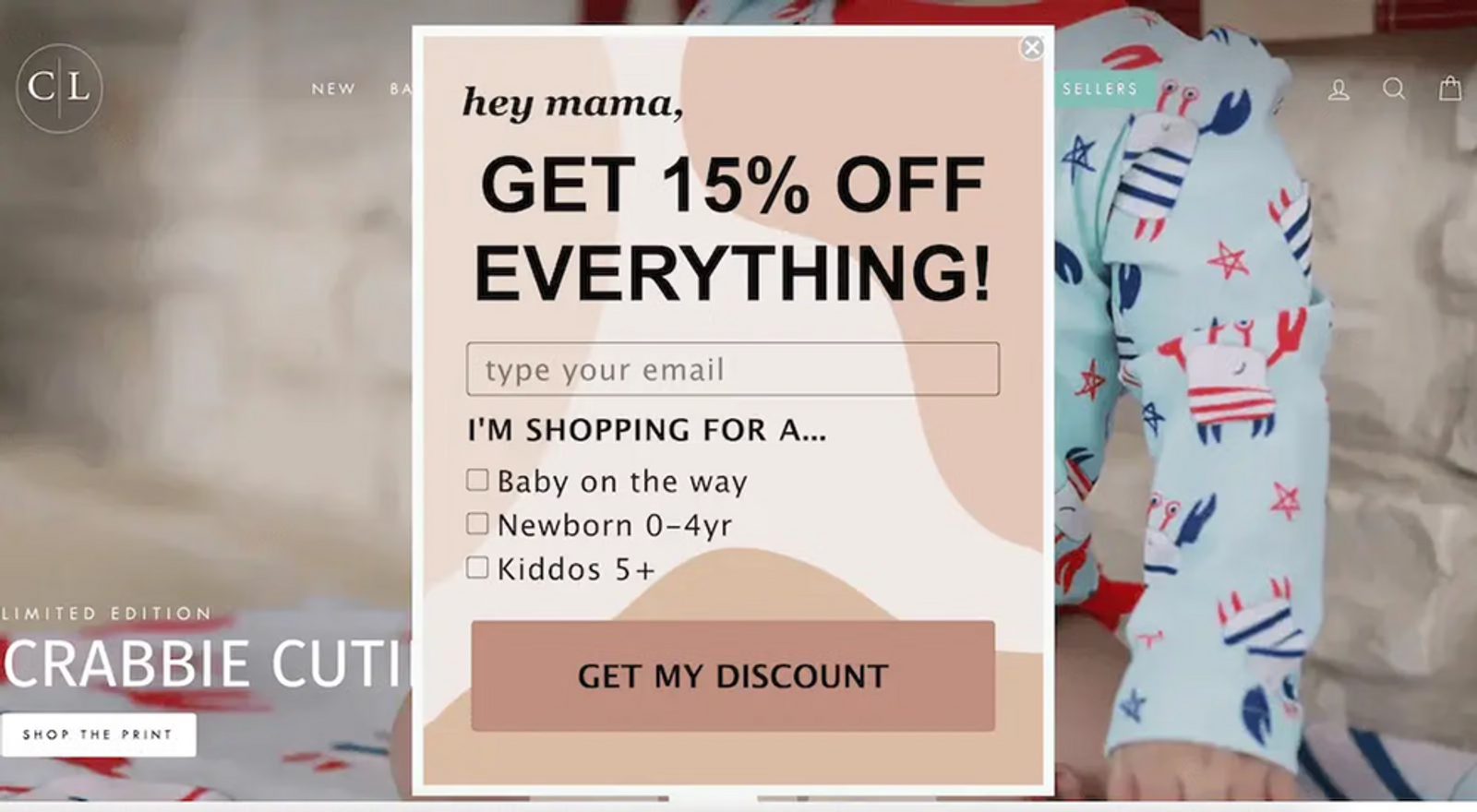
Caden Lane
4. Set clear expectations
One way to foster long-term commitment to your list is by telling subscribers exactly what they’ll get when they sign up, beyond the initial sign-up offer.
You might, for example, explain that email newsletter subscribers will receive recipes and cooking tips, while text message subscribers will receive early access to new product drops. Or you might simply identify how often subscribers can expect to hear from you and give them extra peace of mind by assuring them they can opt out at any time.
Your form doesn’t even need to be fancy to accomplish this. In this sign-up form example, see how intimates brand Thirdlove keeps it simple and straightforward, letting people know that by signing up they’ll receive early access to new products, exclusive deals, and more. The form sets expectations while giving several incentives to sign up at the same time, and there’s a clear link to their privacy policy if people want to know more:
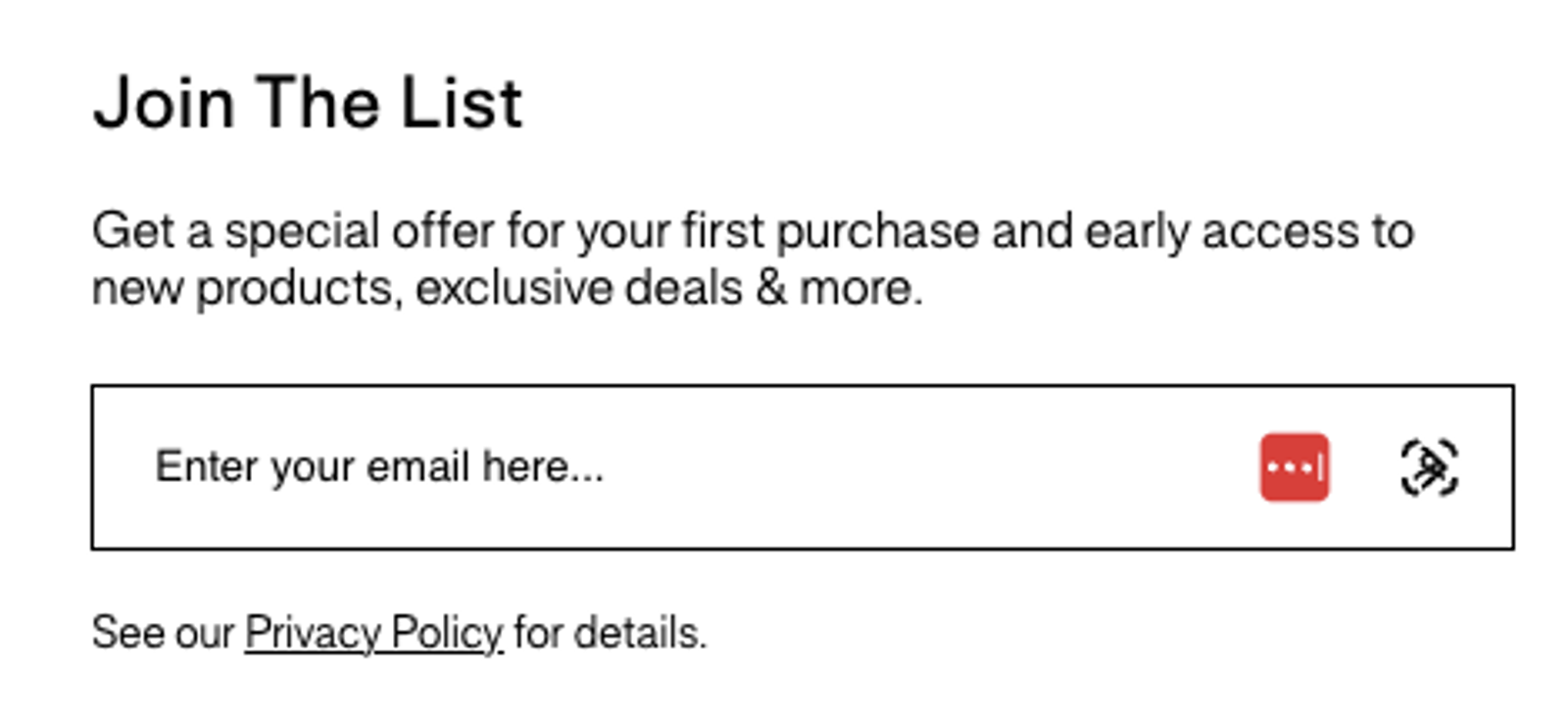
Thirdlove
5. Keep it short and sweet
To create a high-performing sign-up form, you don’t need flashy graphics or long narratives. In terms of form length, Zettler has generally found the simplest, shortest forms are the most successful. “For the main pop-up experience, I generally tell brands, ‘Don’t ask for anything.’ Ask for email, and if it’s a multi-step form, ask for a phone number after that. That’s it,” he says.
Even including a field like first name could impact your form submission rates, Zettler says. “I see that all the time—first name and email address. But you don’t actually need to know that person’s first name. If you get them to buy today, you’re going to have their first name, anyway.”
The goal, here, is to make it as easy as possible for your audience to share their information, boosting engagement in the process. “I generally much prefer that you get the opt-in so that you can start to serve more content to users who aren’t yet purchasing, to get them to make that purchase,” Zettler explains.
“While more information to enrich a user’s profile will absolutely have an impact on owned marketing success,” Zettler adds, “you can get it later on.”
Consider this example from the Official Store of Minecraft. Minecraft has between 170–200 million monthly active users, which means their online store doesn’t have to do much to encourage shoppers to sign up to the store’s newsletter. With this simple sign-up form design, Minecraft offers customers 10% off their first order in exchange for their email address, and require them to fill out only one field:
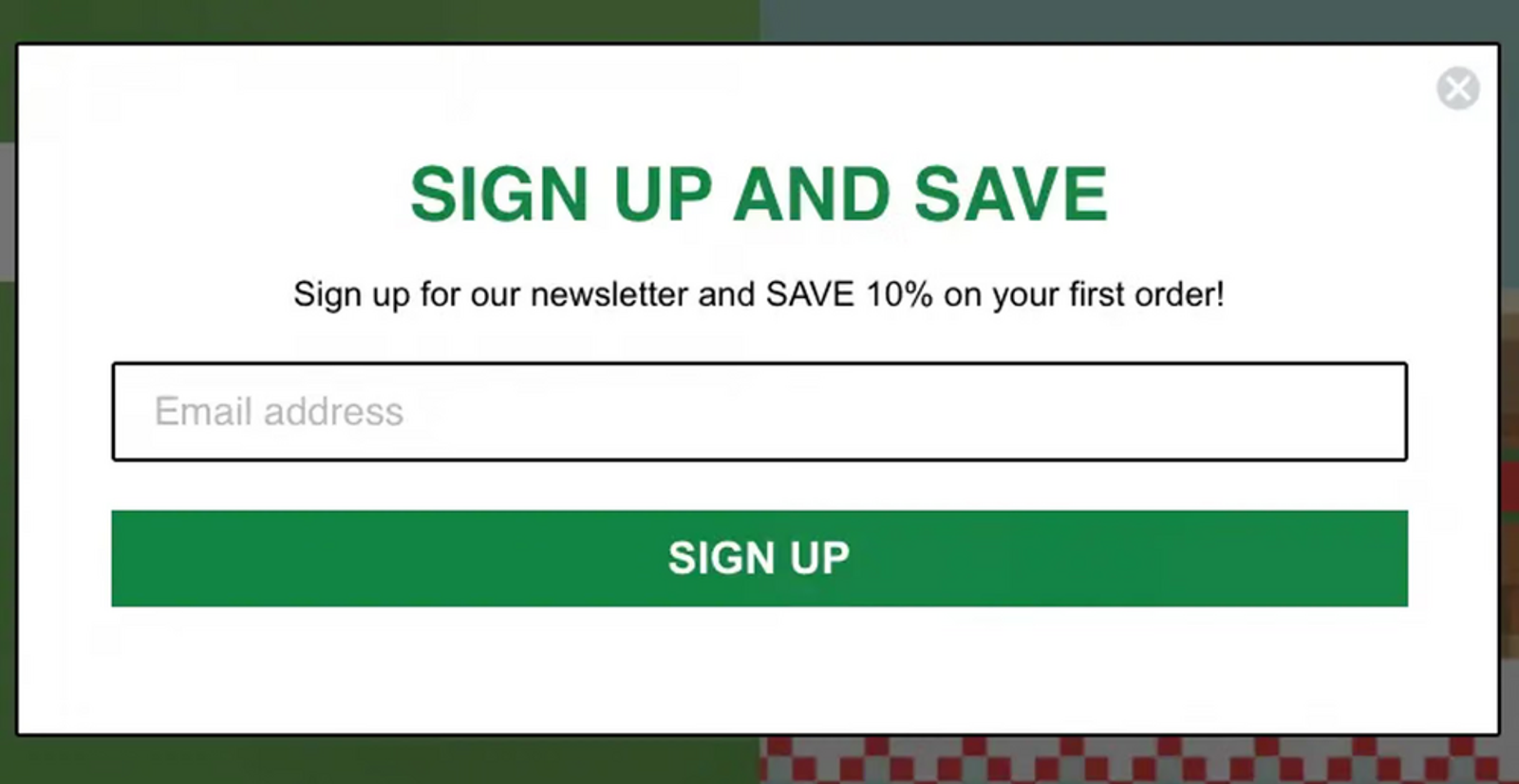
Official Store of Minecraft
6. If it makes sense, don’t be afraid to ask for more information
Asking for additional information on your sign-up forms could help you mine the kind of zero- and first-party data that proves invaluable in personalizing your marketing messages later.
Zero- and first-party data refers to information your customers either hand over willingly on a form or quiz, or consent to you collecting by observing their behavior on your website and owned channels.
Zero-party data is the gateway to first-party data, and ideally, all of it’s centralized in one autonomous B2C CRM. A CRM with built-in AI and marketing automation bridges the gap between what you know about your customers and how you use what you know to personalize the customer experience for each shopper.
Here are a few zero- and first-party data points you might want to ask about on a sign-up form, in addition to getting someone’s email address or phone number:
- Their birthday
- What products they’re interested in
- Why they’re shopping
- How often they want to purchase your products
- What kinds of emails or texts they want to get, and how frequently
It makes sense if: you sell to distinct audiences
According to Sappington, asking for more of this kind of information on your sign-up form makes the most sense for brands that have “very distinct buckets of people.”
Here’s a great example from Cheeky Wipes, which offers both baby care and feminine hygiene products. For founder Helen Rankin, it’s crucial to know which of those product lines her customers are interested in.
“People looking for period products don’t necessarily want to hear about baby products,” Rankin explains. “And for people who can’t have children, are undergoing IVF, or who have had multiple miscarriages, getting an email all about baby wipes—that’s a terrible customer experience.”
To solve this problem, see how the Cheeky Wipes sign-up form asks visitors to identify which products they’re interested in right from the get-go:
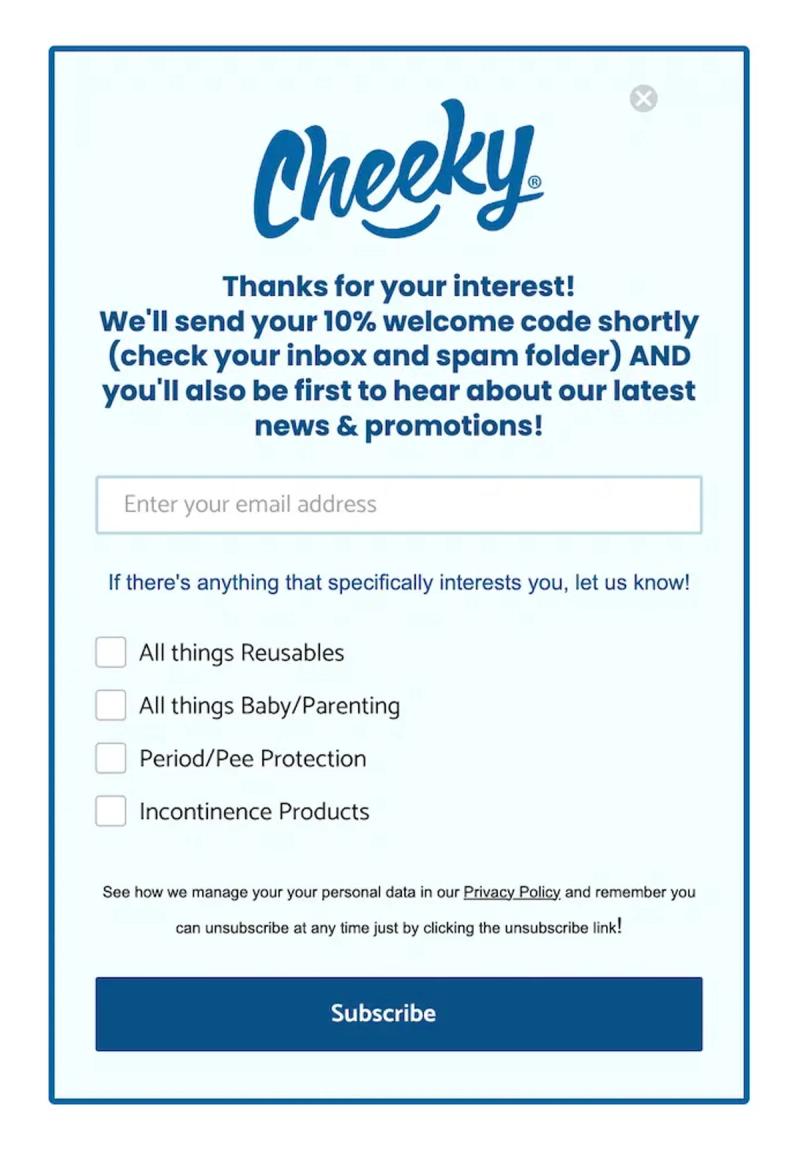
Cheeky Wipes
Similarly, UK-based razor brand Wilkinson Sword experimented with adding a field to their sign-up form to allow new email subscribers to identify whether they’re interested in “male” products, “female” products, or both.
“Data about what people are interested in helps us provide them with relevant content, so we’re willing to sacrifice a bit of conversion for that,” says John Pagni, ecommerce assistant. “But we actually haven’t seen a drop-off yet.”
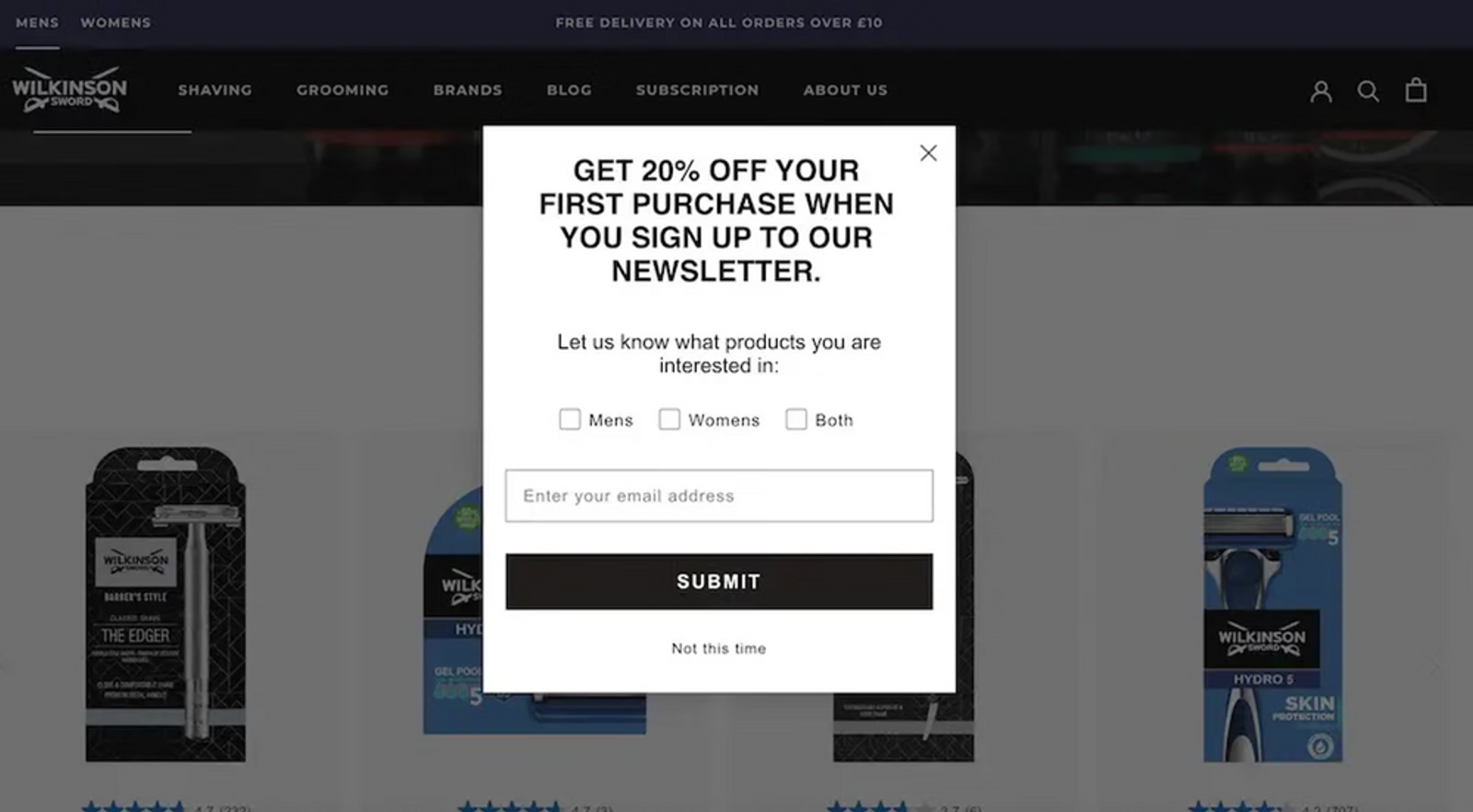
Wilkinson Sword
It makes sense if: you test it and it works
As always, make sure you test every change you make to understand how your unique audience feels about any additional fields on your forms, and that you actually have a strategy for putting that data to use in future marketing efforts.
After testing this for many brands, the team at Homestead has learned that “for some brands we can get the exact same opt-in rate with those extra questions included,” Sappington says. “That’s a win. We’re getting extra data, and it’s not costing us anything.”
But Zettler’s team has run formal tests on a number of fields, too, and he says “it’s night and day in terms of the actual form submit rate results. The more you ask, the less users are going to fill in their information.”
And “unless the brand or we as the agency has a very clear path to how we’re going to use that data, if it hurts our conversion rates, it’s out the door,” Sappington adds. “Otherwise you’re just plugging it in just to plug it in, and it’s not actionable.”
7. Personalize messaging with zero- and first-party data from forms
With the valuable customer information you gain from your sign-up forms, you can serve up the kind of tailored content marketing your audience wants.
Here’s how it works in Klaviyo B2C CRM: when customers fill out a form, “that information gets pushed over to Klaviyo profiles as properties,” Zettler explains. “So we can use it for segmentation, dynamic content in messages, and to recommend products to that particular user.”
It’s also information your AI marketing agent can use to surface personalization opportunities that are latent in your customer data. Depending on what information you get with your forms, you and your AI marketing agent can create segments and conditional splits in flows that group customers based on factors like:
- What products they’re interested in
- What aspect of the product is most important to them
- How often they want to hear from your brand
Here’s a great example from Wilkinson Sword: based on the gender preferences they collect in their sign-up form, they created a simple but effective segmented welcome series that yields a purchase rate of 40%—nearly 20x the industry average.
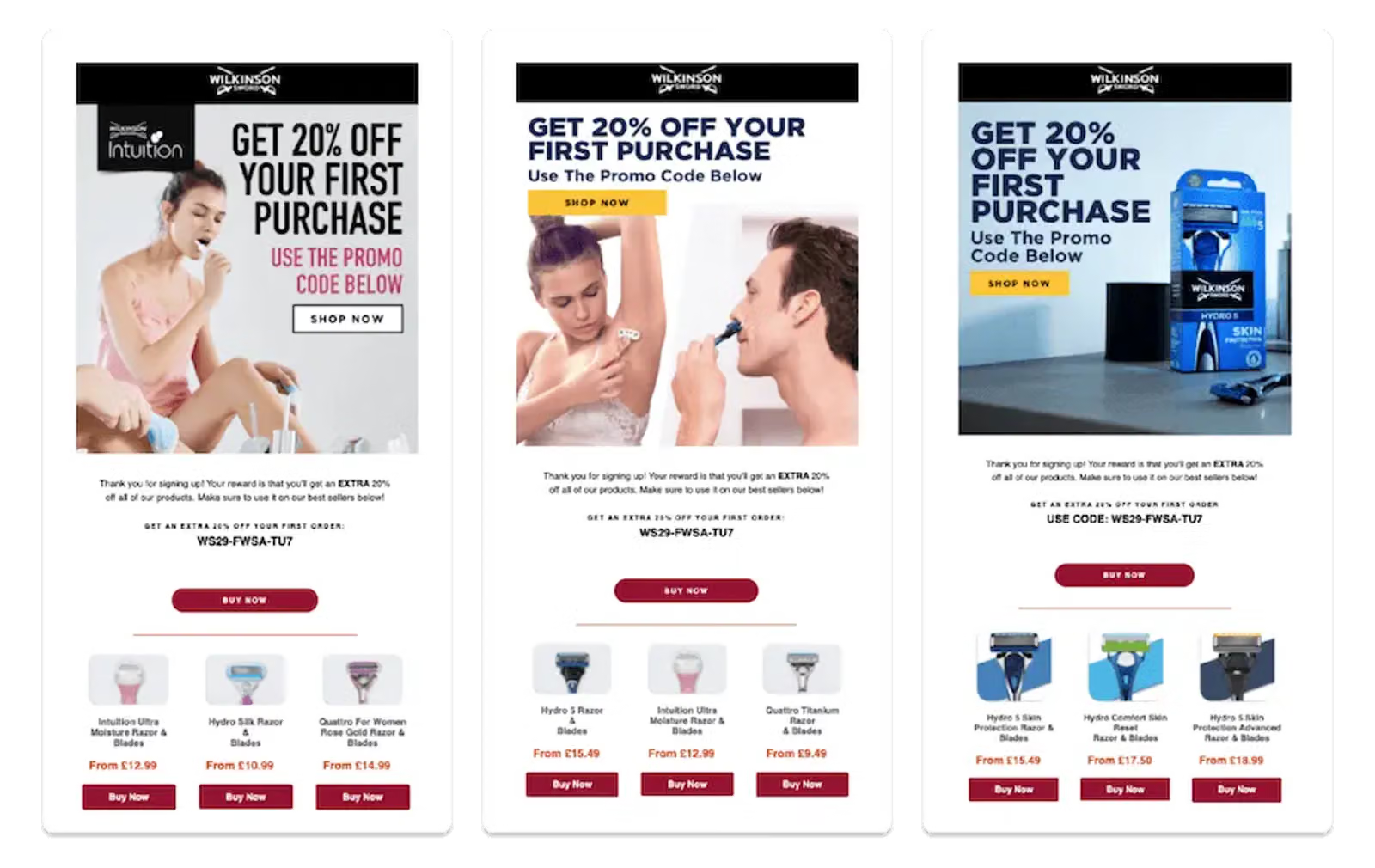
Wilkinson Sword
8. Get the “micro yes” before asking for the big one
One clear case where adding more steps does not translate to lower conversion rates: multi-step forms.
There are several smart ways to approach multi-step forms. Homestead, for example, has seen a lot of success with what Sappington calls the “micro yes” strategy: using a multi-step form to nudge visitors to agree to the value proposition, before revealing what they need to exchange in order to get it.
Something about this strategy earns serious buy-in from users, perhaps because they feel they have more agency in the process. “You’re asking someone if they want an offer prior to just giving them the field,” Sappington explains. “For almost every single brand we’ve tested this for, it’s worked really well.”
Here’s an example from barbecue sauce brand Kosmo’s Q. The first page of the form teases the offer with a few lines of intriguing copy and a question: “Would you like a discount?” Instead of entering their information, all the visitor needs to do here is click yes or no.
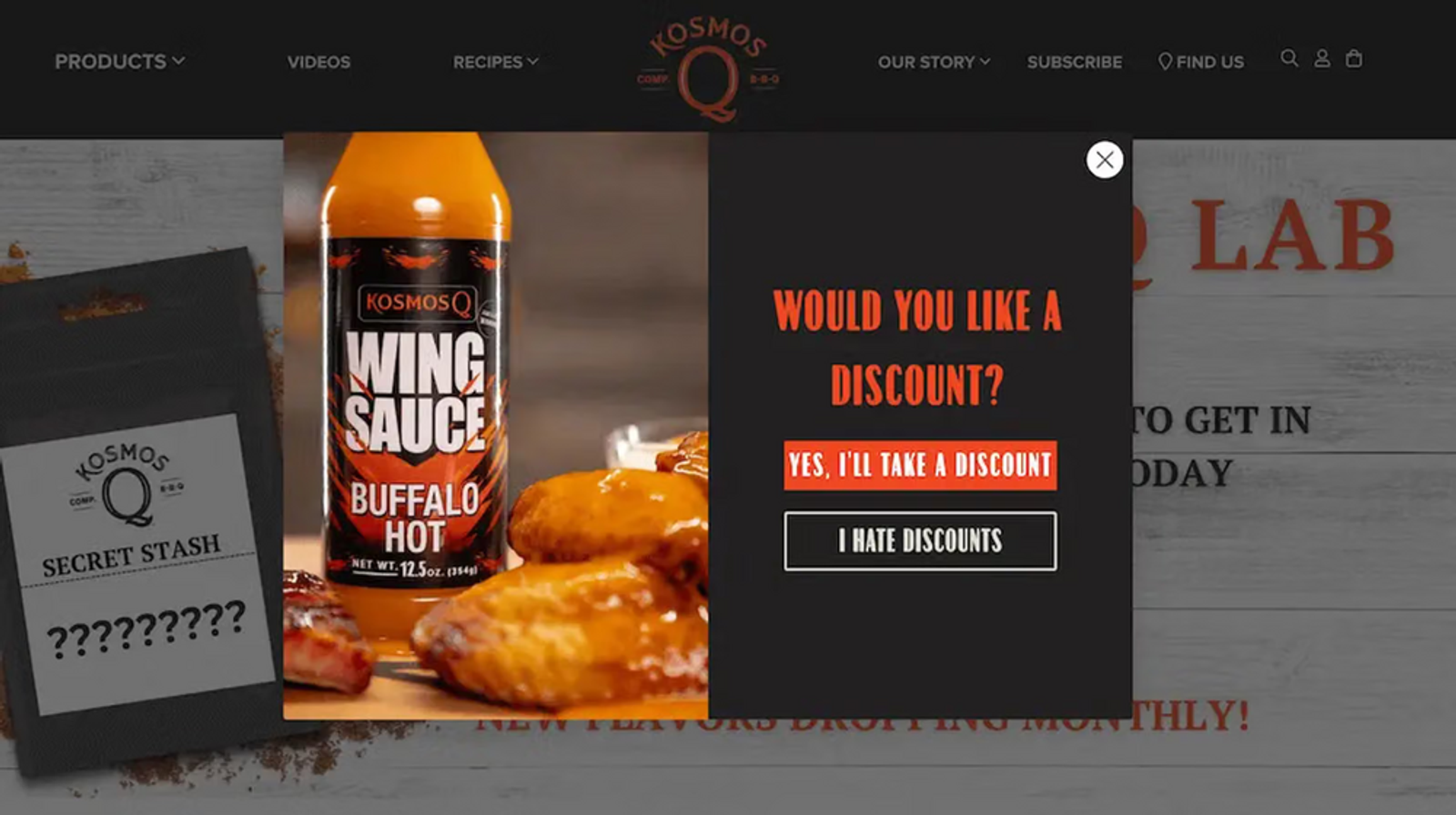
Kosmo’s Q
Then, on the next page, the form reveals the field the visitor must complete in order to claim their discount: their email address.
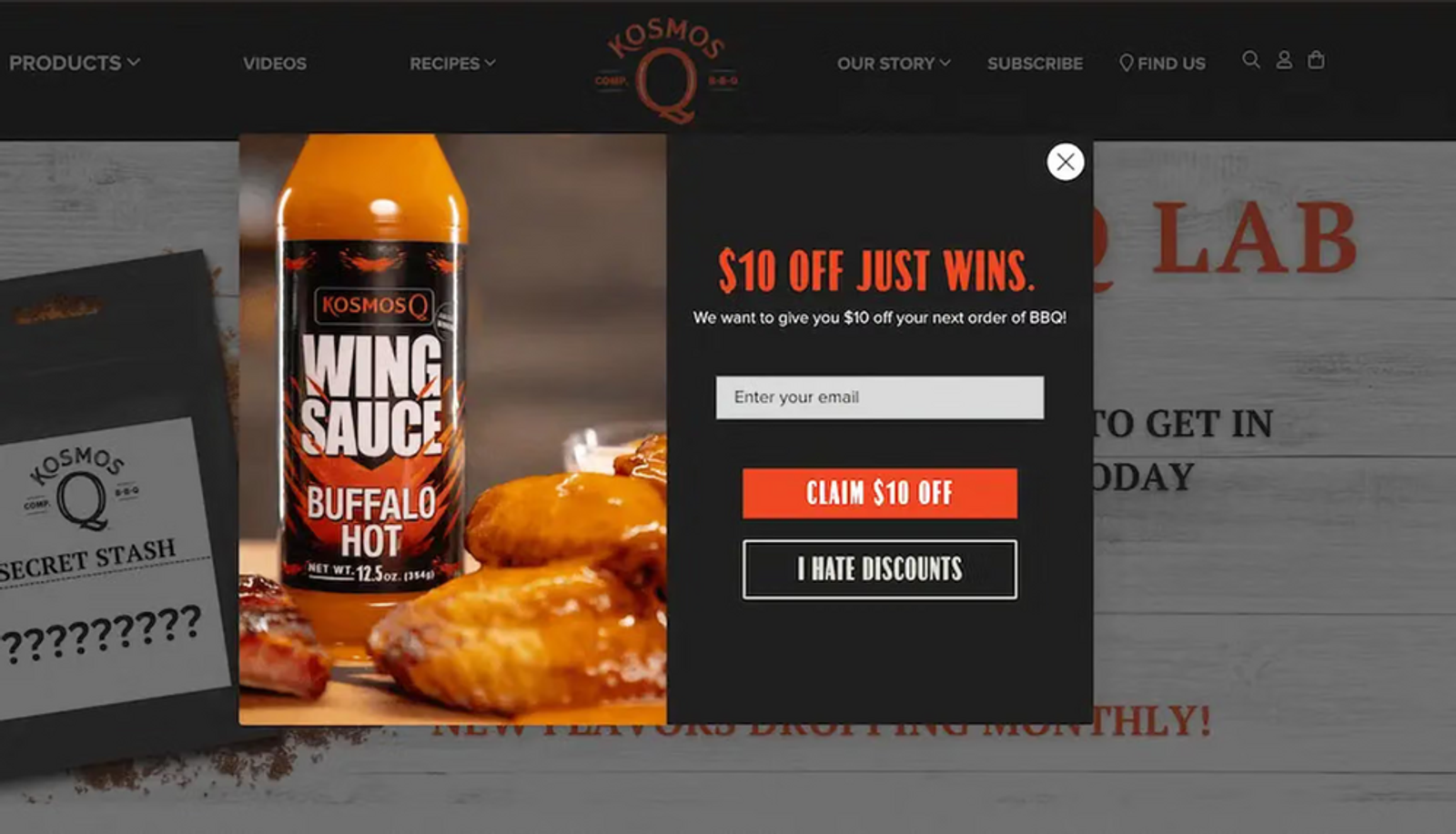
Kosmo’s Q
9. Ask for text messaging or WhatsApp consent on a multi-step form
Another savvy way to use multi-step forms: ask for an email address in the first step, and a phone number in the second.
There’s no denying that consumers are interested in text message marketing. According to Klaviyo’s 2024 SMS consumer research with Recharge, 72% of consumers say brands should send text messages at least once a week.
WhatsApp, meanwhile, is particularly effective at making content more conversational and interactive with quick reply buttons, carousels and product cards, and automated conversations.
Like additional form fields, then, asking for a phone number in addition to an email address doesn’t necessarily mean you’ll see a drop in submission or conversion rates. Not sure whether your web visitors want texts from your brand? Create a multi-step form that offers text message subscription after someone signs up for email.
With this type of multi-step form, the first screen asks the visitor for their email address; once they submit that form, they arrive on a second screen which also asks them for their phone number.
10. Don’t end the experience after someone clicks “submit”
What happens after someone signs up to your marketing list is almost as important as what happens before.
Don’t leave your new subscribers hanging. Send them to a thank-you page that outlines next steps, in addition to sending an email or text confirming that they successfully signed up.
Why? Who cares? It solves what Sappington calls a “constant problem” with multi-step forms: “You try to get someone to sign up for text message marketing and they say ‘No thanks,’ and the form closes them out without revealing the special offer.”
That’s a frustrating user experience, Sappington points out. “That person’s feeling like, ‘Well, I gave you my email, I wanted what you were telling me you were going to give me.’ And almost always, the code’s been emailed to them, but they don’t know that.”
Homestead solves this problem by adding a final page to the multi-step form that says, “Okay, you didn’t want to sign up for text messaging, but here’s the offer you opted in for anyway,” Sappington explains.
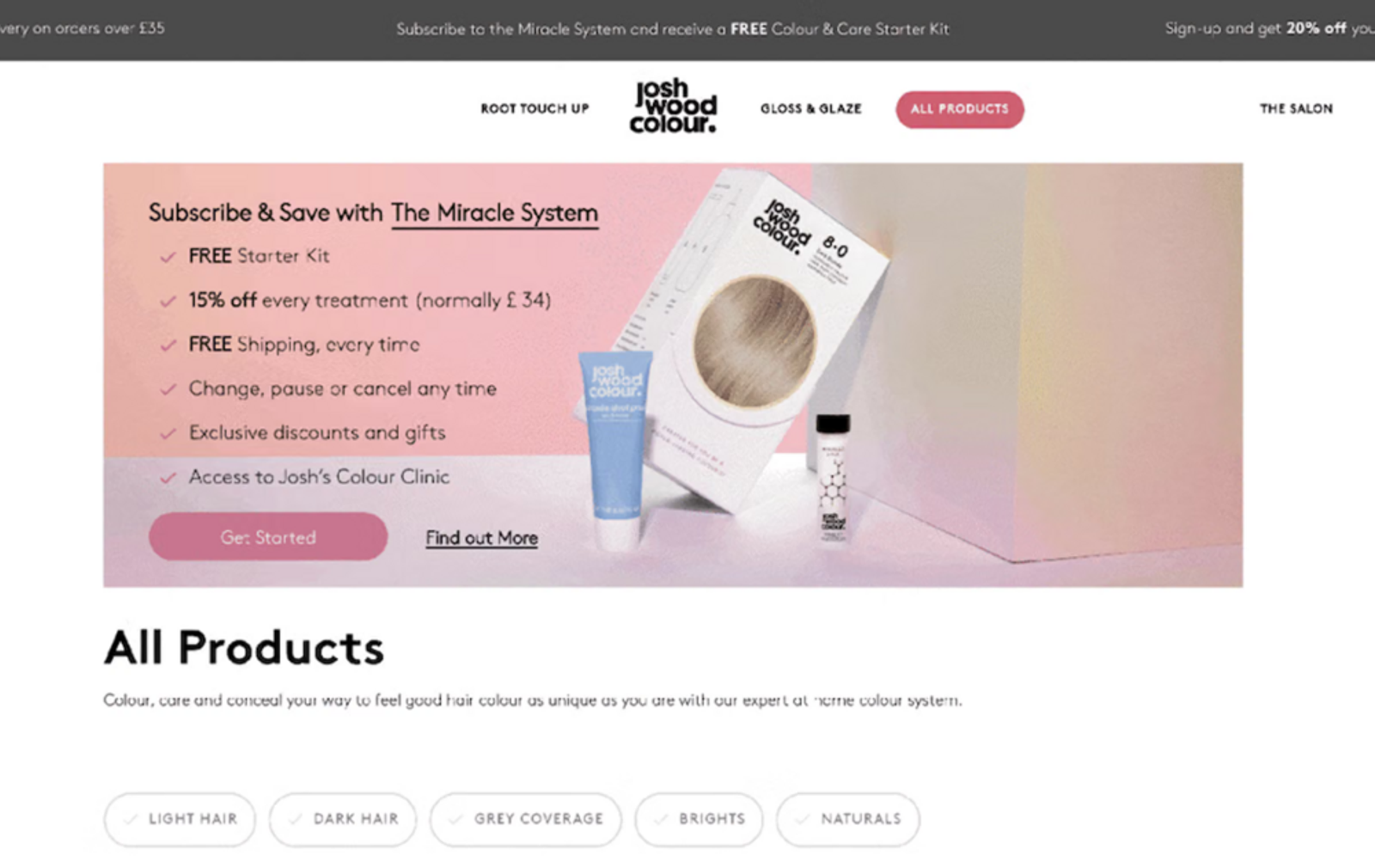
Watch how hair care brand Josh Wood Colour handles the post-sign-up experience: when someone submits a sign-up form on the brand’s website, they see a thank-you message with the promised discount code, plus a call to action (CTA) to start shopping.
Josh Wood Colour
11. Use single opt-in for email sign-up forms, but double opt-in for text messaging
One of the first things Homestead checks when a client is struggling with building their email list is whether their sign-ups are set to double opt-in.
Sappington’s not a huge fan of double opt-in for email. “I would much rather get them on the list, and then clean them out on the back end, rather than restrict them getting onto the list in the first place,” he explains.
“You might unfortunately get a few bad profiles or spam accounts on the list,” Sappington adds. “But I think the reward is worth the risk, there.”
“We generally advocate for single opt-in on email forms,” Zettler agrees. “You want to cast the net wide and get users receiving the content once they’ve entered into that list.”
Consent laws around SMS, on the other hand, are stricter than email, which makes double opt-in a crucial best practice on SMS sign-up forms. Double opt-in for SMS includes both traditional double opt-in, where the user must confirm their sign-up after initially signing up, and tap-to-text (more on this below).
12. Optimize for mobile
Mobile forms need to fit the smaller device screen without hiding form fields, and they need to be easy to read on a monitor.
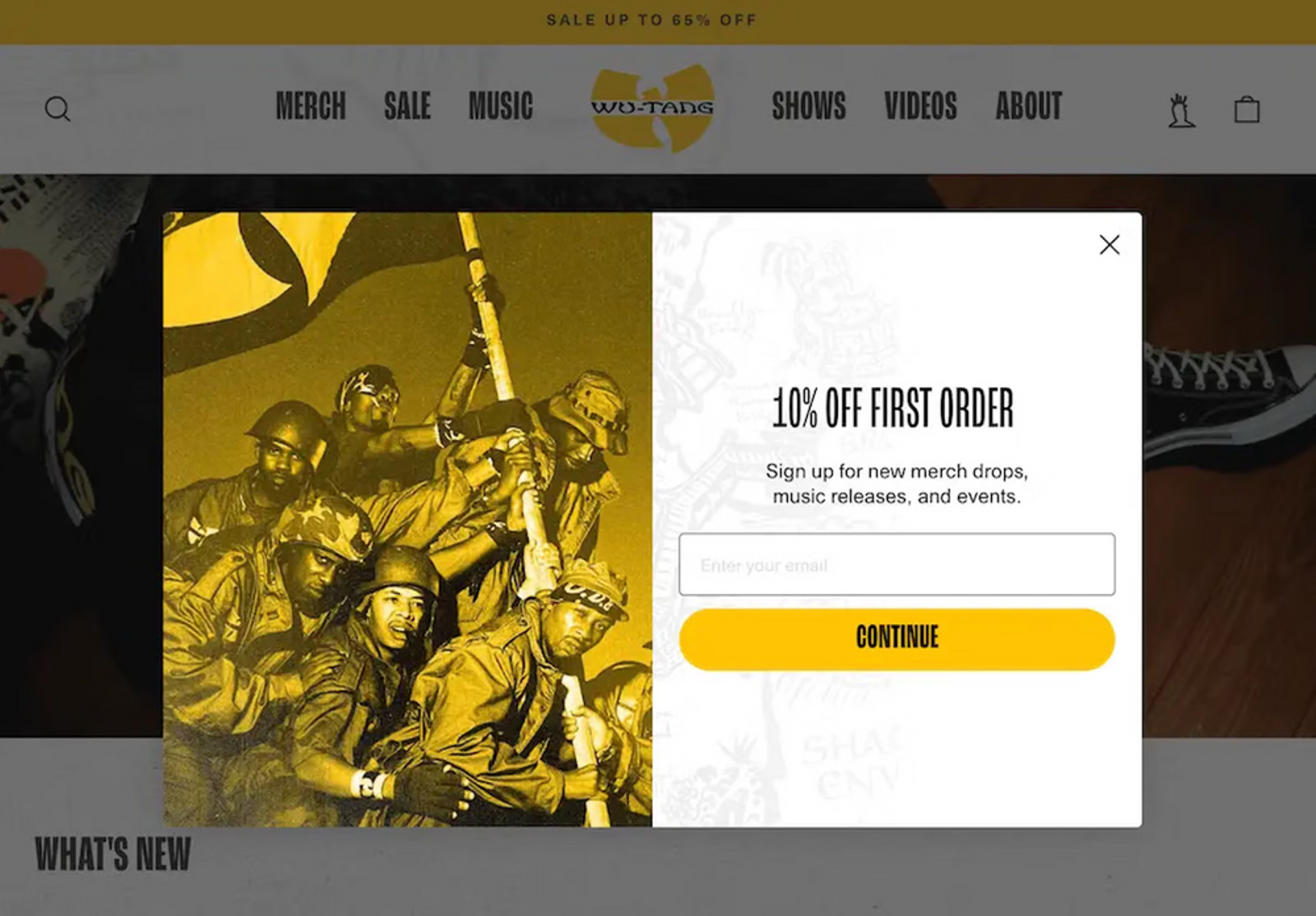
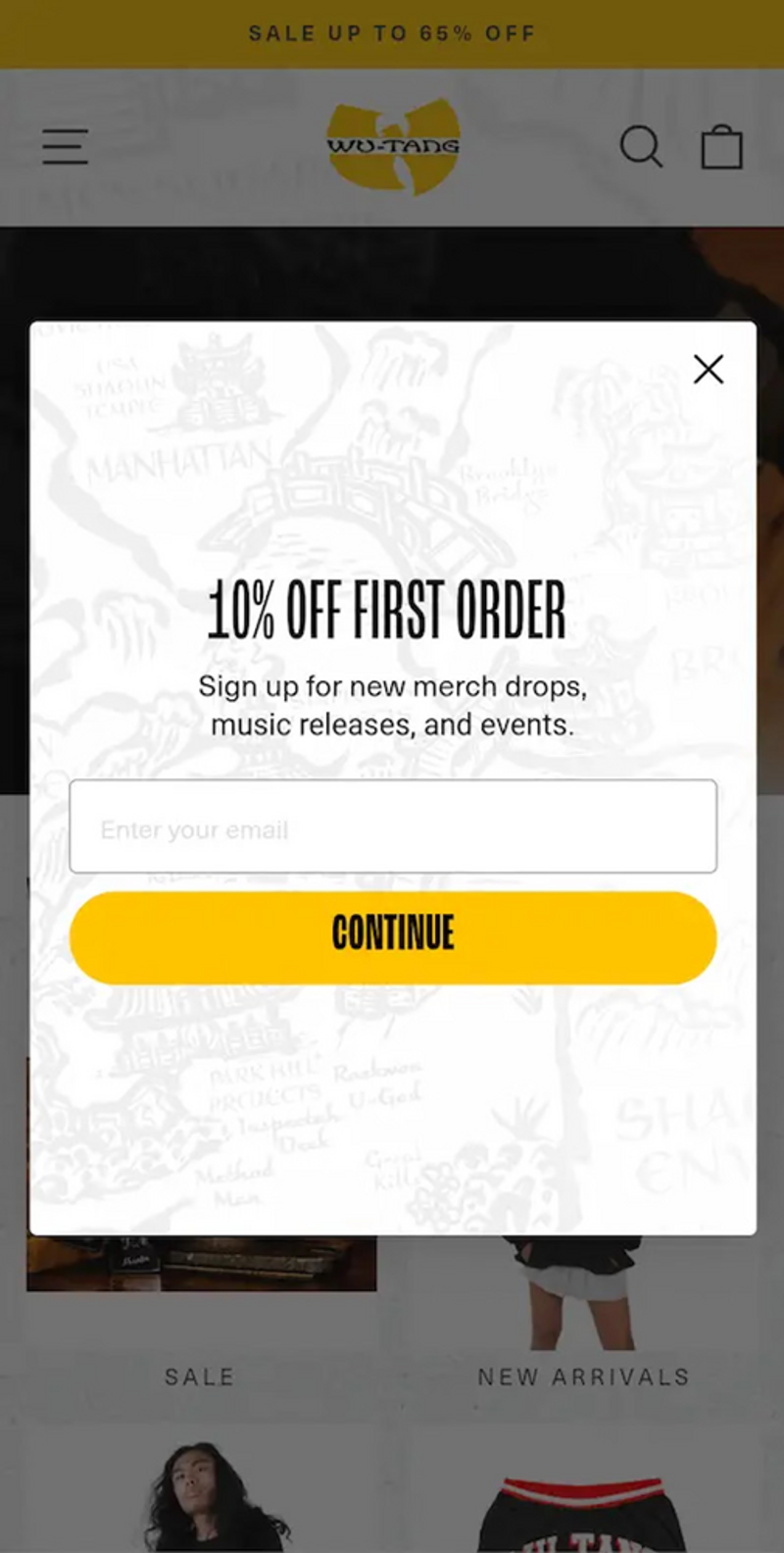
Sappington encourages mobile pop-ups to be “really simple”: flat-color backgrounds, big headers, no lifestyle photography, and copy that gets straight to the point about the offer. “On mobile we look for fairly simple pop-ups,” he explains. “You only have so much real estate, so trying to incorporate too many fancy elements can be a distraction.”
Here’s an example from the Wu-Tang Clan’s official online shop. Notice how the mobile version eliminates the photography and cuts the form in half:
Wu-Tang Clan official shop
Wu-Tang Clan official shop
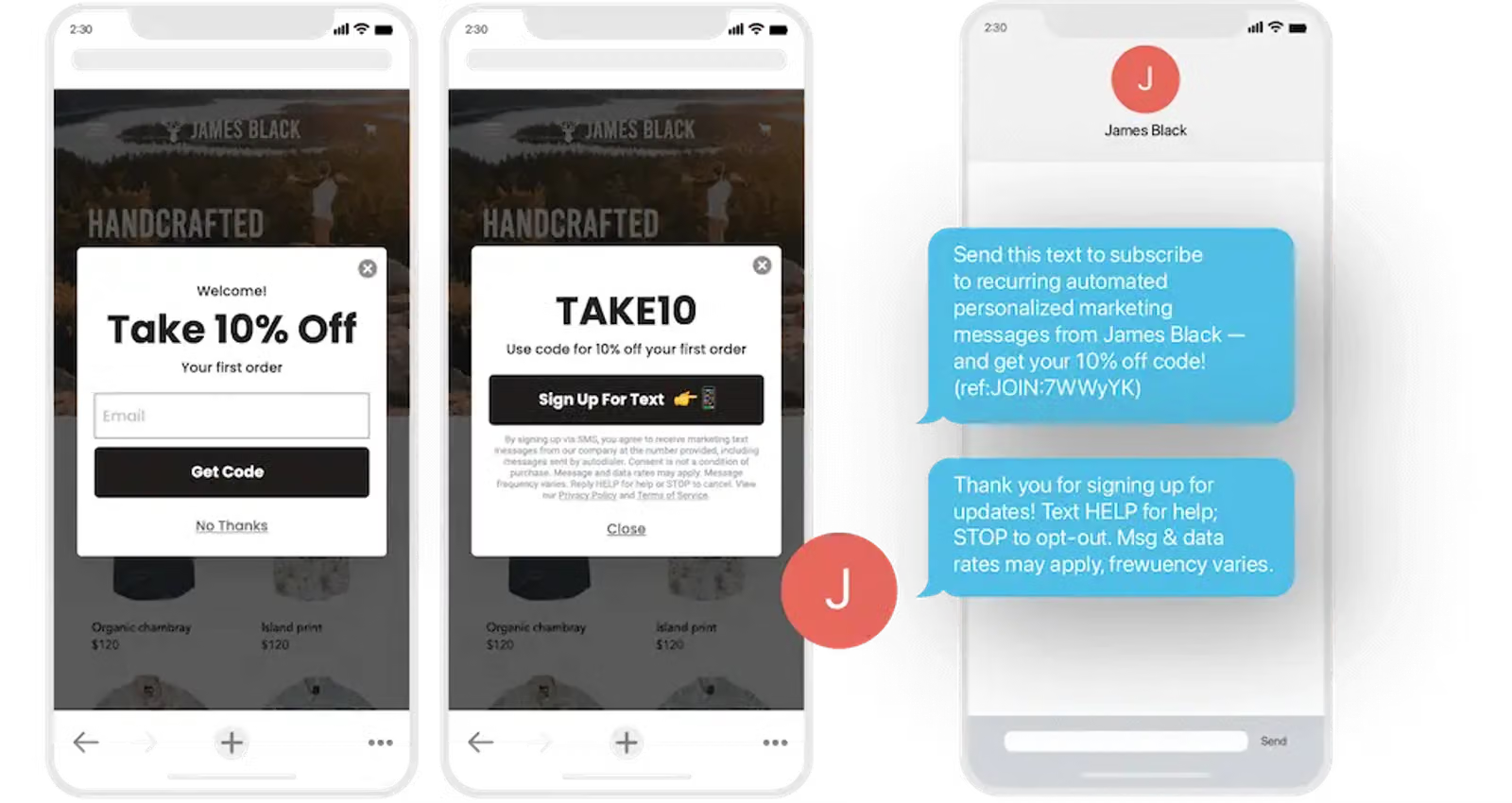
With a device-optimized form, you can also add form elements that are unique to mobile phones, including tap-to-text buttons that allow your subscribers to opt into text message marketing in just two taps rather than manually entering their phone number.
Sappington advises using double opt-in for desktop text message forms, but tap-to-text for mobile ones. “If you’re using tap-to-text, which invites you to press the button and it brings up an auto-filled text to send, that counts as double opt-in because you have to initiate it from your own phone,” Sappington explains.
13. Always be testing the form experience (hint: AI can help)
A/B testing is one of the best ways to improve conversion rates on your website, and testing sign-up forms can lead to some quick but serious wins. Consider testing the following elements of your sign-up form:
- Copy
- Form design (i.e., placement of fields or CTA)
- Type of incentive (i.e., free gift vs. free shipping)
- Discount size
- CTA button language and placement
- Display triggers (i.e., percentage scroll vs. time spent on site)
AI forms display optimization can also test multiple versions of your form to find the highest-converting display time, then automatically select the winning version and set that form live. Skincare brand Tata Harper, for example, increased sign-up form submissions 65% after using forms display optimization on two forms, all without having to run manual tests.
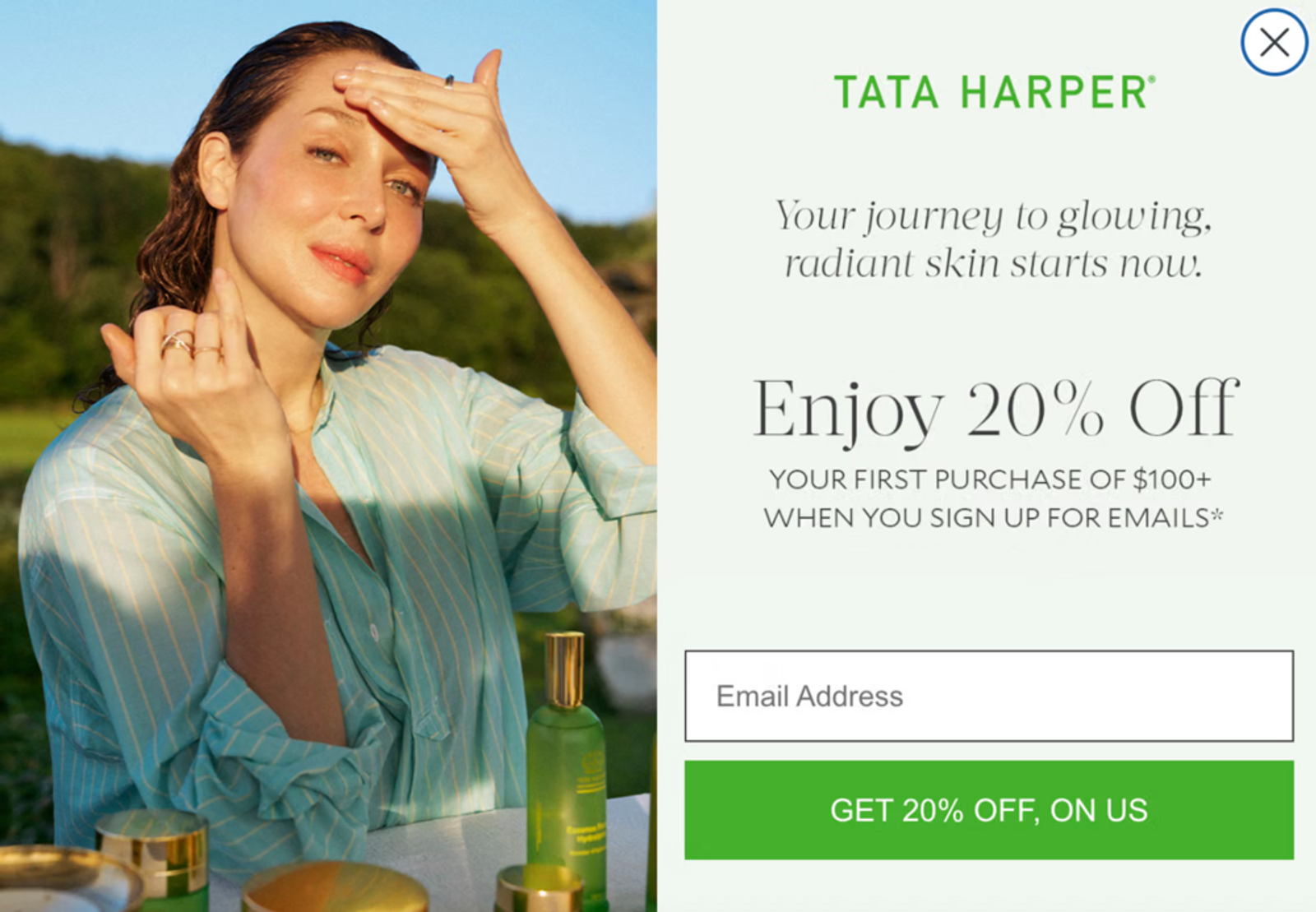
Tata Harper
“Always, always, always test,” Zettler emphasizes. “There’s always something you can find out that will maybe surprise you about how you format a sign-up form.”
Build your best sign-up form yet with Klaviyo
Your sign-up forms are only as good as what you can do with the data you collect from them. Klaviyo, the autonomous CRM for B2C, houses all the customer data you need to personalize thousands or even millions of messages at scale.
And with Composer, the always-on AI marketing agent built into Klaviyo, you can create new email and text messages in minutes.
Start with a goal, a brief, or something Composer uncovered in your customer and performance data. Composer can help build the audiences, flows, and campaigns across channels like email, text message, and mobile push, using your brand and business context throughout the process.
Website sign-up form FAQs
What is a sign-up form?
A sign-up form is a pop-up, web page, or modal with input fields that collect information from your website visitors. You can use a sign-up form to collect contact information, like an email address and phone number, as well as other personal information, like names, birthdays, and product preferences.
Your sign-up form is essentially the pick-up line of your website: its goal is to charm your customers into continuing a relationship with your brand. A form might seem like a small part of your ecommerce or B2C marketing plan, but it’s a budget-friendly way to encourage people to opt in to messages directly from your brand.
What are the main types of sign-up forms?
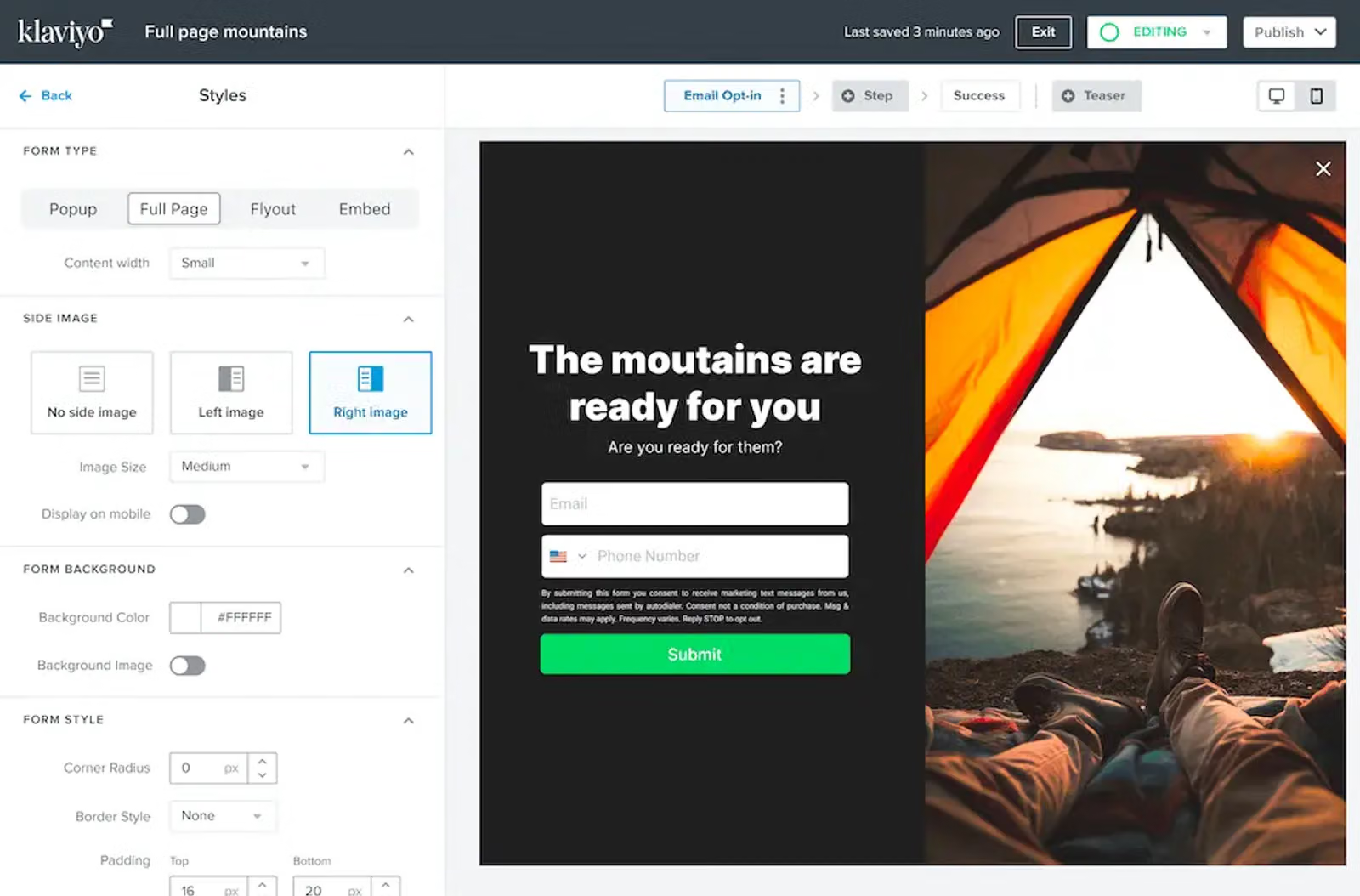
1. Full-screen forms
Full-screen forms display over the entire browser window, capturing your shoppers’ attention. In order to continue browsing, a user must interact with the form by either Xing out of it or submitting their information.
2. Pop-up forms
Pop-up forms, which appear in the middle of the browser’s window, are slightly less disruptive than full-screen forms. Typically, with a pop-up form, the web visitor can still see the rest of the website in the background of the pop-up, and may even be able to click back to their browsing experience without interacting with the form.
Check out how prominently home decor brand Lust Home displays their pop-up form on their homepage:
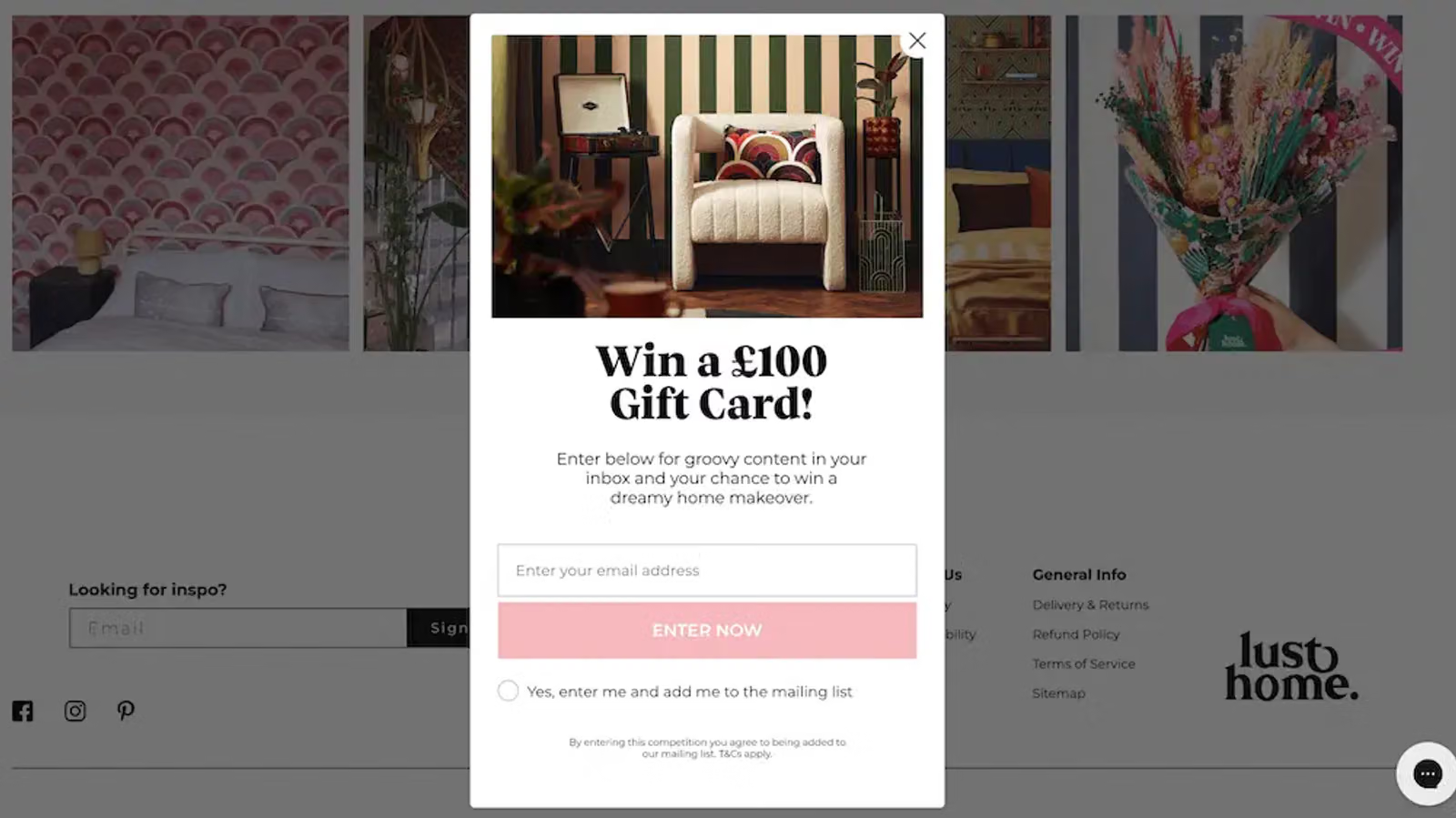
Lust Home
3. Fly-out forms
Fly-out forms slide into the browser’s window from any direction, typically to the edge of the screen rather than the middle. Fly-out forms are less intrusive than pop-ups, but they’re still noticeable. They generally allow a visitor to keep browsing without interacting with the form.
Edinburgh Skincare features a fly-out form on their website, which appears when the user clicks on a teaser in the corner:
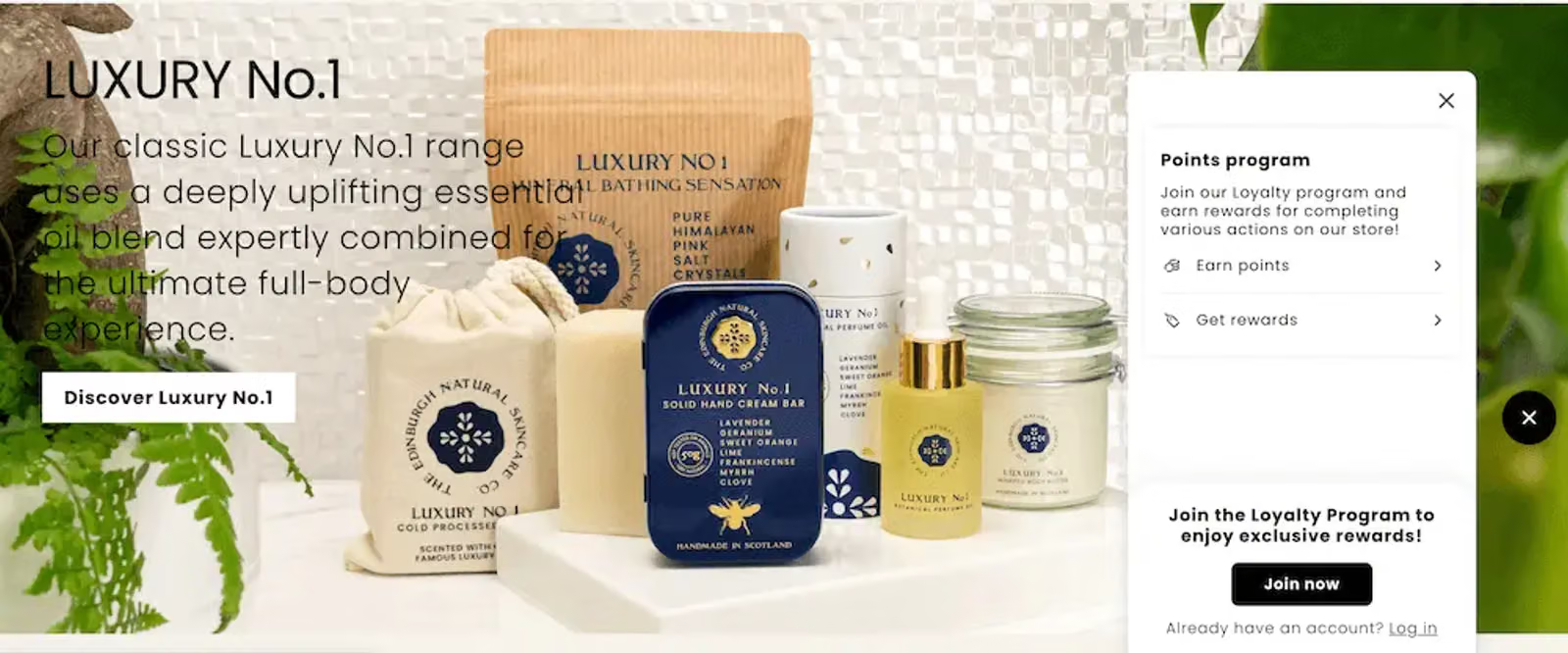
Edinburgh Skincare
4. Embedded forms
Finally, embedded forms appear statically on a specific page on your site, such as in your footer. Embedded forms are helpful for visitors who come to your site with the intention of subscribing, but may not trigger a pop-up or fly-out. Consider including an embedded form in your footer in addition to any pop-up.
Here’s an example from hair care brand Living Proof, which includes an embedded newsletter sign-up form in their website footer:

Living Proof
What to include in a sign-up form?
The most successful sign-up forms include an incentive or value proposition, clear guidelines around what subscription entails, a limited number of input fields, and a prominent, actionable CTA, often leveraging social proof to increase credibility and trust. Learn more about getting started with sign-up forms.
What’s a good sign-up form submission rate?
Maria Trotta, senior digital strategist at Klaviyo, says she’s worked with brands with submit rates in the 8–20% range. “If you’re under 3%,” she writes, “it’s time to re-evaluate your strategy. If you’re at 3%, you should still be working on it.”
Where your form lands in that range depends a lot on what kind of form it is and who it's targeting. Here’s what Trotta expects to see when she works with Klaviyo customers:
- Standard pop-up form (first touch on your homepage): 3–8%
- Exit-intent forms: 10–13%
- Phone number capture-only forms: 10–13%, especially when targeted at email subscribers
What is a sign-up page?
A sign-up page could refer to two types of sign-up forms:
- A full-page sign-up form: a pop-up form that covers the entire browser window when a shopper is on your site. Full-page forms tend to be high-converting since they capture a shopper’s full attention, but because a shopper must interact with them in order to close them, they are also more disruptive to the shopping experience.
- An embedded sign-up form on a landing page: a sign-up form embedded into a specific landing page on your site. The most successful embedded forms tend to be embedded on high-converting landing pages, such as for high-stakes contests, rather than general-purpose or product pages.
Ready to grow your list and make it easier for new visitors to get started? Get started with Klaviyo coupon forms today.

Related content