Build a Knowledge Base That Resolves
Generated by Klaviyo AI
A useful ecommerce knowledge base starts with recurring support tickets, answers questions in shoppers’ language, and places guidance where friction occurs. Ticket trends and resolution data help identify outdated, hard-to-find, or incomplete content, while personalised and complex cases are routed to the appropriate service channel.
- Prioritise recurring questions: Review and group recent tickets, then rank themes by frequency and the time each answer takes.
- Use shopper language: Phrase article titles and answers the way customers search and ask questions.
- Place answers contextually: Surface guidance on public help pages and at relevant points such as product pages, carts, and order screens.
The questions in your shared inbox look more or less the same. Where’s my order (WISMO)? How do returns work? Will this fit? Enquiries sometimes come from someone who couldn’t find the answer.
Your recurring tickets and the information already scattered across your site can give you the blueprint for a knowledge base (KB) where shoppers can find the solutions they’re looking for.
In this guide, you’ll see how to prioritise questions, write the helpful resources that answer them, and choose the ecommerce self-service options that put those answers in front of shoppers.
Start with your tickets and rank what’s worth answering
Someone lands on your FAQ looking for the returns window, doesn’t find it, and writes in anyway. The page answered questions shoppers weren’t asking, because whoever built it guessed what customers wanted to know. Others don’t write in at all. Nearly half of UK consumers (49%) have abandoned a purchase over an unsatisfactory returns policy, according to ZigZag’s 2025 returns benchmark, and a good policy nobody can find reads as unsatisfactory from the outside.
Build from evidence instead. Your customer support inbox acts as a record of what shoppers couldn’t work out on their own, which makes it a reliable source of the questions your help pages are missing. Read back over 90 days of tickets, enough to cover the spread of questions shoppers ask, and recent enough that the answers still describe how your store works today.
Tag the recurring themes as you read, like order tracking, returns, sizing, and delivery. When a theme keeps appearing in your tickets, it’s a signal that shoppers may be struggling to find that answer. The count of customer support tickets tells you which themes are worth a KB article. What to look for as you read back:
- Group by question category: “When will it arrive” and “there’s no tracking update” are the same question, so counting them separately splits one theme into two and hides how often it comes up. File both under order tracking, and the count reflects the demand.
- Leave the one-offs alone: A question that came up once takes as long to write up as one that came up 40 times, and clears a fraction of the support tickets. Answer it in the inbox. One shopper asking whether you gift-wrap gets an answer in the inbox.
Weigh each theme by how often the question arrives and whether one article could answer it. If you find yourself repeating the same reply over and over again, a KB article can carry it. If your reply depends on opening the order first, it can’t. Sorted this way, the themes split like this:
Theme | Settled by an article | Needs a person |
Order tracking | Where the tracking link lives, expected delivery windows | A parcel marked delivered that hasn’t arrived yet |
Returns | Window terms, condition, who pays the postage fees | A return that’s late, damaged, or refunded incorrectly |
Sizing and fit | Measurements, fit notes, how to use the size guide | Advice on a style that’s out of stock in their size |
Delivery | Cut-offs, options, prices, where you ship to | A sudden delivery address change after dispatch |
Product care | Washing, materials, storage | A fault or a warranty claim |
Payments and codes | Accepted methods, when you’re charged, why a code has rules | A failed payment or a duplicate charge |
How often a theme comes up won’t set the running order on its own. A question asked 40 times that takes 30 seconds to answer costs your team less than one asked 15 times that takes 10 minutes to work through. Do the same maths across your themes to get your running order.
Write answers in your shopper’s language
With questions in place, a shopper can land on the right page and still write in, because the page is written the way you’d explain it to your warehouse coordinator. Shoppers search in the words they’d say out loud, and a search box matches the words on the page.
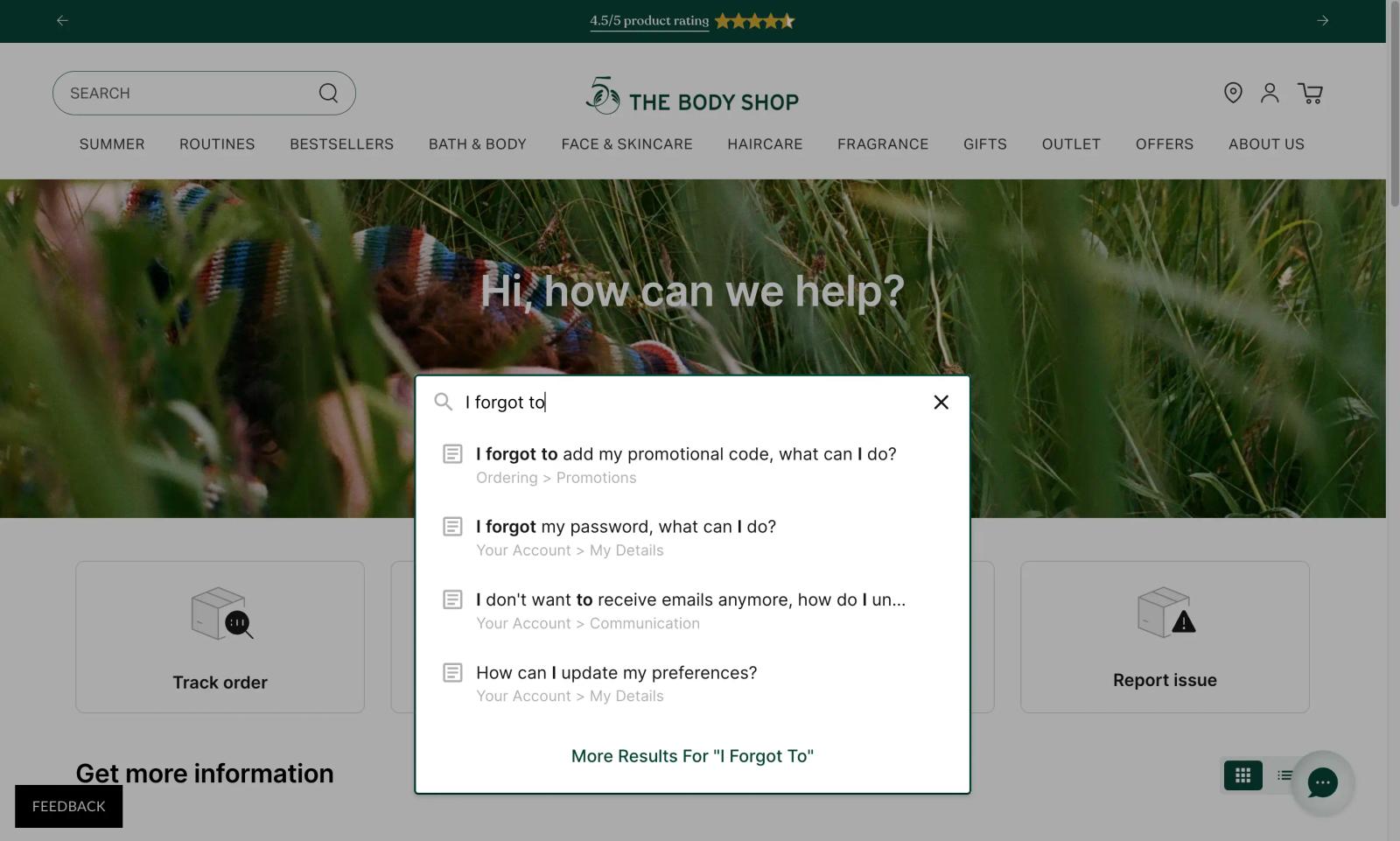
Take The Body Shop, the British vegan skincare brand. The shopper is only 3 words in, and the help centre has already surfaced the article. That’s because it’s titled “I forgot to add my promotional code, what can I do?” File it as “promotional code terms,” and no one searching for it will find it.
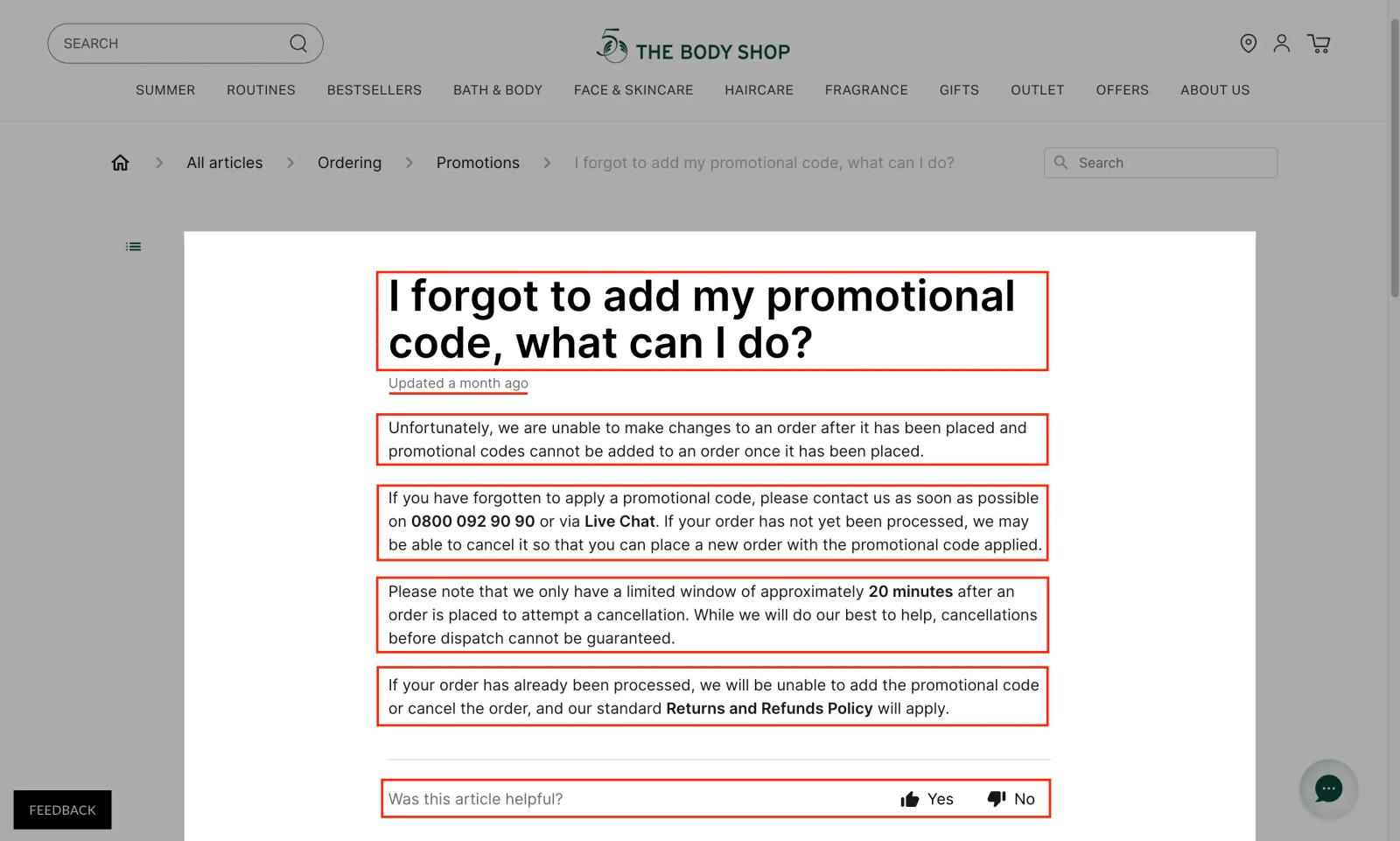
In this example, the heading is the question as a shopper would ask it, down to “I forgot,” and the first line answers it. Underneath, the conditions cover who to contact, the roughly 20-minute window when a cancellation might be possible, and what happens once the order has been processed. And the yes/no vote at the foot of the page is a low-friction feedback loop for improving the KB article.
Write to the question a shopper asked. Publish those answers as pages, link them from your footer and product pages, and you have a working KB built from what shoppers ask.
Place each answer where the question comes up
Your help centre serves the shoppers who go looking for it. The rest of shoppers ask wherever the friction is, e.g., on the product page, in the cart, mid-check-out, or in front of an order-status screen. So put each answer where its question lands. The size guide goes next to the size selector, delivery cut-offs go in the cart, and returns terms go with the delivery confirmation.
Some of those questions never reach your site at all. A Gartner customer service survey found 51% of customer service journeys now begin on third-party platforms, most often search engines, and only 22% of customers start, stay, and resolve entirely within a company’s own channels. People search your brand name and “returns” the way they used to look up a phone number, so your general answers need to be public pages that search engines can scan.
Public KB pages and help centre resources have a ceiling, though. They answer the general rule and stop there, because one of these pages can’t tell who’s reading it. A page alone doesn’t know which parcel a shopper is chasing, what they ordered exactly, or how many loyalty points they’ve earned. The step up is a signed-in space, where the answer is personalised to the person asking.
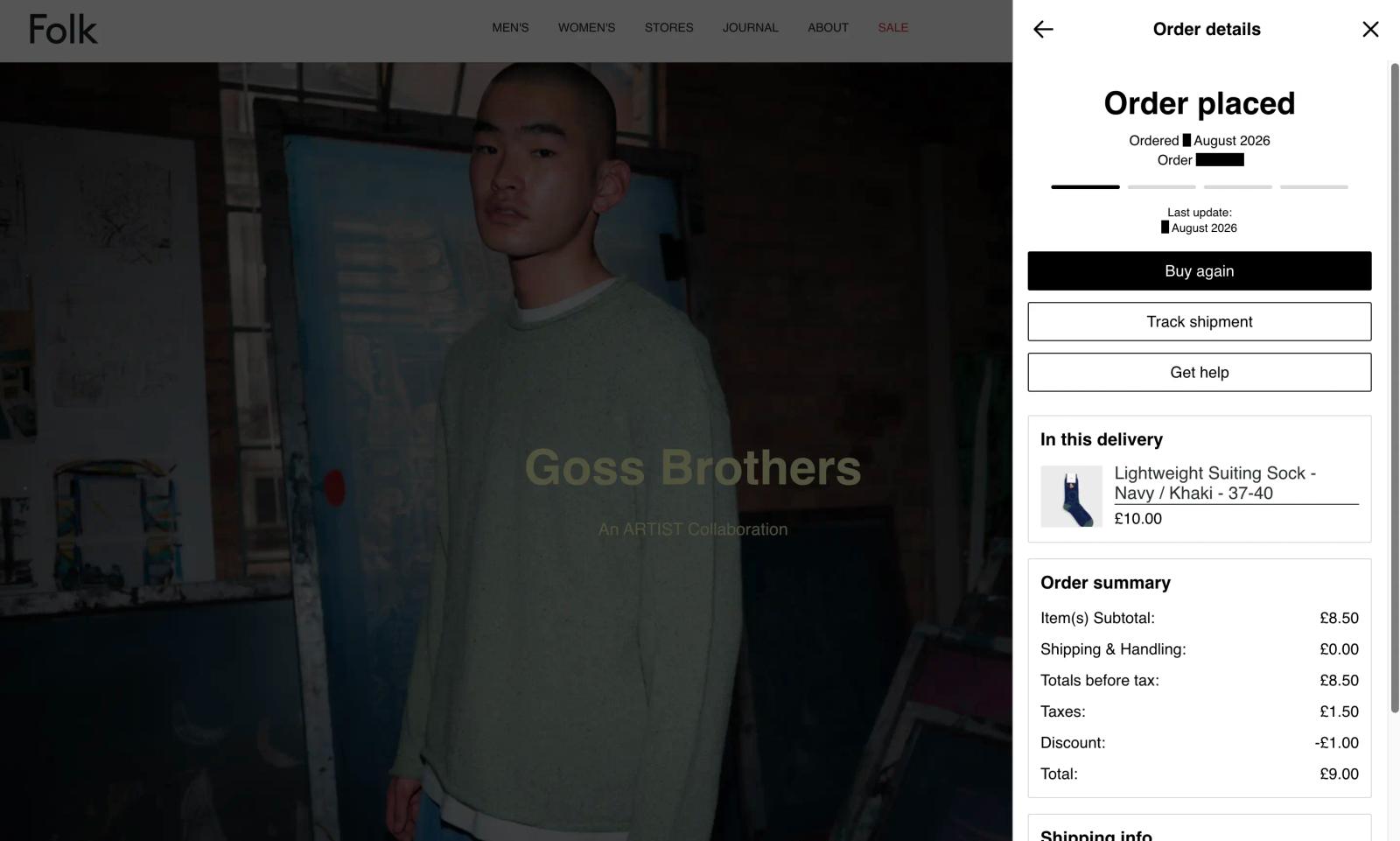
Because it knows who the shopper is, a self-service customer experience hub can show their order data. From a single panel, your customer can track the shipment, start a return, update an address, check their loyalty balance, and reorder what they bought last time. It opens over whatever page they’re on. When something does need someone from your service team, the conversation goes across with the order attached.
Your KB within the store’s help centre gets the occasional web visit from an online shopper with a problem, while your self-service hub becomes somewhere customers return to, and each visit is another chance to help, cross-sell, or up-sell.
A self-service hub can surface the resources you or someone from your customer service team wrote, and an AI customer agent answers from your policies and support content. So how well you capture the common themes shapes how much these capabilities can resolve later, with the harder cases still reaching a person.
Update the KB as the tickets tell you to
Say you switch couriers. Or the returns window moves from 28 days to 14, and the article gives shoppers the wrong answer. Then a shopper quotes you back to yourself: “Your returns page says 28 days, so why has this been refused?”
That’s one shopper. The pattern across your tickets is the signal to watch, and it reads two ways. If WISMO emails climb in the weeks after you publish the tracking article in your KB, shoppers aren’t reaching it. If the question arrives in wording your article doesn’t use, they’re reaching it. It just no longer describes their experience, and a good policy nobody can find may as well be reworked. Tag as you go, watch which tags climb, and fix the help article behind them.
Autonomous customer service can shorten that cycle. It answers shoppers from your live help content, so a gap in your pages shows up as a weak answer in a conversation you can read back. It also reviews its own work on daily and flags the exchanges that didn’t land, which points you to the questions your KB pages don’t cover well, or maybe don’t cover at all.
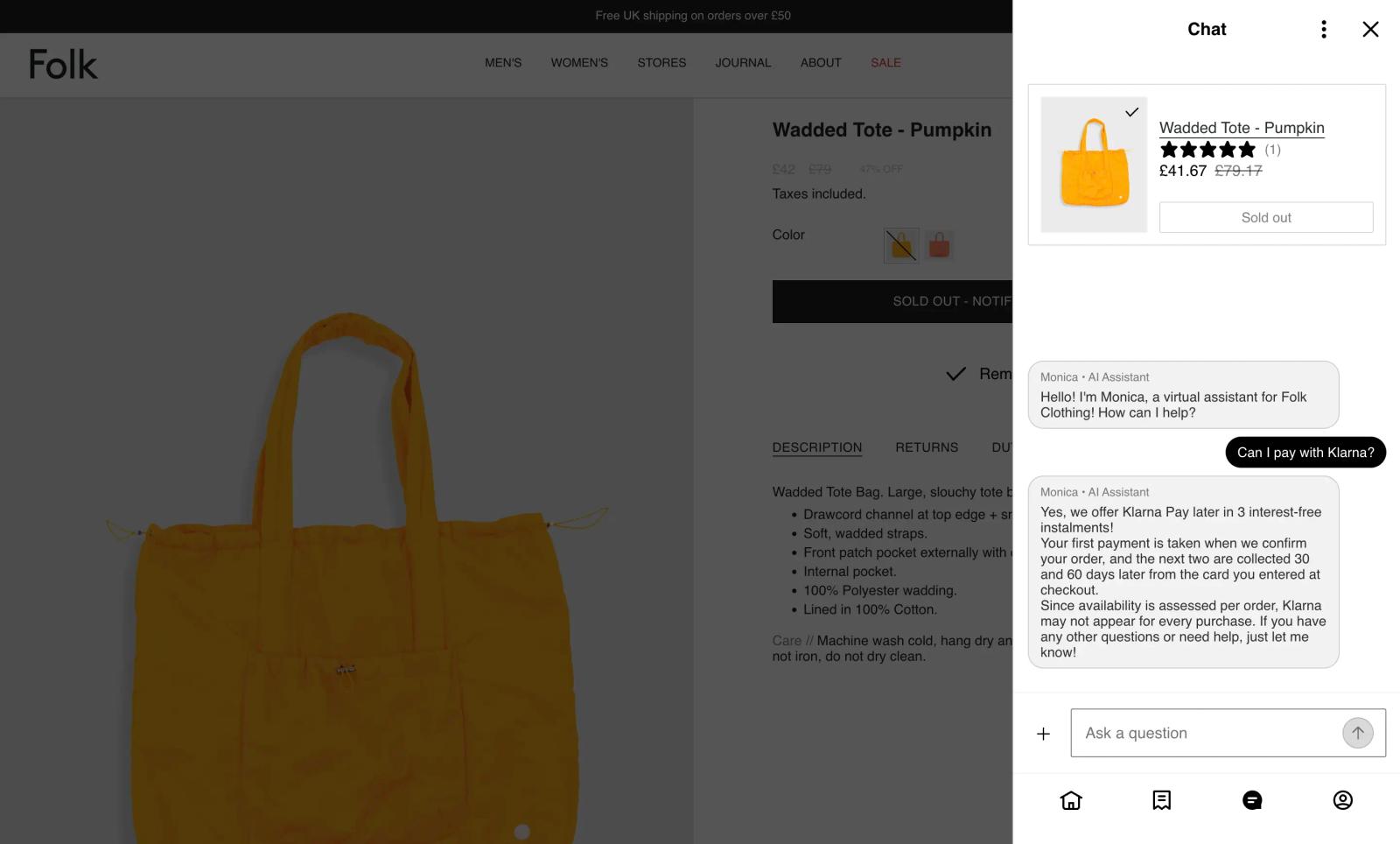
Monica’s AI-generated answer here is only as current as Folk Clothing’s payment pages. The moment those payment terms change, the customer conversations are where you’ll see it first.
To assess whether any of this is working, take a baseline of customer support ticket volume by tag for the month before the KB articles go live. Leave a full month after publishing to give shoppers time to find the articles and search time to catch up, then compare the same tags.
If order tracking has dropped from 40 tickets to 15, that’s 25 replies your team didn’t have to write, and 25 shoppers who got their answer first time. The Institute of Customer Service’s UK Customer Satisfaction Index names first-time resolution as the “strongest driver of customer satisfaction.” If it’s flat, the KB article isn’t where the question comes up, maybe isn’t phrased the way shoppers ask, or isn’t reachable from the self-service hub where they’d expect to see it.
Route the tickets your KB can’t settle
Some customer support tickets will reach your team no matter how thorough your KB is. One group needs a decision only a person can make. The other needs an answer that only exists inside a customer’s order.
- Needs-a-person: Tickets where the answer isn’t fixed. A parcel arrives with the item broken inside, or someone gets the wrong product. No policy tells you what to offer, so a person weighs the customer, the cost, and the history, then makes the call. These go to a helpdesk. Messages from email, chat, text messages, WhatsApp, and DMs arrive in one workspace, with the customer’s orders, loyalty status, and past chats beside each one.
- Repetitive-but-specific: Tickets where the answer is fixed but the details aren’t, so each answer has to be looked up against an individual account first. These go to the self-service hub, where a shopper can track the order or start the return themselves, or to an AI customer agent that answers by reading your help content, policies, terms of service, and the customer’s order data, handling routine questions 24/7.
In Klaviyo’s 2026 State of Customer Service report, customer service leaders rate AI and automation as “very successful” at handling general FAQs (62%), product information (59%), order tracking (57%), returns, refunds, exchanges, or cancellations (51%), and loyalty or rewards programme enquiries (49%). Your articles cover the themes an agent draws on when it answers.
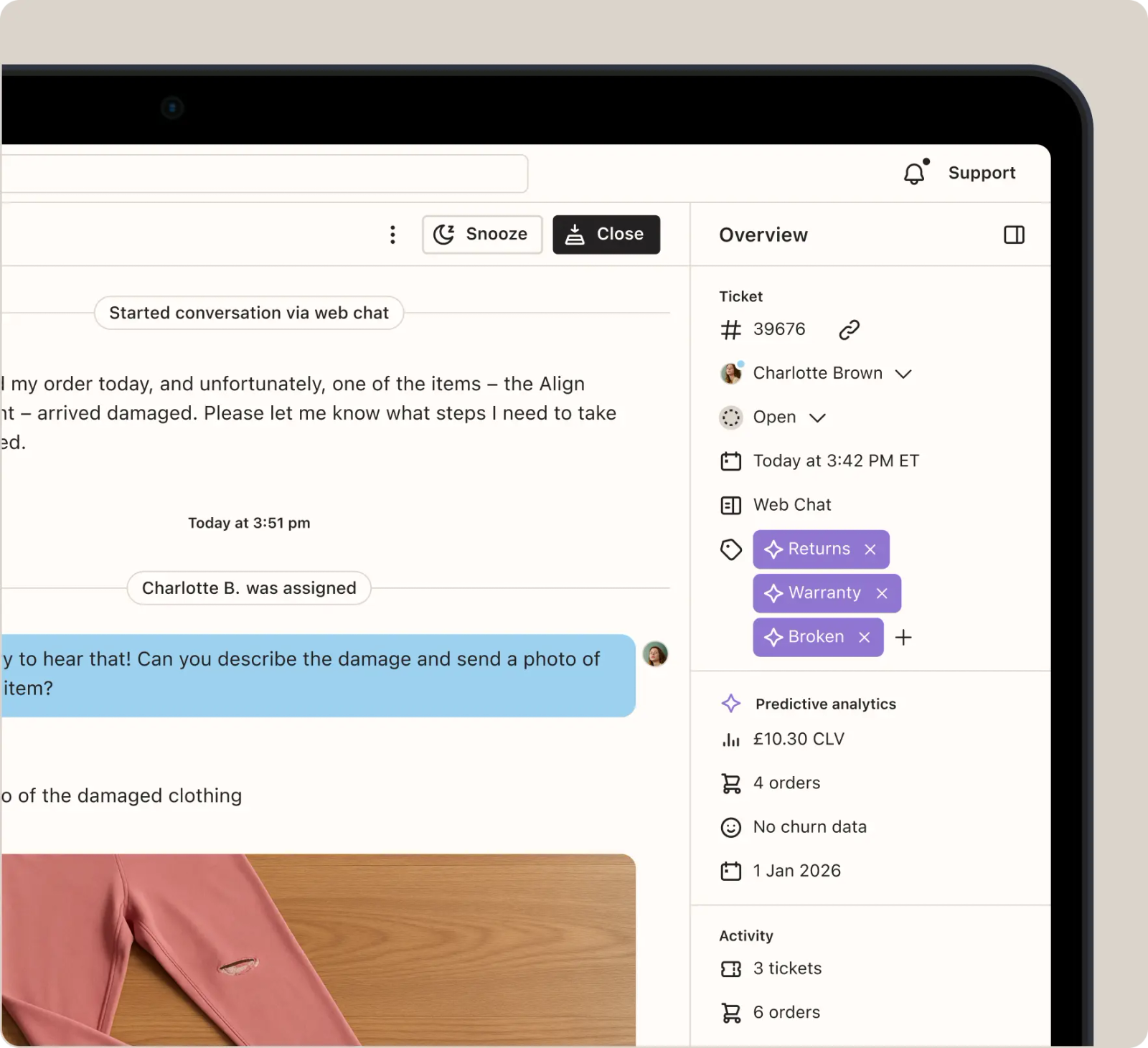
The tear in the trouser leg from the needs-a-person group may look like this when it lands. Charlotte can see the shared photo, the AI tags, and the customer’s history in one view, giving her the context she needs to assess the issue. The only thing left to decide is what to offer.
Connect your KB to the rest of your service
Folk Clothing, the London fashion brand, used to run support from a shared inbox. Cases piled up. Customer Agent now resolves 53% of support conversations, and average ticket resolution time has fallen 75% period over period since they moved to Helpdesk. In Customer Hub, more than 1,400 customers tracked orders and started returns themselves in the first 3 full months.
Klaviyo, the autonomous B2C CRM, connects those service products to the same customer data, so each interaction starts from what you know about the shopper. Customer Hub gives shoppers a self-service space, Customer Agent answers the routine enquiries, and Helpdesk brings the rest to your team with the order and the history attached. Your KB feeds all 3. That’s why the articles you write from your customer support tickets keep working long after you publish.
Your KB, your AI, and your team can work from one view of the customer.

Related content