Streamlined SMS disclosure setup
Generated by Klaviyo AI
The post explains new Klaviyo updates that simplify adding compliant SMS disclosure language to signup forms. It covers initial setup, drag-and-drop reuse of disclosure blocks, centralized editing options, and warnings for missing or incomplete disclosure elements.
- Simplified disclosure setup: Users are guided step-by-step to configure mobile terms of service, privacy policy links, and SMS disclosure fine print when starting with Klaviyo SMS.
- Drag-and-drop disclosure block: Once configured, SMS disclosure language can be added to any signup form by dragging and dropping a dedicated block.
- Centralized editing options: SMS disclosure language, terms of service, and privacy policy links can be reviewed and updated from either the Signup Forms builder or SMS Account Settings.
- Compliance safeguards: Before publishing a signup form that collects SMS consent, the system warns if required SMS disclosure items are missing or incomplete.
Deliverability and compliance can seem complex – but we’re here to help keep things simple. With Klaviyo, you’ll always have the confidence that your signup forms are compliant – and optimized – for collecting SMS consent.
Today, we’re announcing updates that make it easier than ever to create compliant signup forms that convert. We’ve simplified the process of adding and editing SMS disclosure language – including your mobile terms of service and privacy policy links – within signup forms. Once you’ve set up your SMS disclosure language, adding this language to any signup form is as easy as dragging in a new block.
Create, edit, and add SMS disclosure language in minutes
If you’re getting started with Klaviyo SMS for the first time, you’ll be shown step-by-step how to set up your mobile terms of service, provide your privacy policy links, and review your SMS disclosure fine print. You can either create a new mobile terms of service from scratch, or link to an existing terms of service if you already have one.
Once you complete these steps, you can add SMS disclosure language to any signup form simply by dragging and dropping a new block. This makes capturing phone numbers compliantly a breeze.
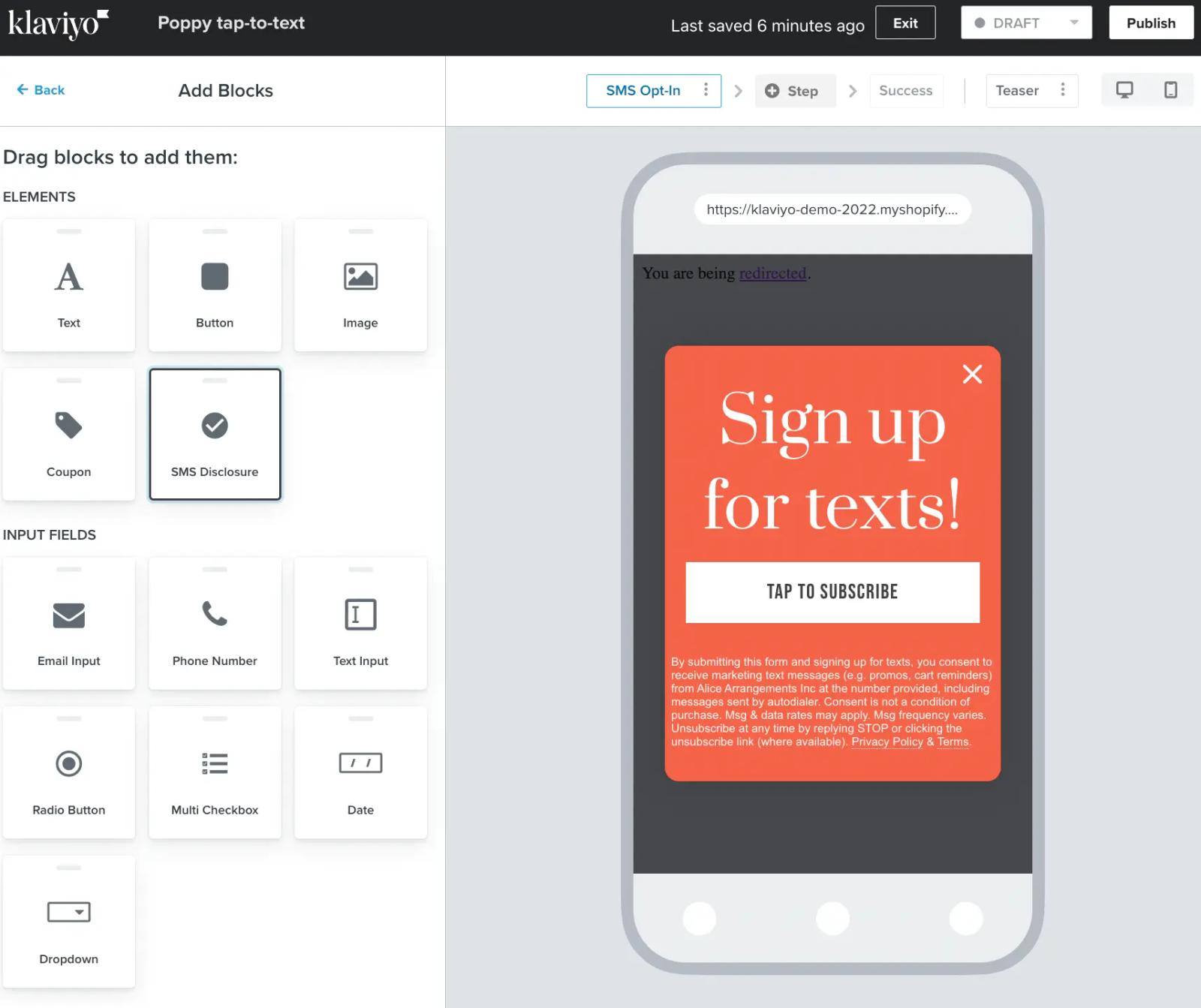
If you’d like to make any changes to your SMS disclosure language at any time, you can now do so from two places: either through the Signup Forms builder or by visiting your SMS Account Settings. Here, you can review and make changes to your mobile terms of service, update your privacy policy link, or your SMS disclosure language.
When you’re ready to publish a signup form that collects SMS consent, we will now show you a warning if you are missing any items on your SMS disclosure block – or, if any existing items are incomplete.
Learn more
Build compliant signup forms, faster with our new SMS disclosure updates. Check out our help center to learn how to set up your SMS disclosure language. You can also read about best practices for collecting SMS consent here.

Related content