Use Gmail Annotations for BFCM
Generated by Klaviyo AI
The article explains what Gmail Annotations are and how they can help brands stand out in the Promotions tab during Black Friday Cyber Monday. It outlines the main annotation types, setup and approval considerations in Klaviyo, and where annotations are visible and effective.
- Why annotations matter: Gmail Annotations let brands showcase deals, images, and urgency directly in the Promotions tab, helping emails stand out when inbox competition peaks during BFCM.
- Three annotation types: Marketers can choose between product carousels, single image annotations, and deal annotations depending on whether they want to highlight multiple products, a hero visual, or time-sensitive offers.
Most brands heading into Black Friday Cyber Monday (BFCM) are laser-focused on sending volume, discounts and timing. But very few are thinking about how their emails actually appear in Gmail, where so many people open their emails.
As of early 2026, over 3 billion people rely on Gmail. In some of my client accounts, over 60% of emails land in Gmail accounts.
Gmail Annotations are one of the most underused tools in email marketing, and BFCM is the highest-stakes moment to use them. Brands that get this right show up in the Promotions tab with deal highlights and promotional images before a subscriber even opens the email. That gives them a real edge when inbox competition is at its peak.
As the founder of Voima Digital, I’ve implemented annotations with ecommerce clients across a range of industries. I've seen consistently stronger open rates and click rates when annotations are set up correctly.
The reason is simple: your email communicates value before someone even opens it. Subscribers know exactly what you’re offering. In a crowded inbox with multiple offers competing for your attention, that split second of clarity is often all it takes.
What are Gmail Annotations?
Gmail Annotations make your emails come to life and give you a chance to stand out in the inbox. Instead of showing a plain subject line and preheader, Gmail highlights a visual card that can include:
- A promotional image or a carousel of up to 10 images
- A deal badge with your offer (e.g., "20% off sitewide")
- A discount code displayed directly in the preview
- An expiration date that creates urgency
To understand why Gmail Annotations are important, it helps to understand how the Gmail inbox works. Gmail uses tabbed inbox systems where the user can choose to automatically separate marketing and promotional emails from their primary email inbox.
The Promotions tab quickly earned a reputation as an email marketer’s nightmare, which is whyGoogle eventually expanded it to allow senders to include visual and interactive elements. That capability is Gmail Annotations.
This isn't a new feature, but adoption remains surprisingly low. Most brands either don't know it exists, or they assume it's too technical to implement. In Klaviyo, that’s not the case.
Black Friday is the highest-stakes moment to use Gmail Annotations, but not the only one
Black Friday is the one time of year when every brand in your subscriber’s inbox is sending emails to consumers at the same time. The average shopper’s promotions tab in November is packed with a wall of subject lines presenting some version of the same message.
Annotations don't help you shout louder, but they do help you look different.
A subscriber scanning their Promotions tab during BFCM is looking for something that catches their eye or answers the question, “Is this worth opening?” An annotated email answers that question before it's even asked. For a subscriber on the fence, that visibility is often the difference between opening and scrolling.
Black Friday is one of the best times to implement Gmail Annotations, but it shouldn't be the last. Any campaign where urgency or a strong visual offer is central, like a new product launch or a seasonal sale, is a candidate for annotation.
Once you set them up and see the impact, annotations become a standard part of how you build campaigns in Klaviyo.Subscribers who consistently see well-designed, visually structured emails from your brand start to associate that presentation with professionalism and trust.
3 types of Gmail Annotations
Depending on what you’re promoting and the action you want subscribers to take, there are a few different annotations available for email marketing strategy:
1. Product carousel annotation
Product carousels are one of the most engaging annotation types available. Subscribers can scroll through up to 10 product images and click straight through to a product page without ever opening your email. For ecommerce brands, it’s essentially a shoppable storefront sitting inside the inbox.
Best for |
|---|
|
Why use it |
|---|
|
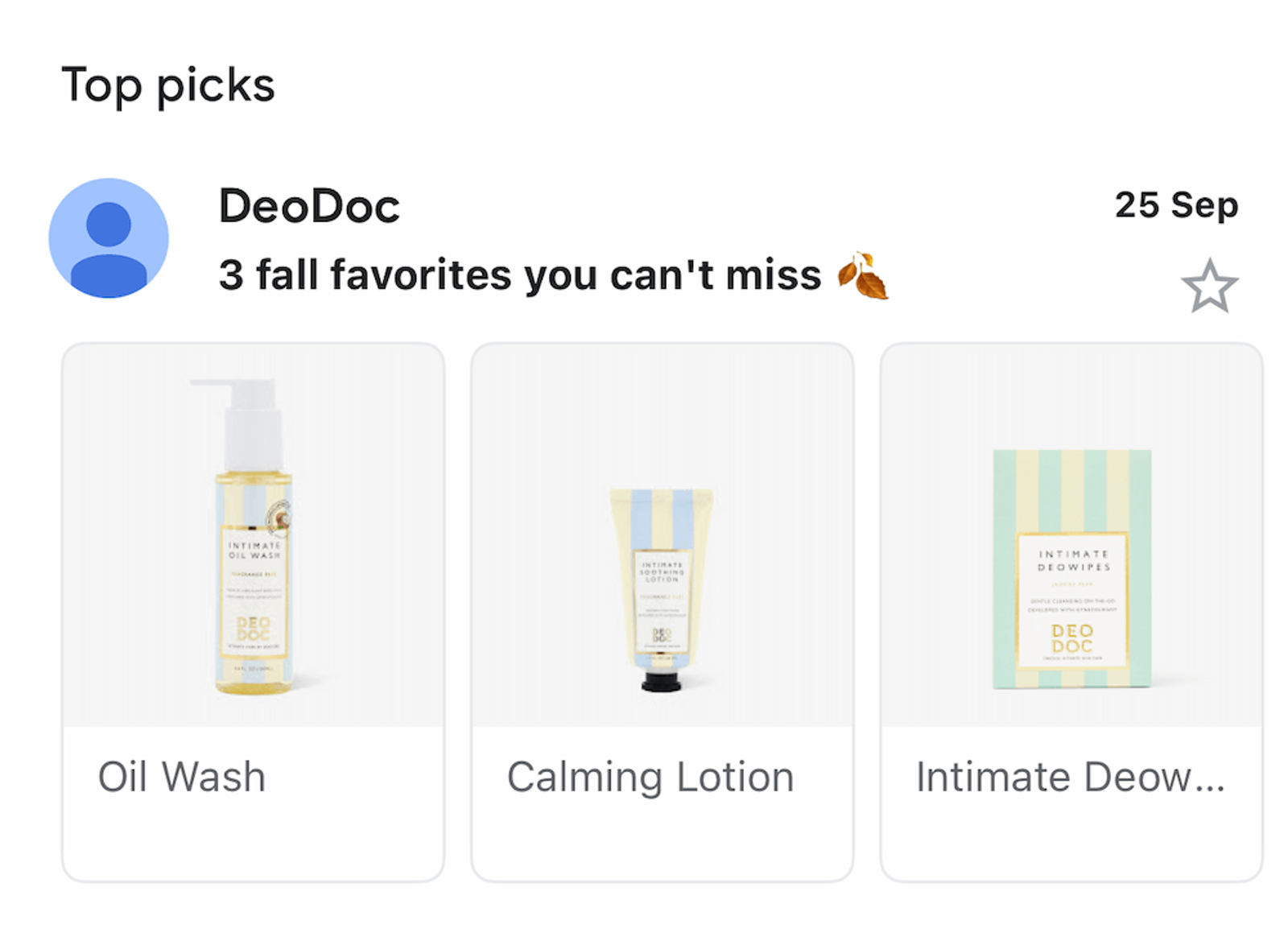
Image source: DeoDoc
2. Single image annotation
A single image annotation is your best strategy for focused messaging and when your offer needs room to breathe. If you’re promoting a sitewide discount, launching a new collection, or putting a hero product front and centre, let the visual do the talking.
Best for |
|---|
|
Why use it |
|---|
|
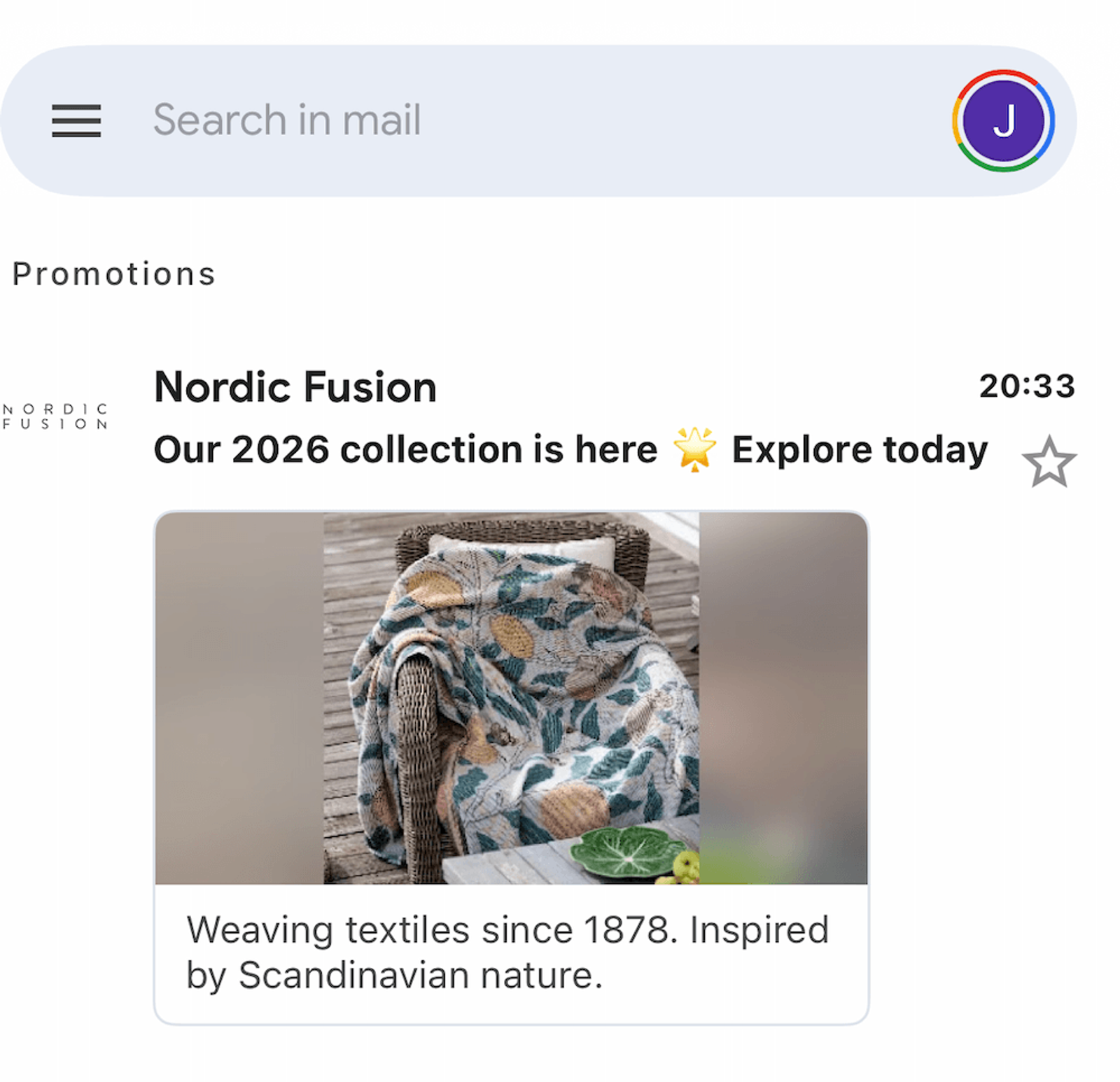
Image source: Nordic Fusion
3. Deal annotation
Deal annotations are built for urgency. With a deal annotation, you can highlight your promotion details directly in the inbox preview, including the offer, a discount code, and an expiration date. This gives subscribers a reason to act before they even open the email.
Best for |
|---|
|
Why use it |
|---|
|
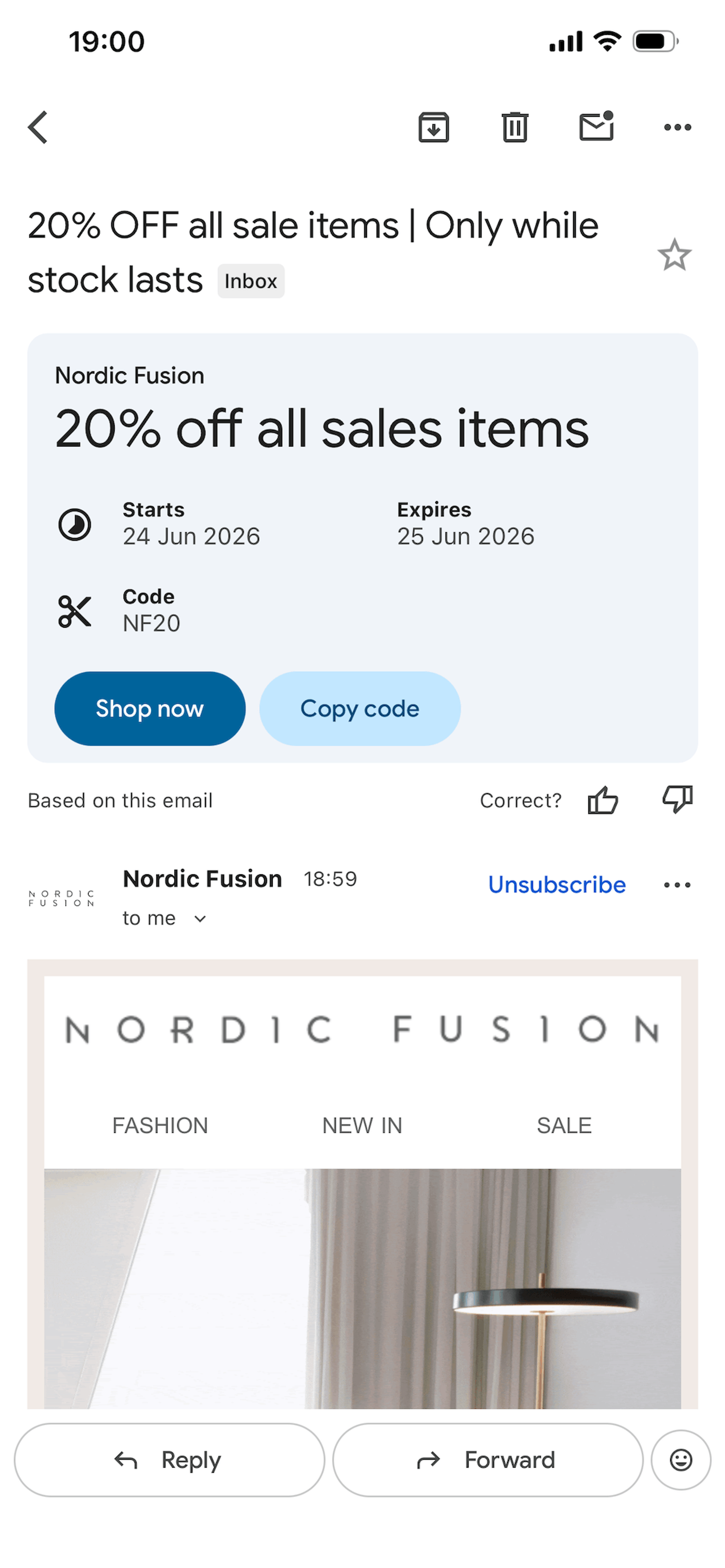
Image source: Nordic Fusion
Getting started with Gmail Annotations
Before your annotations go live and become visible in the inbox, Google requires all senders to go through an approval process.
The good news is that applying for approval is free. But until you meet the eligibility criteria, your annotations simply won’t show up, even if you’ve set everything up correctly in Klaviyo.
Once you’re approved, getting started in Klaviyo is straightforward:
Head to your most recent campaign in Klaviyo, select “Deliverability,” and scroll down to the “Email send volume by inbox provider.”
Take note of how Gmail compares to other providers, and pay close attention to the open rate across each one. If your Gmail open rate is lagging behind, annotations could be exactly what you need.
From there, build your annotations using microdata, a structured markup format that tells Gmail what to display in preview cards.
In Klaviyo, use the HTML builder to create your campaign. The microdata code goes at the very top of your email in the <head> section. Think of it as the behind-the-scenes instructions Gmail reads before your subscribers ever see your email. Each annotation type, whether it’s a product carousel, a single image, or a deal annotation, has its own microdata format, so it’s worth preparing these before you start building your campaign.
Before you hit send, always test your annotations. Use Google’s preview tool to preview how your annotation will appear in the Promotions tab.
Even better, send a test email to your own Gmail inbox using Klaviyo's preview tool. Seeing it land in your own Promotions tab in real time is the most reliable way to check the image, the deal badge, and the expiration date before your campaign goes live.
Where Gmail Annotations won’t work
Annotations are exclusive to the Gmail Promotions tab, and only visible within the Gmail mobile app. Subscribers who have disabled their Promotions tab or who use a different email provider will not see them.
And even when everything is configured correctly, Gmail uses its own private algorithm to determine when it displays annotations and who sees them. Each subscriber’s engagement history, both with your brand and within the inbox more broadly, is likely to influence visibility.
That’s not a reason to deprioritize annotations. It’s simply a reason to think of them as a way to increase your visibility during busy and loud promotional periods. The subscribers who do see them are likely your most engaged, and those are exactly the people worth showing up for.
The inbox is your first impression
Most brands will head into Black Friday doing exactly what they did last year: focusing on a strong subject line and a good offer, and keeping their fingers crossed. For many of them, that’ll be enough to get by.
Gmail Annotations give your brand a presence in the inbox that most of your competitors simply do not have. The set-up is straightforward, and the impact is visible from your very first annotated send. For a tactic that takes an afternoon to implement, the return during Black Friday week alone makes it worth every minute.
BFCM planning is already underway. The brands that show up differently in the inbox this November will be the ones that start now.

Related content