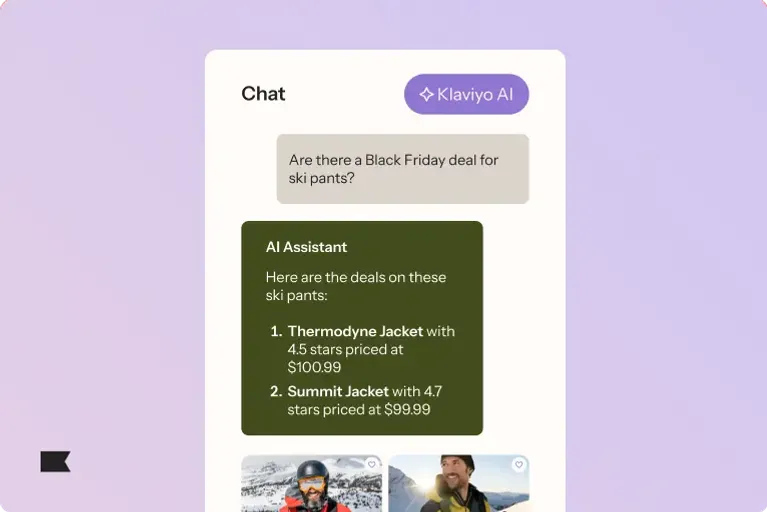
How Composer Supports Every BFCM Stage
Generated by Klaviyo AI
Composer uses business context in Klaviyo to support BFCM planning, live campaign management, and post-sale analysis. It can review performance, build and check campaigns and flows, identify gaps, and apply BFCM insights to December and January marketing.
- Prepare early: Audit past performance, review successful content, and build campaigns and flows before BFCM begins.
- Monitor live results: Track conversion trends and campaign performance while the sale is underway.
- Launch and QA: Build last-minute email, SMS, and push campaigns and check each one before it goes live.
- Apply post-sale insights: Review results, uncover segment coverage gaps, and use the findings to shape December and January campaigns.
Black Friday Cyber Monday (BFCM)doesn't ease up once it gets going. List uploads, segments, discounts, it all has to be locked in before the sale goes live, because once it's underway, you're focused on running it, not rebuilding it. The brands that come out ahead usually aren't doing anything flashy. They just did the thinking early, before the clock started.
Composer, Klaviyo's AI marketing and content agent, gives you an extra pair of hands that already knows your business inside out. It's not starting from scratch. It already has your data, your history, and your customers, so you can make sharper calls before, during, and after the weekend that shapes your Q4 success.
What Composer does for you
Think of Composer as your AI marketing and content agent inside Klaviyo. It has your full business context, so you can:
- Make sharper marketing decisions, backed by your own data.
- Spot opportunities across Klaviyo before you'd catch them yourself.
- Move from idea to live campaign faster.
- Get better answers the more you use it.
Using Composer for BFCM success
From prep to wrap-up, Composer's with you at every stage of BFCM.
In the run up to BFCM
The brands that win BFCM aren't the ones scrambling on the day, they're the ones who showed up prepared. Composer helps you get there by doing the groundwork most teams don't have time for: digging through last year's numbers, spotting content that's already resonating, and building the campaigns that capture new customers before the big rush even starts.
Prior to the big event, prompt Composer to:
- Audit your flow performance during last year's BFCM, asking: What worked? What didn't?
- Review top-performing Instagram content and creator trends (if you use Klaviyo's Social Marketing) to inform which creators and themes to feature in your BFCM push.
- Build new campaigns and flows from scratch that can gather more first-party data before peak season hits.
During your BFCM push
Once your sale is underway, things move quickly, and staying on top of performance shouldn't mean digging through reports. Composer gives you a live read on what's working, so you can adjust, launch something new, or fix a small issue before it becomes a bigger one.
During BFCM, use Composer to:
- Ask for conversion trends and campaign performance as your sale unfolds.
- Build last-minute omnichannel campaigns and flows (email, SMS, and push).
- QA each campaign (i.e., check for quality) before content goes live each day.
Once the dust settles
BFCM generates more customer data in a few days than some brands see all quarter, and what you do with it matters just as much as how you performed. Composer helps you make sense of it fast: what converted, where you lost people, and how to carry that momentum straight into December and January.
After BFCM is over, continue to use Composer to:
- Review and share BFCM campaign and flow performance (e.g., opens, clicks, and revenue by segment or channel).
- Uncover any segment coverage gaps from the sale period.
- Build holiday campaigns and flows based on what you learned for December through January.
Build your own BFCM prompts
Be specific with your prompts, and keep refining them until you get the output you need. The more data you have in Klaviyo, and the longer you've been using it, the sharper Composer's answers will be. Below are some starting prompts to help you get going.
Prompting to build a specific BFCM campaign | ‘Help me build a campaign to announce our major BFCM sale to an early access group. The sale is on [our signature product] for [insert your discount or other promotion]. Target this as an early access opportunity for our VIP shoppers, and state that we will extend our sale to our full audience the following day. |
Prompting to audit flows ahead of peak season traffic | ‘Review whether my flows are optimised for an influx of engagement during Black Friday Cyber Monday. What are current gaps in the content and where are there opportunities to drive more conversions? Compare against how these flows performed during last year's BFCM.’ |
Prompting to get a read on segment performance and gaps | ‘Determine which segments drove the most revenue and engagement over the last 30 days. How can I best target these segments during BFCM?’ |
Hungry for more prompt ideas?
You don't have to start from a blank cursor. The Klaviyo AI Prompt Library has 116 expert-written prompts, built by Klaviyo Champions, ready to drop straight into Composer or your preferred LLM.
It's built around 3 steps: pick a prompt (browse by goal, channel, or industry), load it into Composer or your LLM (pre-filled with your brand, data, and voice), then launch and let Composer run and optimise it for you. You can filter by category, industry, or role, or narrow the list to Composer-only prompts.
A few worth bookmarking for this BFCM season:
- Campaign Pre-Send Checklist: Run a pre-send checklist on a campaign to catch errors before it goes out.
- A/B Test Validation: Check that a test is set up correctly and the sample size is large enough to mean something.
- 30-Day Email and SMS Marketing Calendar: Plan what to send next in Klaviyo to maximise revenue and retention.
- Broken Segment Logic: Find segments with broken conditions before they quietly cost you conversions.
There's no version of BFCM where things slow down long enough for you to catch your breath. And that's fine, because you don't need things to slow down. You need a way to keep up with them, and that's what Composer's built for. Try Composer today.

Related content