Always know what’s new in Klaviyo

Subscribe to email updates

Composer

Composer takes on more of the work

Out of preview, Composer can answer harder questions across your data, run analyses and audits on a schedule, and turn the workflows that work into reusable skills.

Composer takes on more of the work

Composer is Klaviyo’s AI marketing agent that knows your business. Now it can reason across more of your customer, marketing, and commerce data, put your results in context with industry benchmarks, and show the sources behind its answers.

A campaign creation interface displaying details for a "Fall campaign," including discount, promo code, and an ad preview.

Opportunity

Marketers spend hours working out what needs attention, analysing performance, and turning what they find into action. Most of that work starts from scratch every time.

Example

A marketer schedules a weekly performance review. Every week, Composer analyses campaigns and flows, compares them against relevant benchmarks, and brings the marketer back in when something requires attention.

Value

  • Ask complex questions in plain language and see the sources behind the answer
  • Put recurring analyses and audits on a schedule
  • Save the workflows that work as reusable skills

K:Data Platform

Every agent you use, now fluent in your data

Ask Composer, Claude, ChatGPT, or any agent on MCP. Every time you ask the same question, you’ll get the same answer—and it shows its work in the thinking stream.

Every agent you use, now fluent in your data

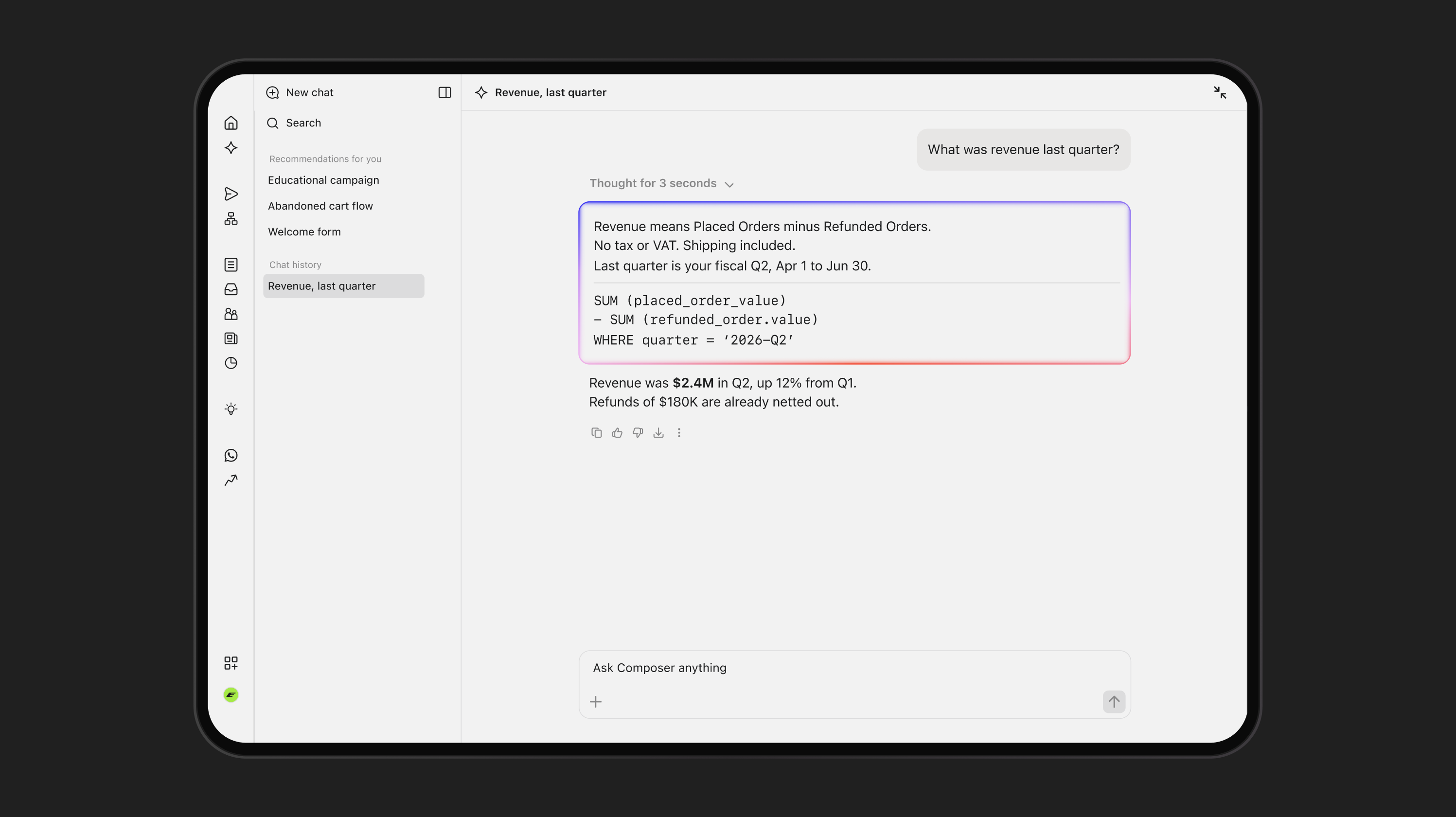
Klaviyo turns a plain-language question into SQL using its own definitions of terms like revenue, runs it against your data, and shows its work in the thinking stream. Ask in Composer, or via the Klaviyo MCP server from the AI tools you already use.

An AI-powered data analysis tool answers "What was revenue last quarter?", detailing calculation methods and stating the revenue was $2.4M, up 12% from Q1.

Opportunity

When an AI has to guess what ‘revenue’ means, the same question can get different answers in different chats. Numbers you can’t reproduce are hard to trust.

Example

A retention marketer asks, ‘What percentage of customers never make a second purchase?’ Composer returns the percentage, the definition it used, and the query, so an analyst can check it.

Value

  • Answer questions about customers, products, and revenue, not just campaign performance
  • Get the same answer whichever agent you ask
  • See how it reads your question and gets to the right answer in fewer turns

Social marketing

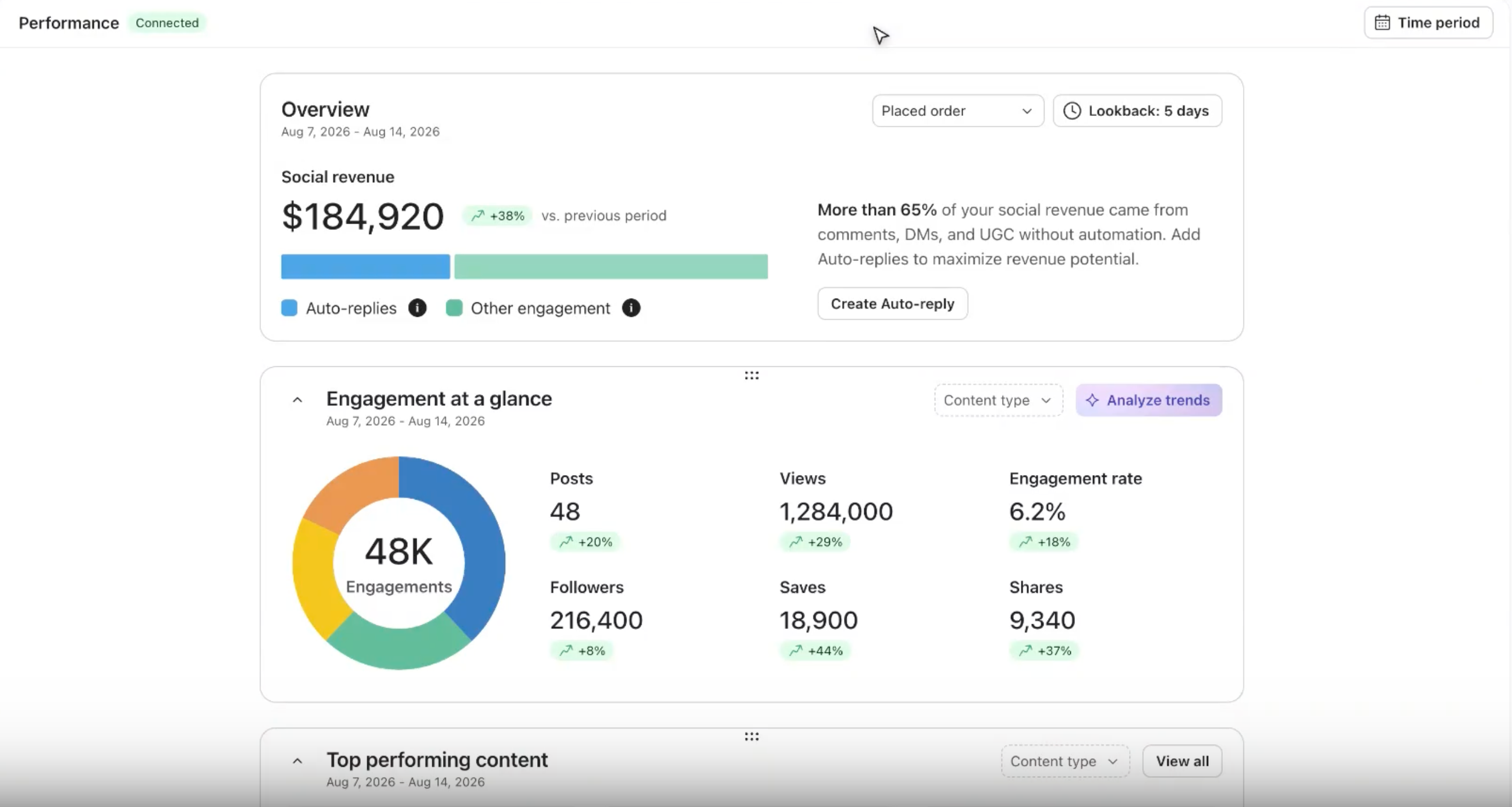
Put a revenue number on social

New metrics for your social media activity show the revenue and orders tied to Instagram comments, DMs, tags and Auto Reply subscriptions.

Put a revenue number on social

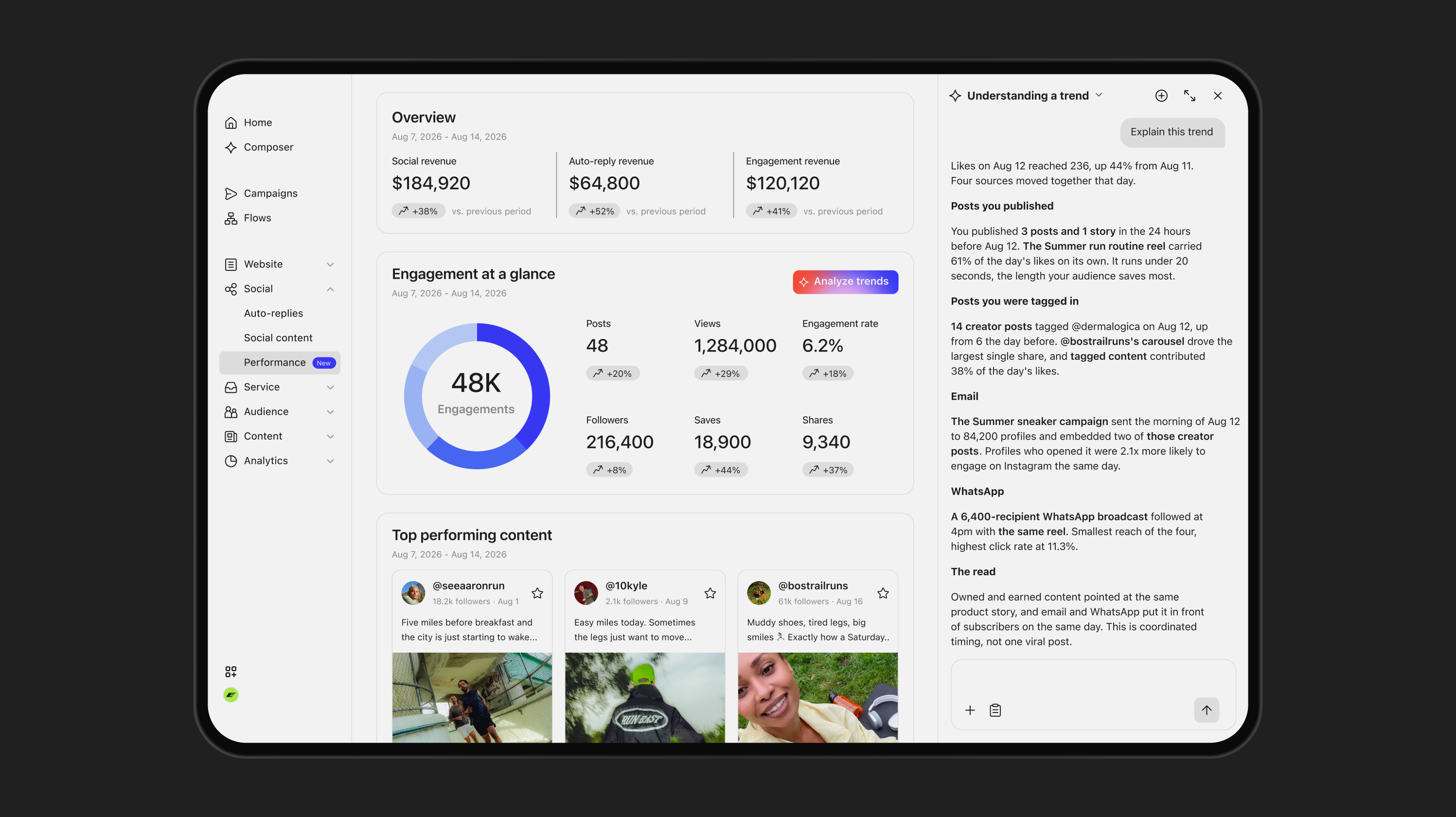
Klaviyo connects an Instagram handle to a customer profile and that profile’s purchase history, so it can show the orders tied to a social action. Find the prebuilt report in Social › Analytics, reported separately from Klaviyo Attributed Value.

Two dashboard cards displaying social media performance metrics including spend, engagement, and top performing content examples.

Opportunity

Most social reporting stops at reach, engagement, and follower counts, right where the budget conversation starts.

Example

A social manager heads into a quarterly budget review with the revenue tied to Instagram comments and DMs, not just the engagement rate.

Value

  • See revenue and orders tied to social engagement
  • Choose which customers, social actions, and time window count
  • See results the day you connect Instagram, not after weeks of setup

Customer Agent

The right products, prices, and currency in every market

Customer Agent now detects each shopper’s Shopify market and recommends products from the correct regional catalogue, with local pricing, currency and availability.

The right products, prices, and currency in every market

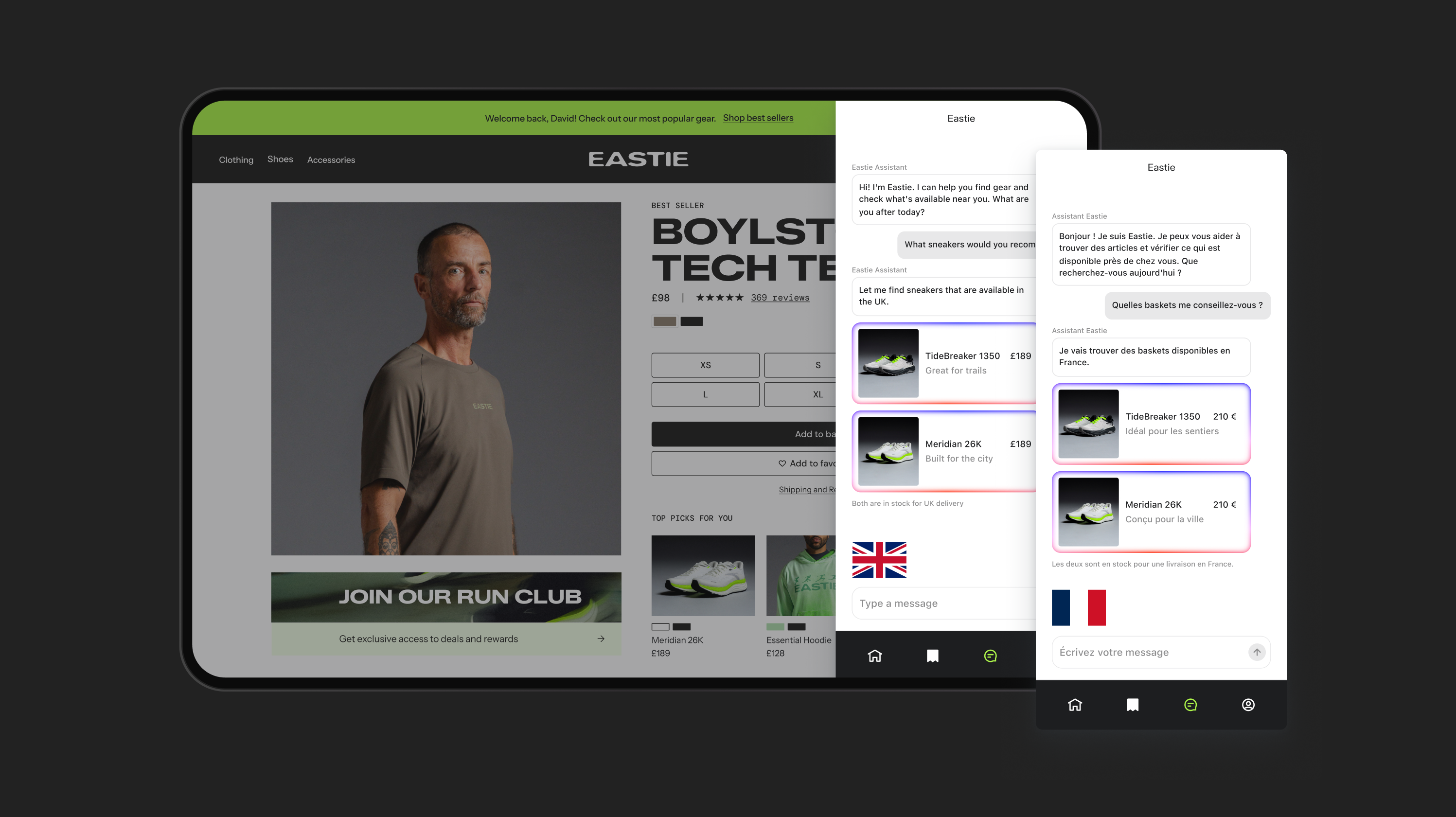
Customer Agent uses your existing Shopify Markets setup to automatically understand each shopper’s market and recommend products from the appropriate regional catalogue, with the right availability, price, currency, and localised product page. It works across web chat, email, SMS, and WhatsApp, so you can support shoppers across markets with one Customer Agent. Available for Customer Agent customers using Shopify Markets.

Two chat windows displaying localized sneaker recommendations: one in English for the UK (£189), and one in French for France (210€).

Opportunity

Customer Agent can already understand a shopper’s language. But for global brands, a localised experience requires more than language. Products, pricing, currency, and availability can all vary by market.

Example

A shopper in Canada asks Customer Agent about a product. Instead of using the brand’s default U.S. catalogue and USD pricing, Customer Agent uses the Canadian market configuration to recommend the right product, price, currency, and localised product page.

Value

  • Recommend only what’s available in each shopper’s market
  • Show the right price, currency, and localised product page
  • Support multiple markets with one Customer Agent
Customer Hub

Web content blocks, now in flows

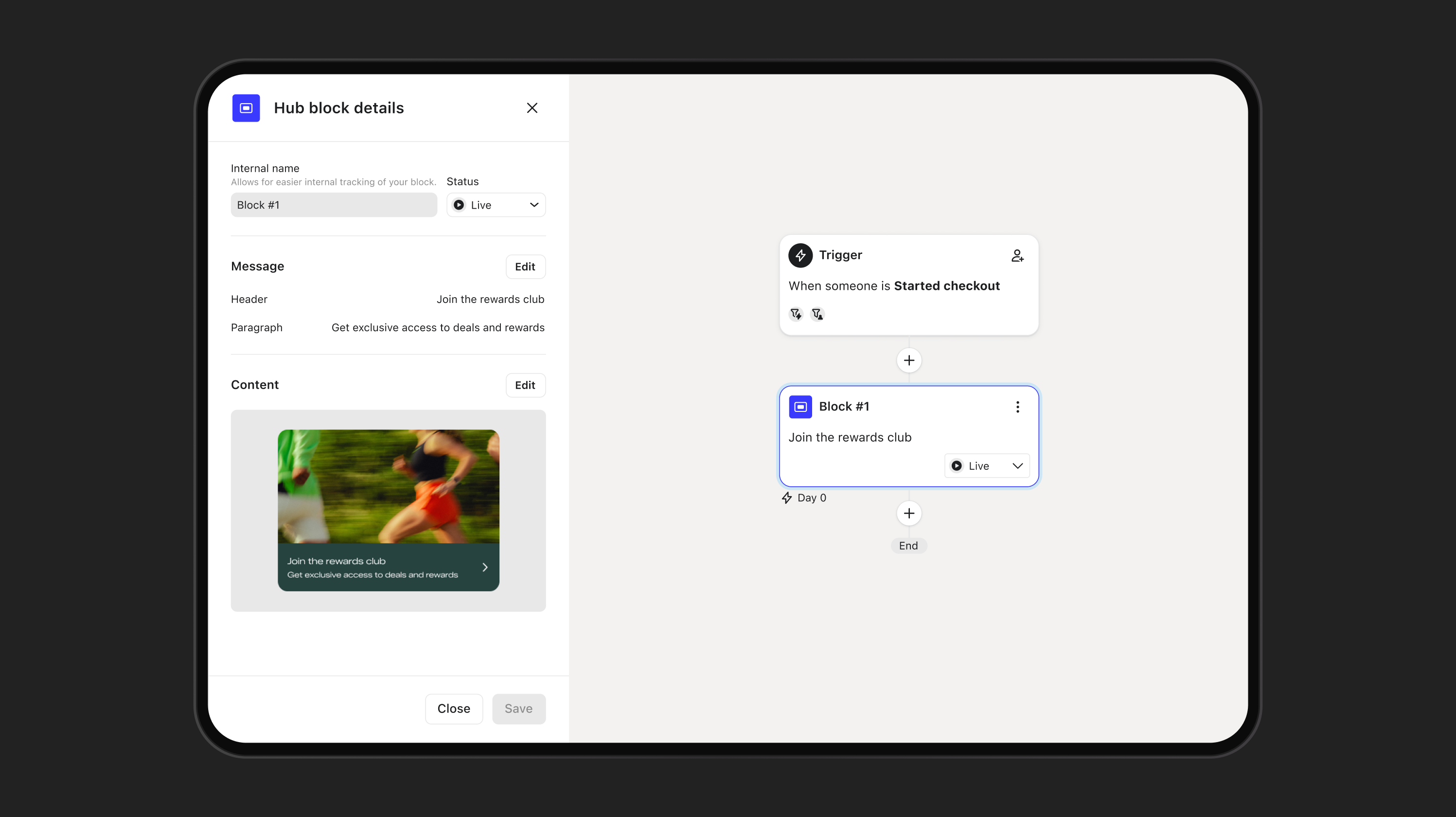
Add Customer Hub content blocks to flows alongside email, SMS, and WhatsApp to create connected, personalised experiences across messaging channels and your website.

A tablet screen showing a marketing automation tool, configuring a "rewards club" signup block triggered by a started checkout.

Web content blocks, now in flows

Create, target, and publish personalised web content in automated flows alongside email, SMS, and WhatsApp. Start with suggested Customer Hub content blocks based on content from other channels in the flow, then customise them for your site. Included with Customer Hub.

Automation workflow showing "Added to newsletter" triggering a "welcome offer email," with a menu of next step options including email, text message, and push notification.

Opportunity

Personalised experiences can become disconnected when a shopper reaches the website. Extending relevant offers and messages onsite can mean separate tools, separate workflows, and rebuilding the same content.

Example

A new subscriber receives a welcome offer by email. A Customer Hub content block in the same flow reinforces that offer when they return to your site, connecting the welcome experience across email and web.

Value

  • Coordinate web content alongside your other marketing channels in one flow
  • Keep offers and messages consistent from inbox to site
  • Continue welcome, browse, and post-purchase journeys onsite

Personalisation

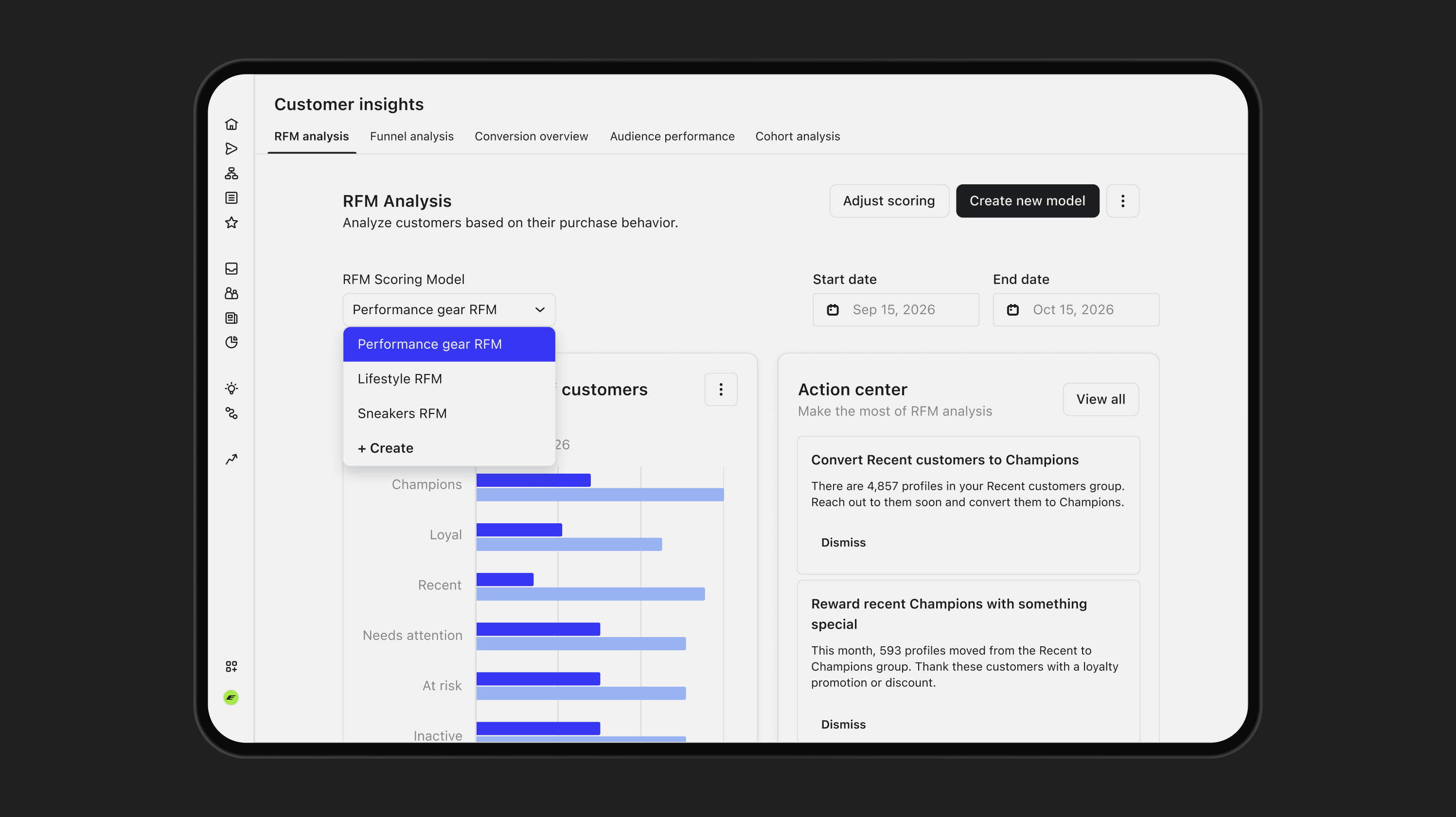
RFM for each part of your business

Create up to four RFM models so each customer is scored against others who shop the same way, instead of against your entire list.

RFM for each part of your business

Run up to four RFM models in one account, each with its own conversion metric, time frame and thresholds. Segment customers by how they shop and the product categories they buy, not just their total purchase history. Trade one-size-fits-all scoring for personalised experiences that match how each group actually shops, using each model’s groups in your segments and flows. Available with Personalization (formerly Marketing Analytics) or Advanced Klaviyo Data Platform.

RFM analysis UI with "Performance gear RFM" selected in a dropdown, and a bar chart comparing customer distribution for two dates.

Opportunity

A single RFM model can mislabel customers when different parts of the business have very different purchasing patterns. A high spender who buys twice a year can appear At Risk compared with monthly buyers.

Example

A brand builds one model for subscription orders and one for one-time purchases, then triggers a winback flow when someone becomes At Risk in the subscription model.

Value

  • Score subscriptions, channels, or product lines separately
  • Trust the groups you use for retention, win-back, and cross-selling
  • Use each model’s groups directly in segments and flows
Topic
Filters
AI
Marketing
Service
Data & Analytics
Other

All updates

Social Performance

See which social content actually drives revenue — Track order-attributed revenue, engagement, top creators, and trends over time, then dig deeper with Composer.

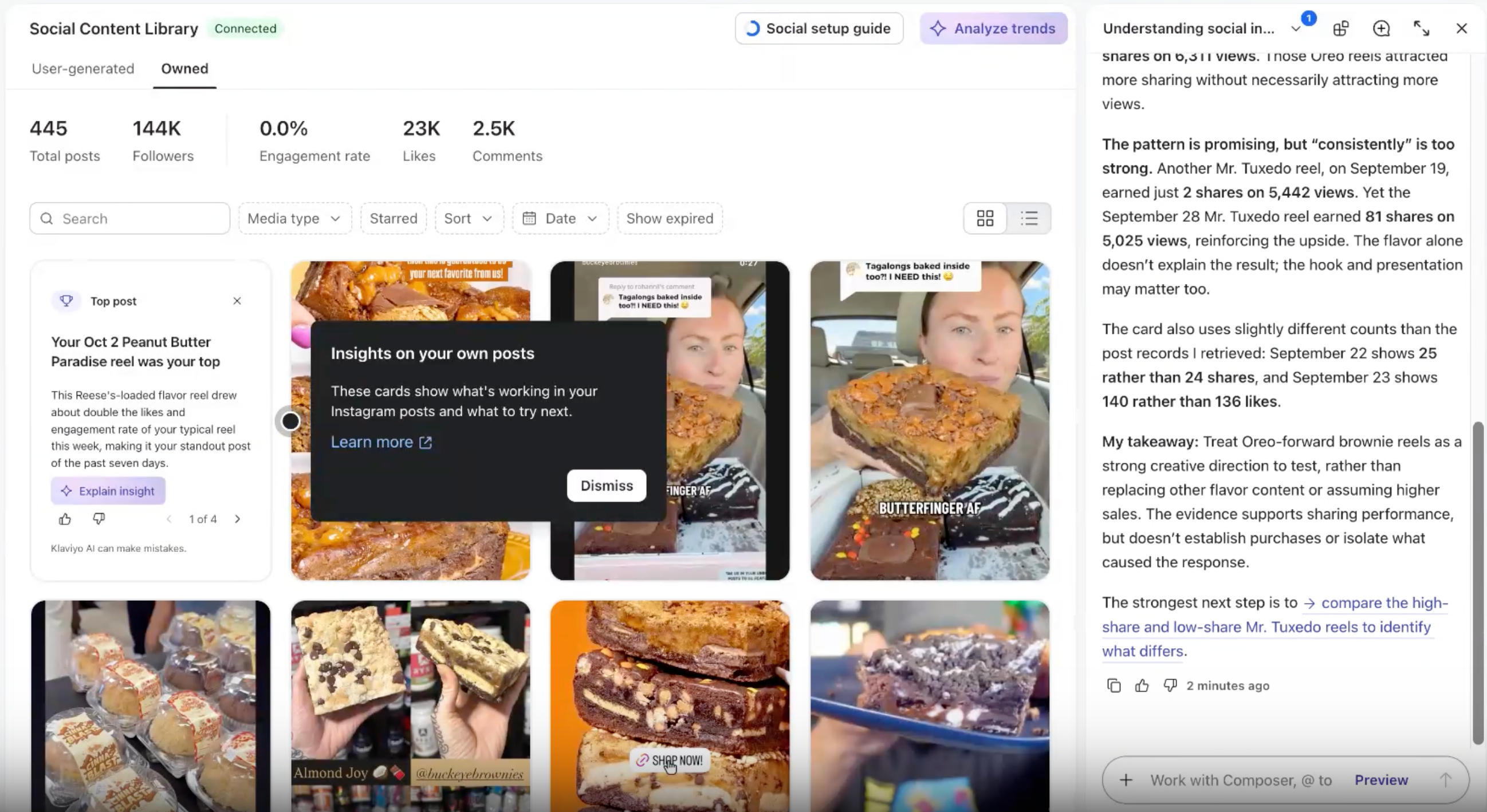
Owned Social Insights

See what drives Instagram engagement without digging through data — Review daily insights on your best formats, topics, and posting times in the social content library.

In-App Review Banner Expanded

Share your Klaviyo experience in a few clicks — In App Review from a quick in-app prompt sends you to your WooCommerce, BigCommerce, Wix, PrestaShop, or Square app marketplace listing.

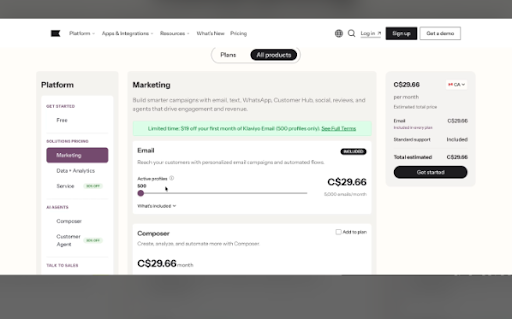
Pay in Canadian Dollars

Pay for Klaviyo in Canadian dollars — Choose CAD as a new Canadian customer to see pricing, sign contracts, pay, and get invoices in your home currency.
A web page displaying pricing for a marketing platform, showing the "Marketing" plan selected at C$29.66 per month with an email feature for 500 active profiles.

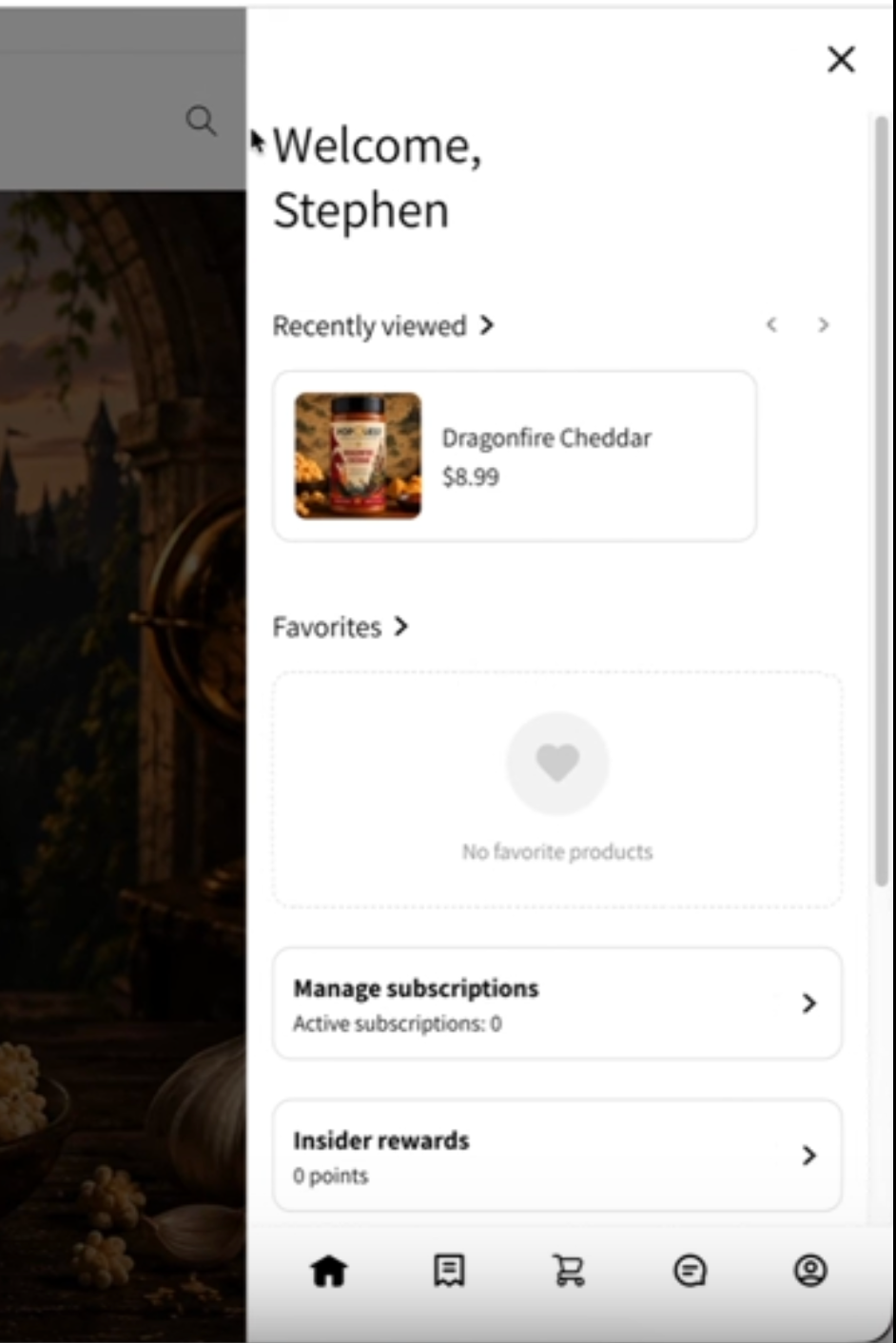
Onsite Preview

See exactly how shoppers will experience Customer Hub before going live — use Onsite Preview to test and refine your setup without publishing.

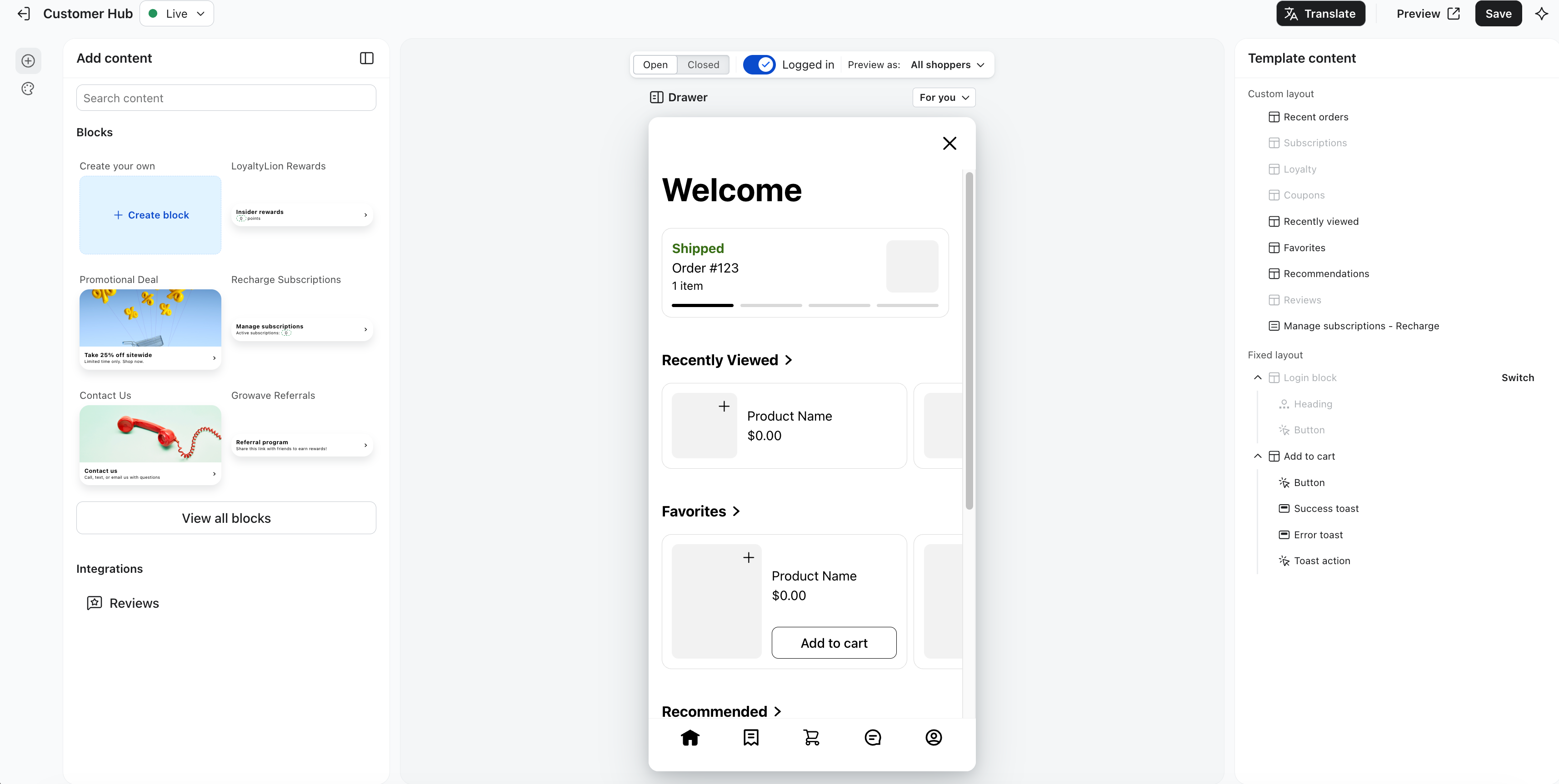
Customer Hub Editor Redesign

Find Customer Hub controls faster with a familiar Klaviyo editor layout — Use universal left navigation, one in-context panel for content and integrations, and consistent Content and Targeting tabs.
Customer Hub admin interface displaying content blocks, a mobile welcome screen preview, and template content customization.

Customer Agent, Profile Context Tools

Ground agent responses in real shopper data — use built-in profile tools to read order history, segment membership, and predictive analytics during any conversation.

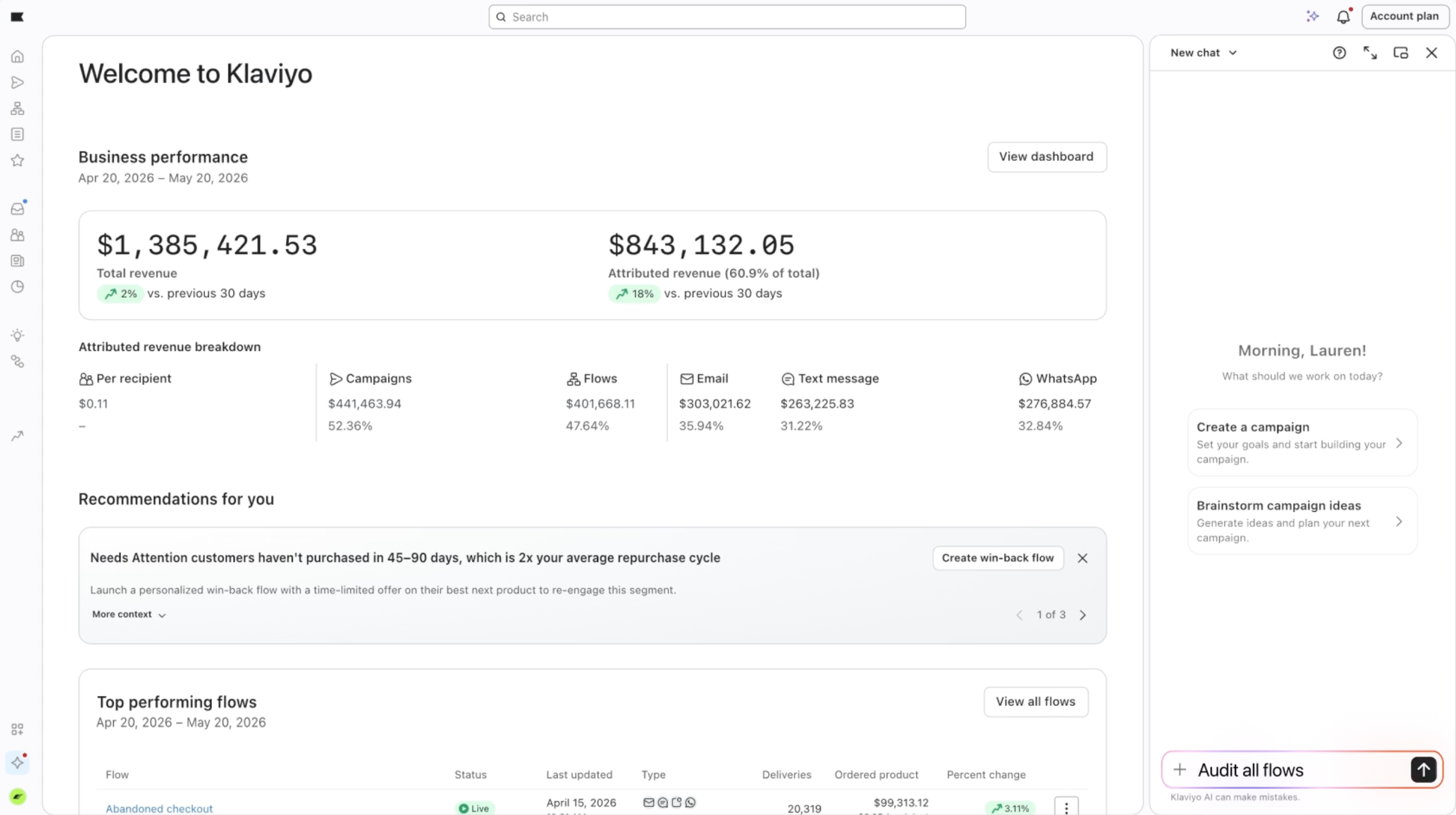
Composer

Get an always-on marketing expert that analyses your performance, audits your flows and campaigns, and drafts messages grounded in your real account data — use Composer to surface your next best move and act on it in minutes.
Klaviyo dashboard showing business performance metrics, revenue breakdown by channel, and marketing recommendations.

Custom CSS for Klaviyo Sign-up Forms

Match your sign-up forms exactly to your brand's look and feel — use custom CSS to control line height, letter spacing, element spacing, and right-to-left text directly in the forms editor.
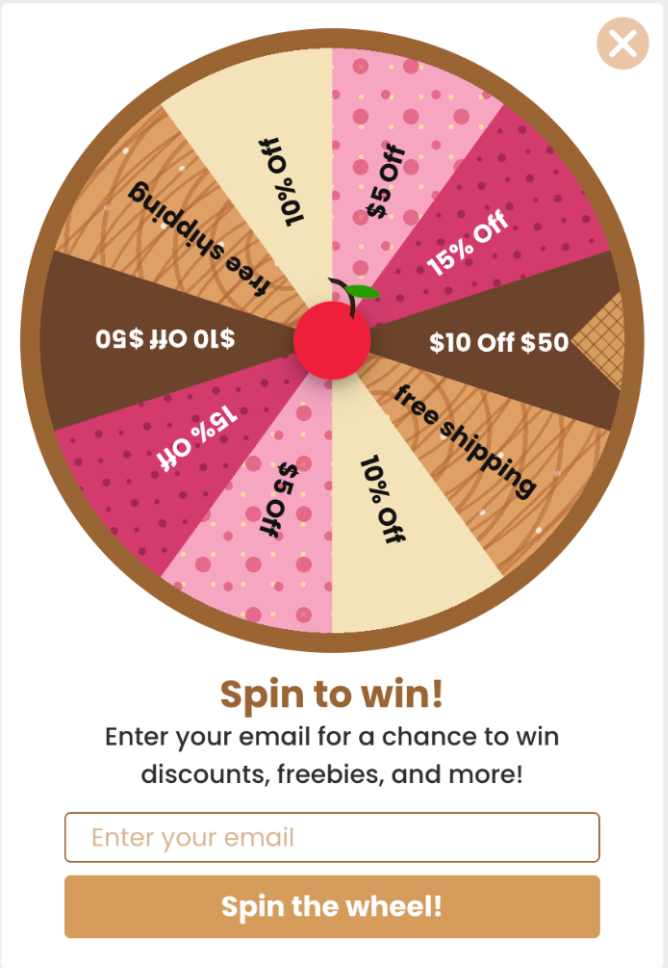
Spin to Win prize wheel offering discounts and free shipping via email signup.

Embedded personalised content blocks

Show personalised messaging, promotions, and CTAs directly on your Shopify storefront — create content blocks in Customer Hub, then drop them into your theme without touching code.
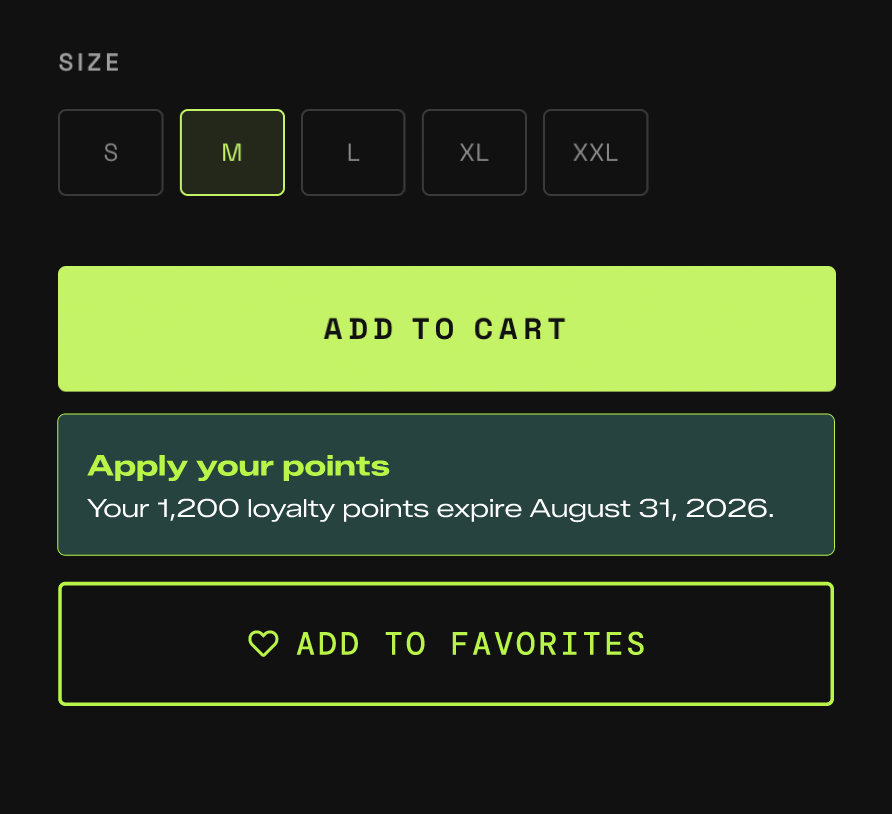
UI showing size selection (M selected), Add to Cart button, loyalty points, and Add to Favorites button.

Instagram 1-to-Many

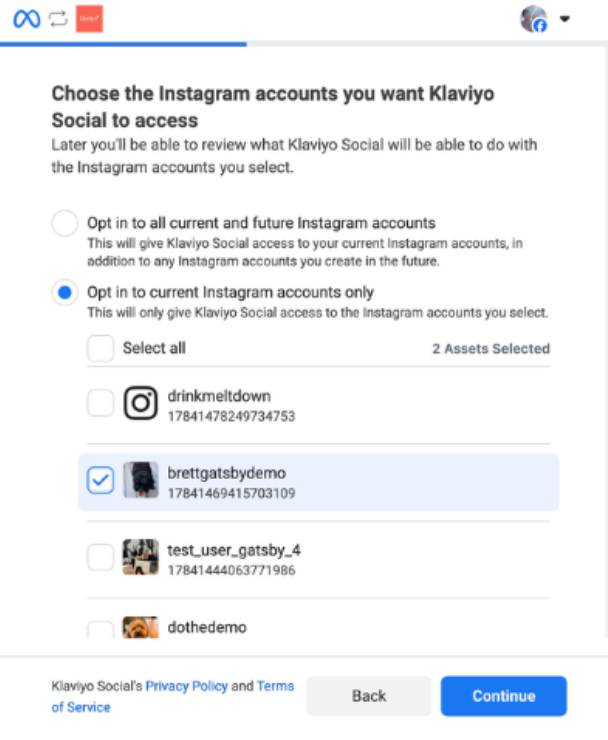
Run multiple regional Klaviyo accounts from a single global Instagram — connect one Instagram to all your Klaviyo accounts with Social Marketing.
Klaviyo Social screen to connect Instagram accounts, with "Opt in to current Instagram accounts only" selected and "bretgatsbydemo" checked.

Customer Agent, Public APIs

Automate agent setup, pull conversation data, and embed Customer Agent into custom surfaces — use the new public REST API to configure, monitor, and run your agent programmatically.
Customer Agent, Profile Enrichment

Turn support conversations into first-party data — use Profile Enrichment to capture shopper preferences and intent as profile properties in real time.

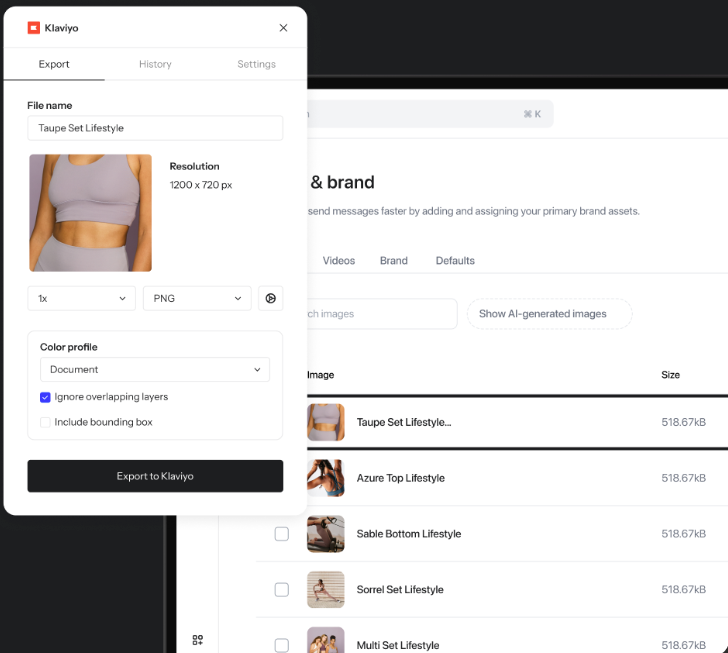
Figma Plugin

Move design assets to your media library without leaving Figma — export single or multiple items, name them on the fly, and switch between connected Klaviyo accounts.
Klaviyo interface displaying an export dialog for the "Taupe Set Lifestyle" image, showing a person in taupe activewear and export settings.

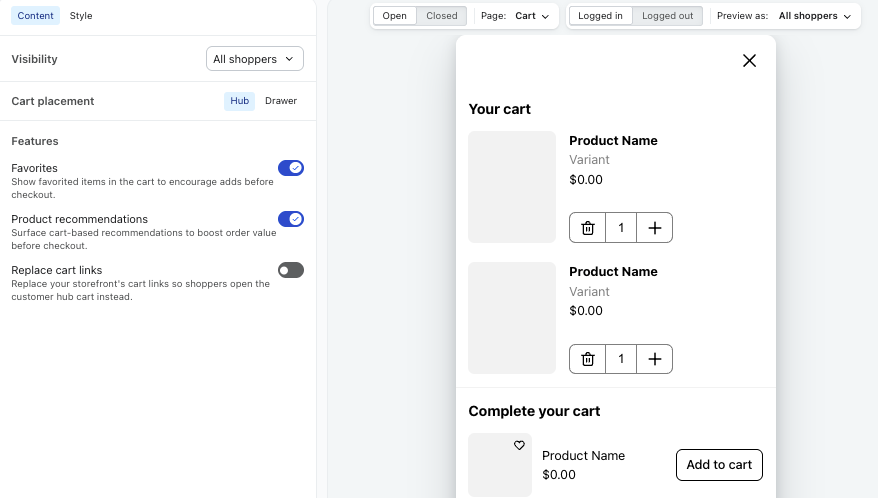
Cart in Customer Hub

Give shoppers a seamless mini-cart experience with personalised product recommendations — enable Cart in Customer Hub to surface upsells and increase average order value.
E-commerce backend interface showing cart settings on the left and a shopping cart pop-up preview with generic product listings on the right.

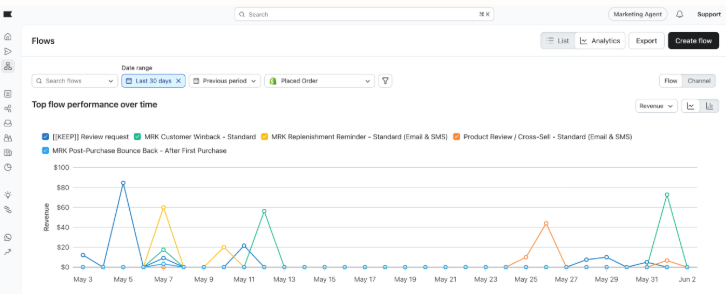
Flow Analytics Dashboard

Compare flow performance across channels and time periods — use the new Flow Analytics dashboard to track revenue, conversions, and deliveries with period-over-period insights.
A dashboard with a line graph titled "Top flow performance over time," displaying revenue for multiple marketing flows over the last 30 days.

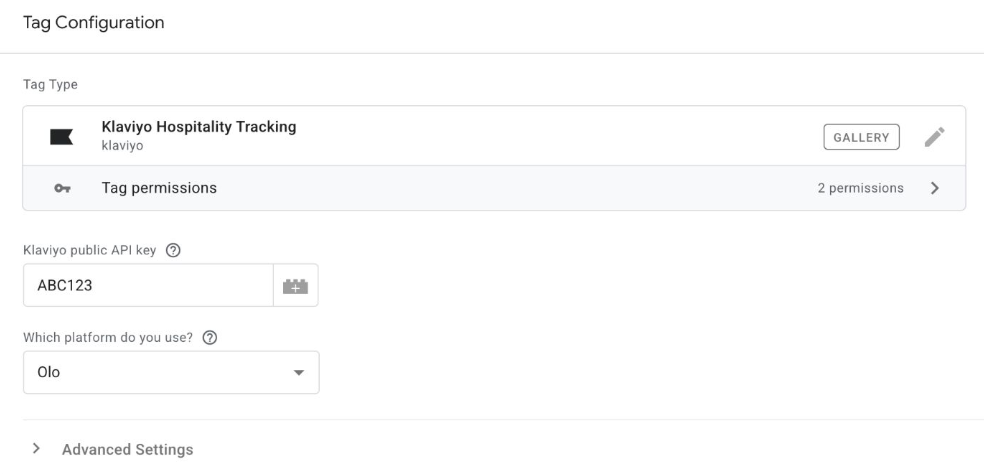
Onsite Tracking for Olo via Google Tag Manager

Track browse, cart, and checkout behaviour from Olo Serve ordering sites — add the Klaviyo tag in Google Tag Manager to capture guest activity and trigger abandonment flows.
Tag configuration screen for Klaviyo Hospitality Tracking, showing API key ABC123 and Olo selected as the platform.

Event Property Filters for In-App Form Triggers

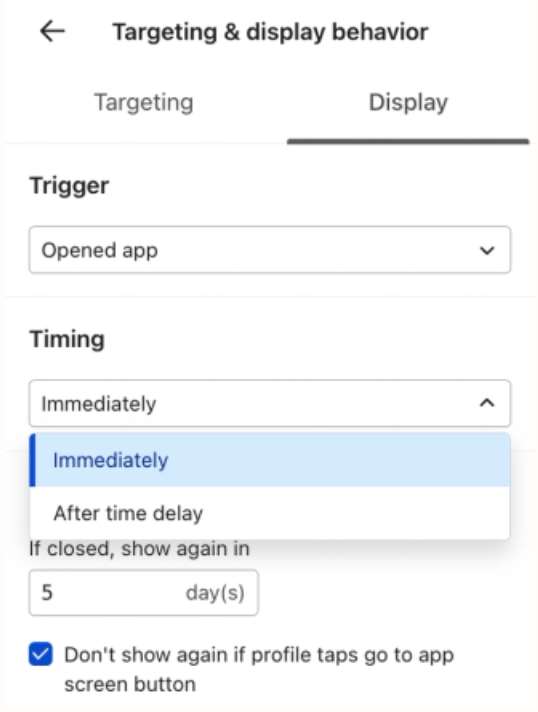
Show in-app forms only when event properties match specific values — add an event property filter to your display triggers for more precise, contextual targeting.
App display behaviour settings: Trigger is 'Opened app', Timing is 'Immediately' selected from a dropdown, re-display set to '5 day(s)', and a checkbox for "Don't show again if profile taps go to app screen button" is checked.

Klaviyo extension for Shopify Sidekick

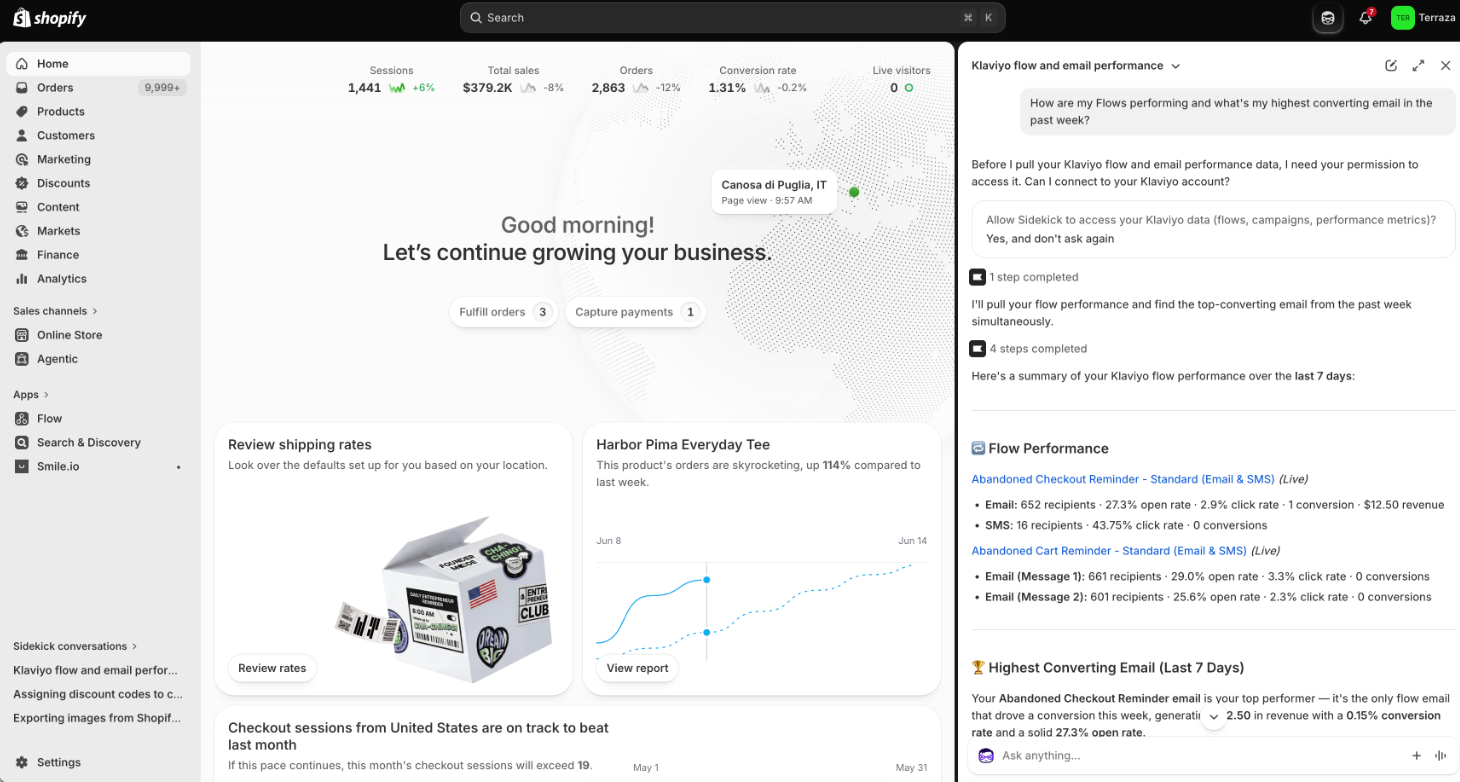
Get answers about your Klaviyo marketing performance without leaving Shopify — ask Sidekick about campaigns, flows, and segments, then deep-link back to Klaviyo to act.
Shopify dashboard displaying business performance metrics and Klaviyo email marketing insights.

Smarter Sync for OTA Guests + Real-Time Cloudbeds Updates

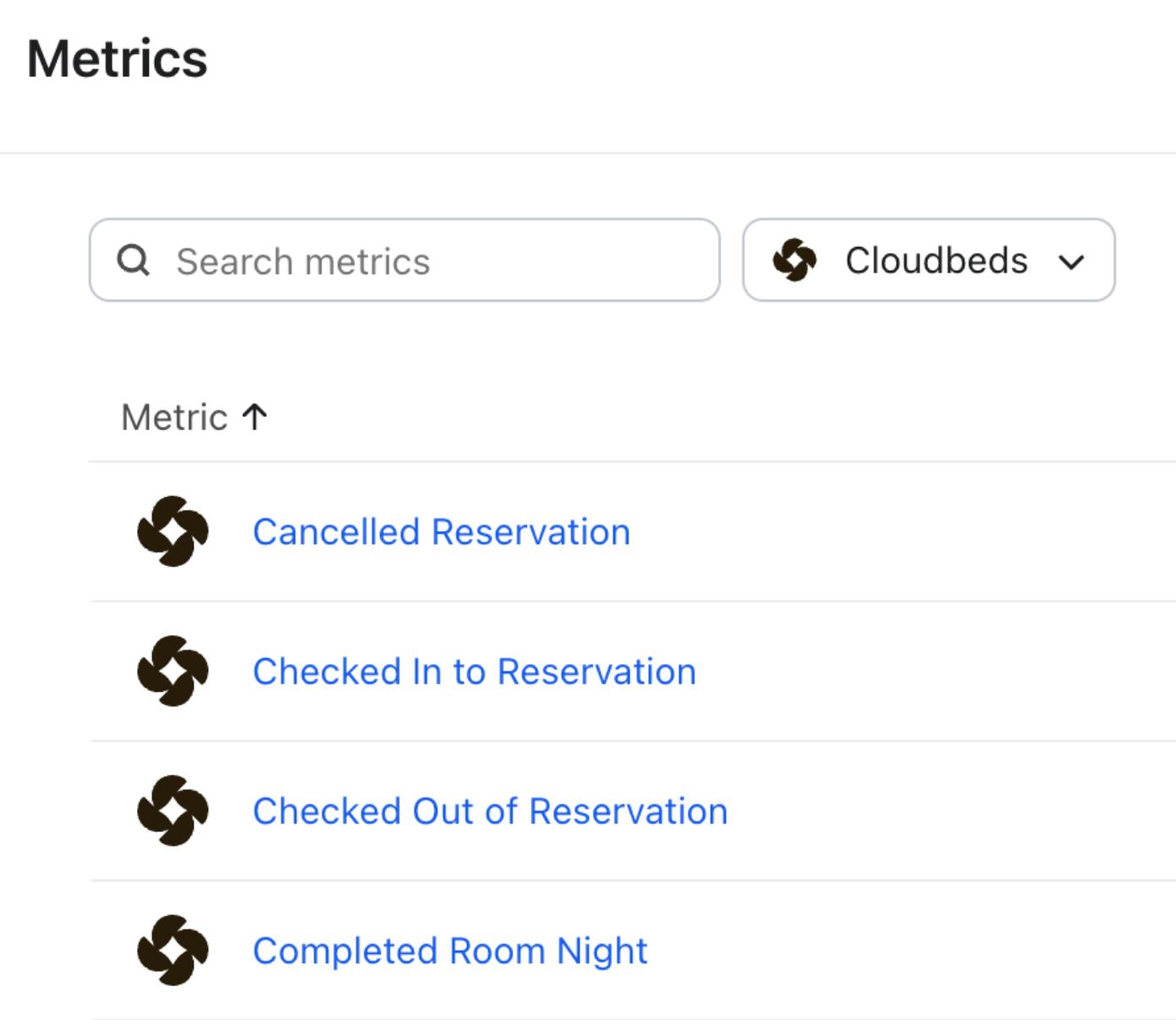
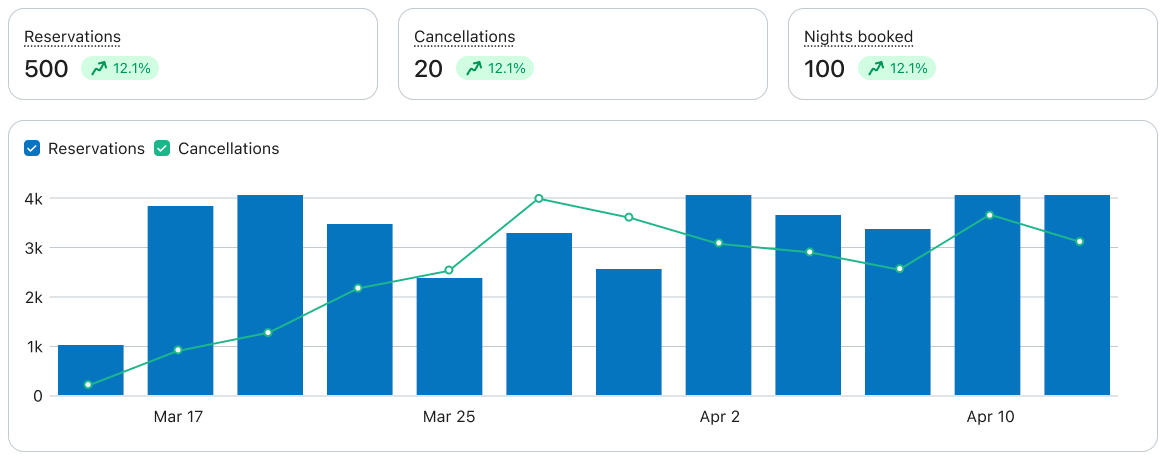
Reach guests who book through OTAs and keep reservation data accurate as changes happen — use real-time reservation sync to trigger check-in, mid-stay, and post-stay flows on the right dates.
A "Metrics" interface showing a search bar, "Cloudbeds" filter, and a list of reservation-related metrics.

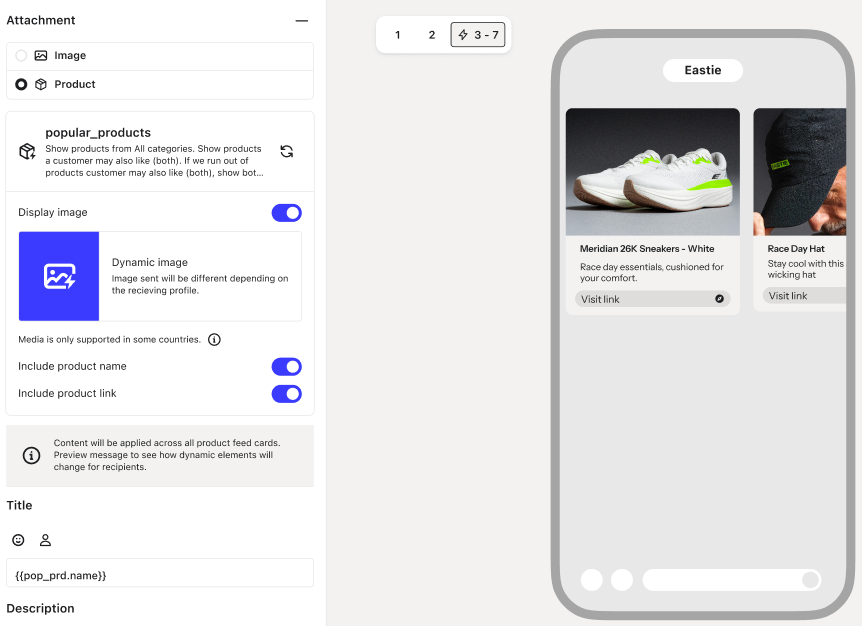
Product Feeds in Text: Dynamic Product Recommendations in SMS

Send personalised product recommendations via SMS using real-time catalog and customer data.
Product attachment settings interface with a mobile preview showing dynamic product cards for sneakers and a hat.

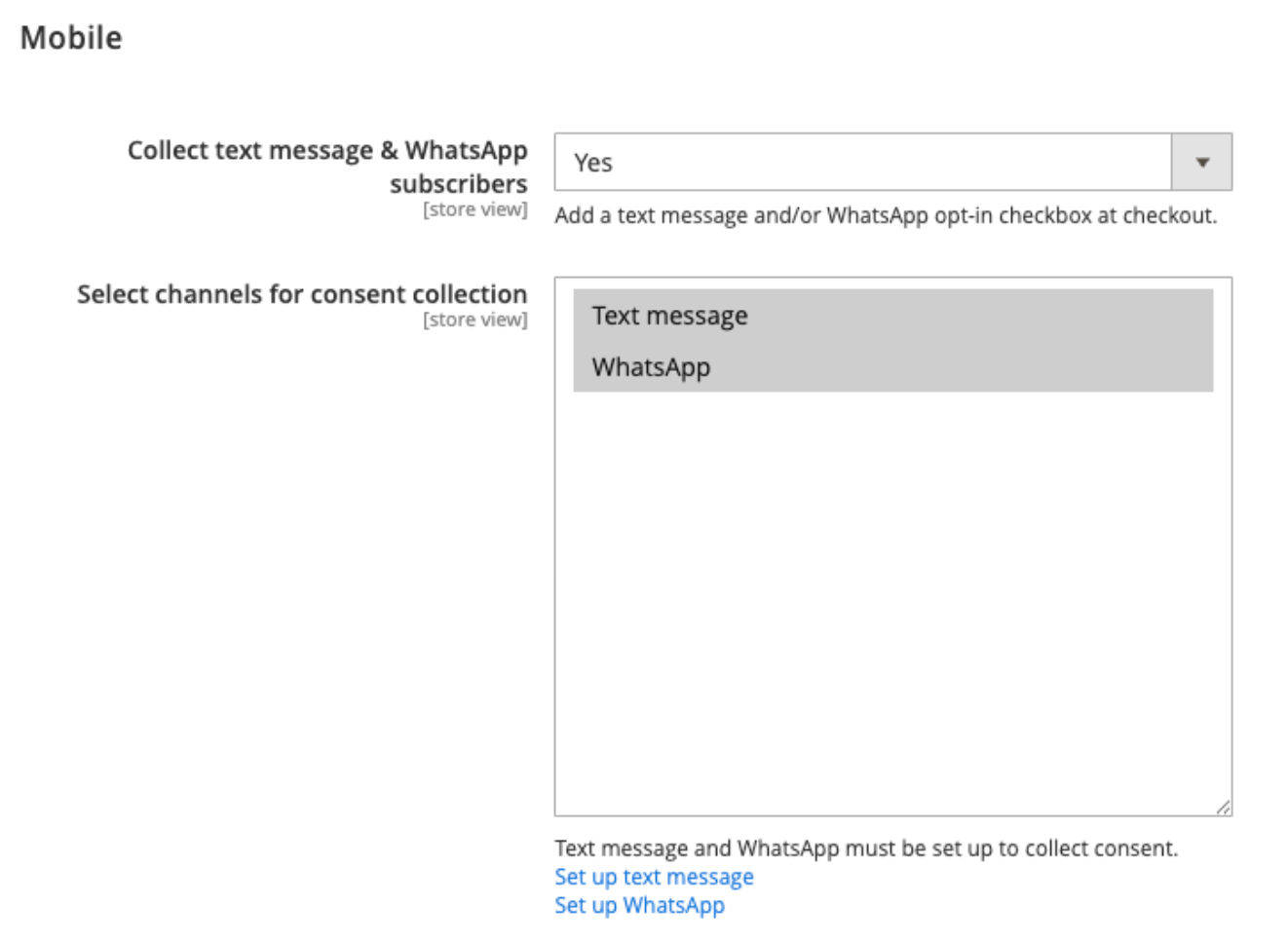
Magento 2 WhatsApp consent collection

Capture WhatsApp opt-ins at checkout when shoppers are most likely to subscribe — enable WhatsApp consent alongside SMS in your Magento 2 integration settings. [Learn more](https://help.klaviyo.com/hc/en-us/articles/360058698511)
Mobile settings for collecting text message and WhatsApp subscriber consent, with both channels selected.

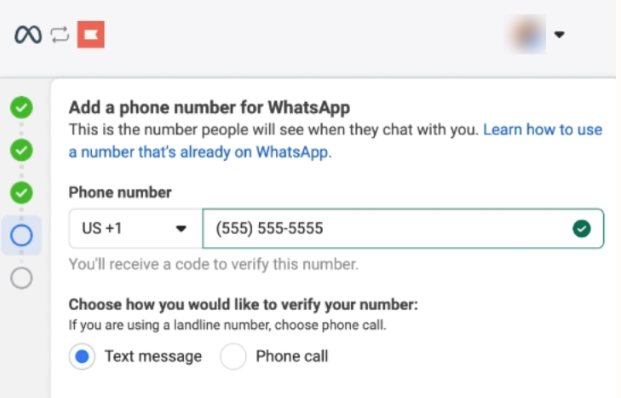
WhatsApp Sending Numbers from Klaviyo

Skip the hassle of buying a WhatsApp number from a third-party provider — get one directly in Klaviyo and start sending faster.

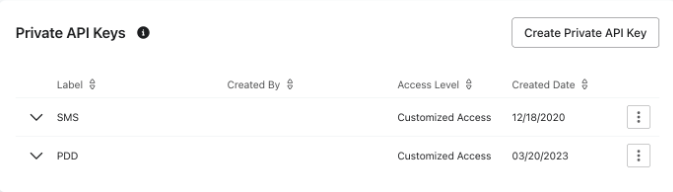
API Key Disablement

Respond to suspected credential exposure in seconds without deleting your keys — disable and re-enable API keys directly from settings.
User interface displaying a list of Private API Keys, including SMS and PDD with customized access levels and creation dates.

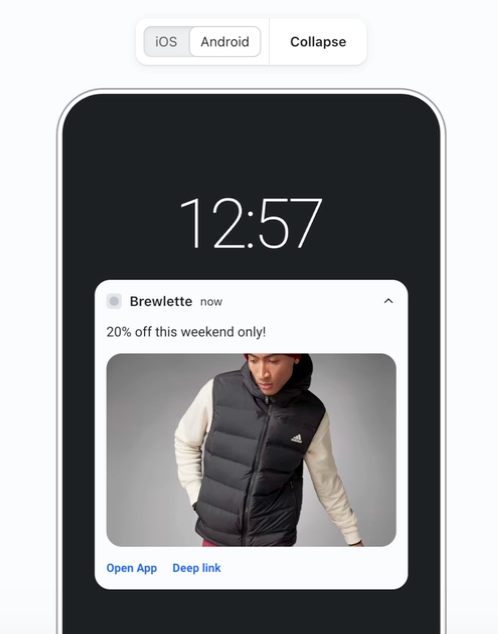
Push Action Buttons

Shorten the path from notification to conversion — add up to 3 action buttons that open your app or deep link to a specific screen.
An Android phone screen displays a Brewlette notification offering "20% off" with an image of a person in a puffer vest, and "Open App" and "Deep link" options.

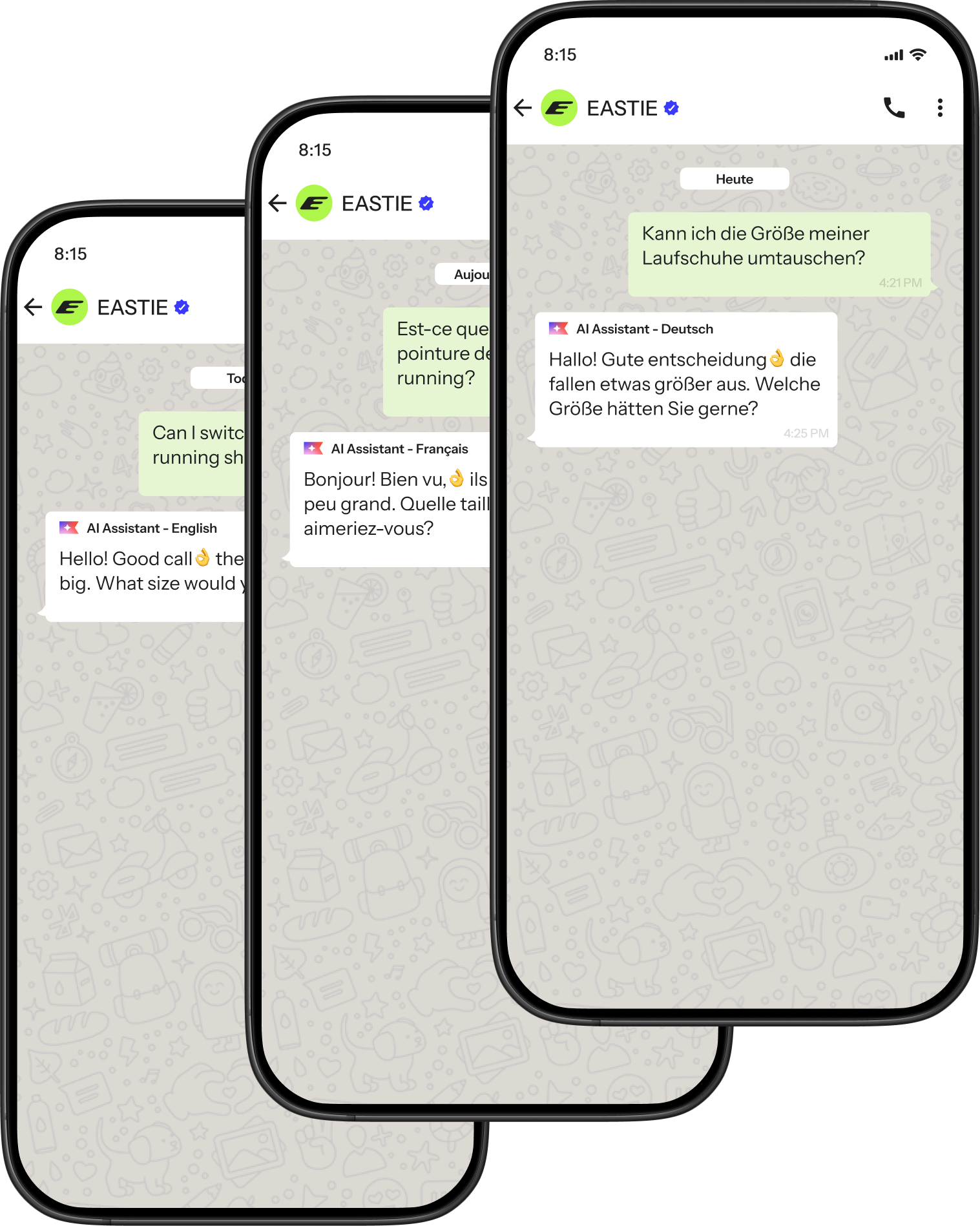
Customer Agent Multilingual
Serve any shopper in their native language without duplicating your agent setup — configure once and let Customer Agent respond automatically in whatever language customers write.
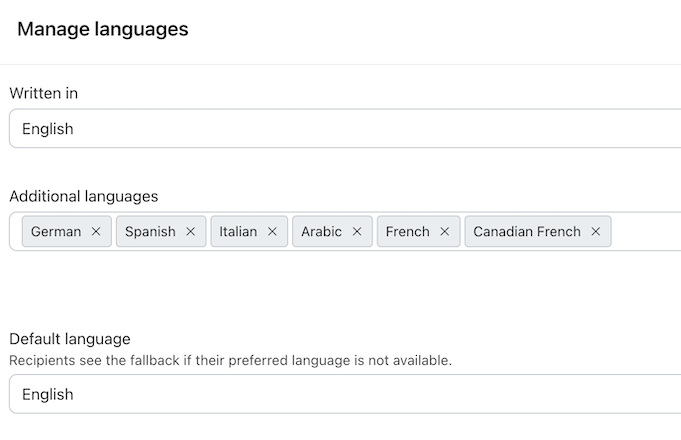
Simplified Language Management

Update multiple language settings at once instead of one by one — add or remove locales in bulk from the Smart Translations modal.
A "Manage languages" screen with "Written in" and "Default language" set to English. Additional languages selected are German, Spanish, Italian, Arabic, French, and Canadian French.

Reporting Dashboards for Hospitality

See guest, reservation, and loyalty metrics in one place without building custom reports — view pre-built dashboards that appear automatically based on your restaurant or hotel integrations.

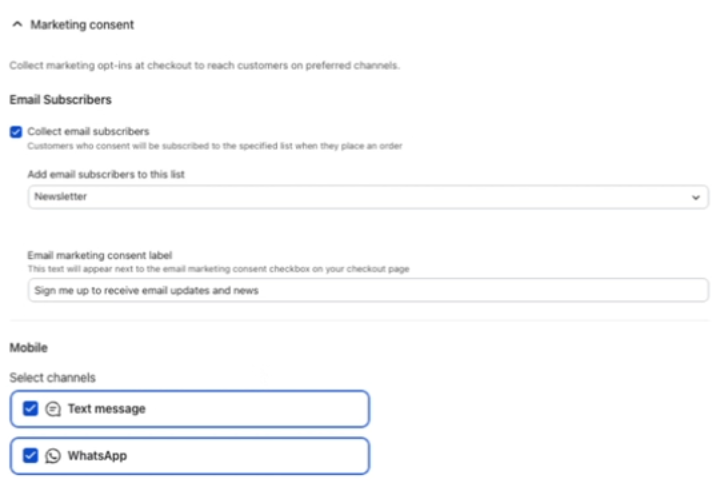
WhatsApp consent on WooCommerce checkout

Capture WhatsApp subscribers at checkout when purchase intent is highest — enable WhatsApp consent collection in your WooCommerce integration settings.
Marketing consent settings page with options for email subscribers (Newsletter) and mobile channels (Text message, WhatsApp).

Smart Translations - Import Glossary settings

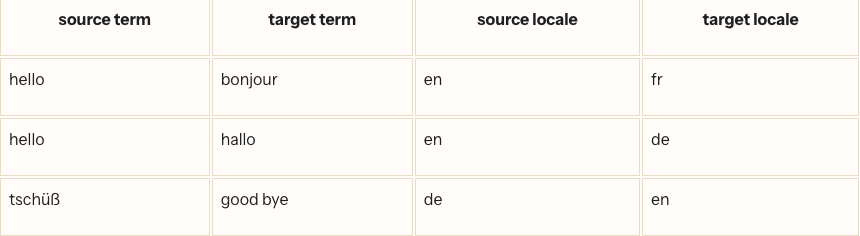
Manage translation terminology at scale — import hundreds of glossary terms via CSV instead of adding them one by one.

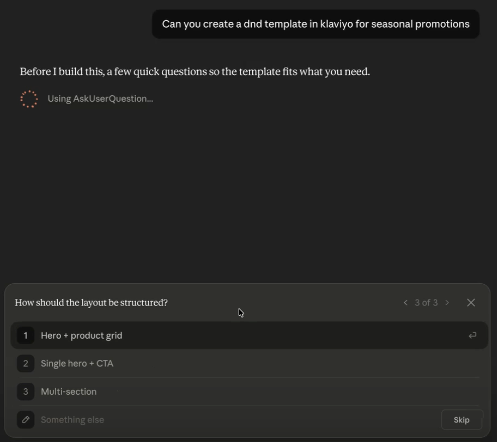
DND create and update email template tools in MCP

Design email templates with AI tools like Claude or ChatGPT and land on clean, editable drag-and-drop templates in Klaviyo — use the new MCP Server tools to skip the HTML handoff.
A dark mode interface shows an AI assistant asking "How should the layout be structured?" as question 3 of 3, with "Hero + product grid" highlighted among layout options.

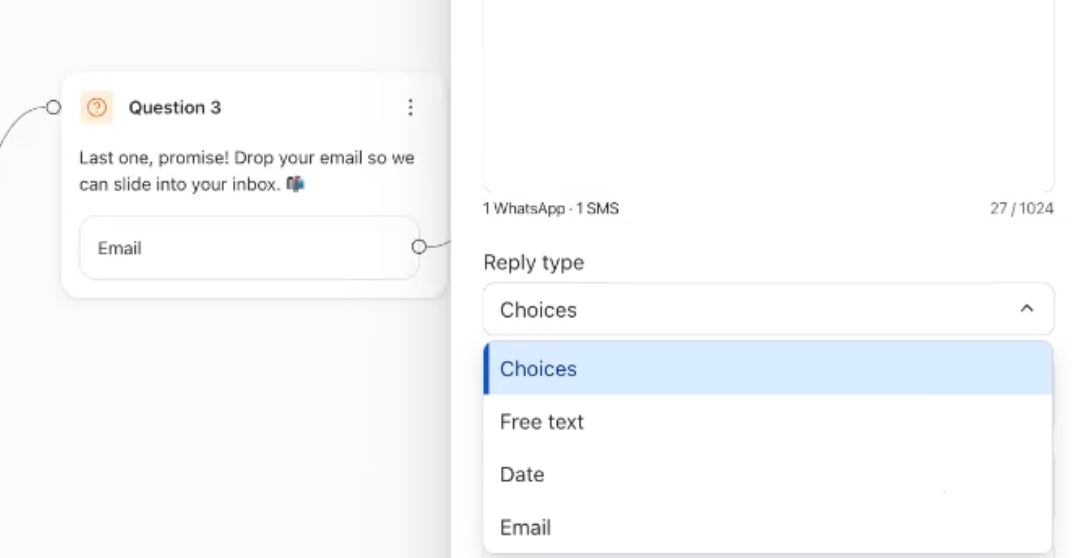
Mobile Channel Automation Improvements

Collect richer zero-party data and merge phone-only profiles with existing email profiles — use new question types, longer messages, rich formatting, and video support in WhatsApp and SMS automations.
A user interface showing "Question 3" asking for an email, with a "Reply type" dropdown menu open, displaying "Choices" as selected and "Email" as an option.

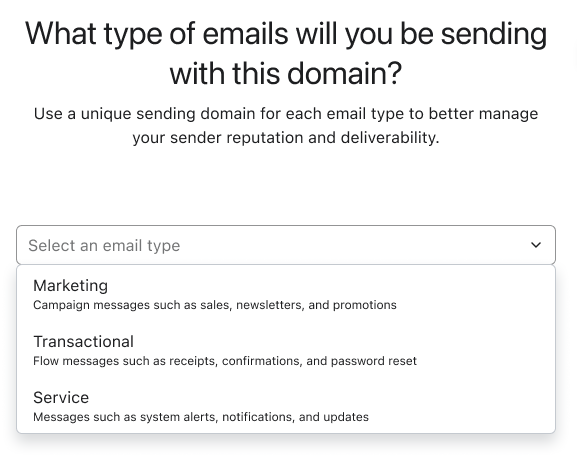
Transactional and Service Branded Sending Domains

Protect your transactional and service email reputation from marketing volume fluctuations — set up separate branded sending domains for each send type.
A form asking "What type of emails will you be sending with this domain?", with an open dropdown menu showing options for Marketing, Transactional, and Service emails.

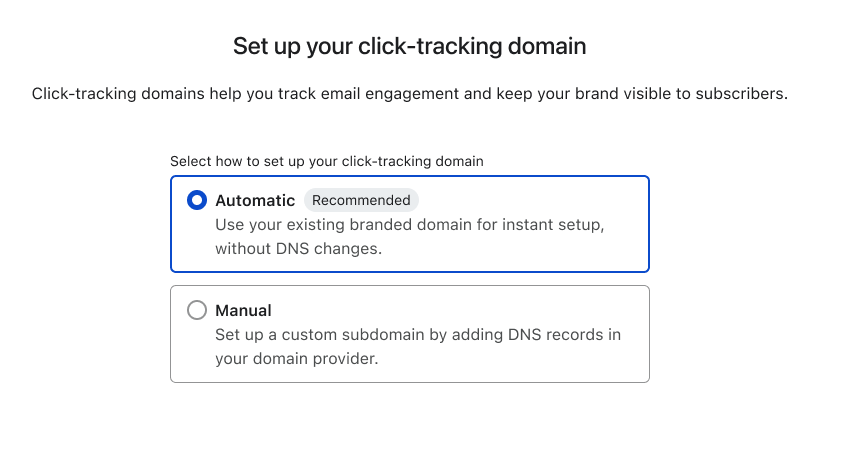
Self-Serve Dedicated Click Tracking

Strengthen brand trust and email deliverability with cleaner link URLs — set up a dedicated click-tracking domain directly in account settings.

Punchh Offer Management + Reward Object

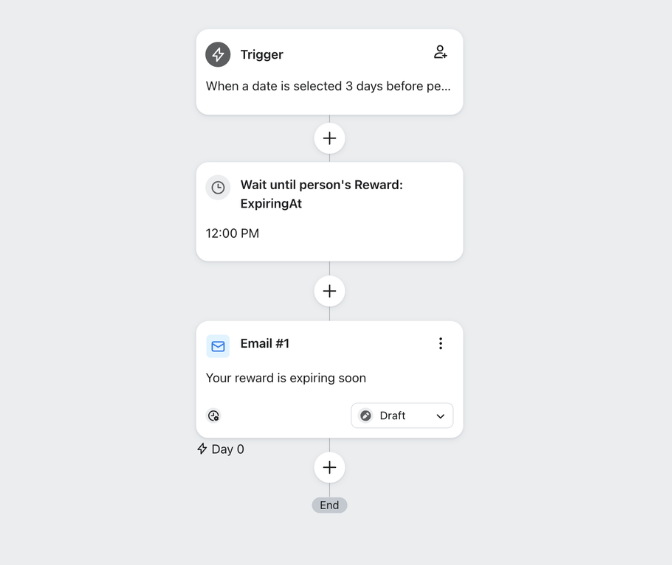
Drive loyalty engagement with real-time reward data and automated offer distribution — sync Punchh rewards to profiles and trigger countdown flows based on expiration dates.
A workflow diagram showing an automated email sequence for expiring rewards, with a trigger, a wait step until 12 PM on the expiry date, and an email notification.

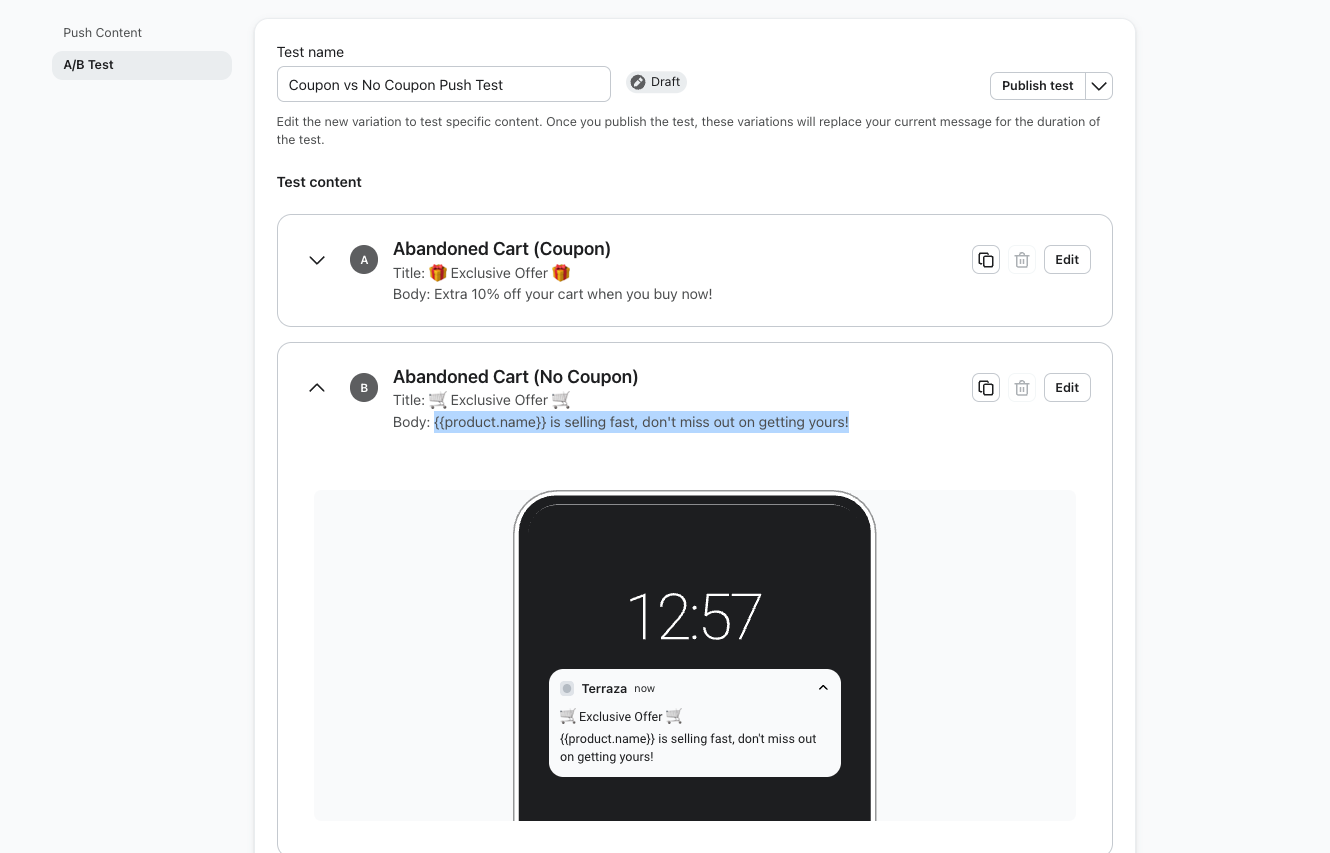
Mobile Push A/B testing in Flows (GA)

Optimise push notification performance — create A/B tests in Flow Builder to compare titles, body copy, and push behaviour, then pick winners based on engagement rate.

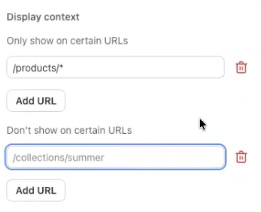
URL Targeted Content Blocks

Show the right onsite content on the right pages — Target Customer Hub content blocks by URL rules to create more relevant shopping experiences and reduce misplaced messaging.
Form fields for setting URL display context, showing '/products/*' for inclusion and '/collections/summer' for exclusion.

Integrations Schema for Customer Hub

Expand Customer Hub integrations without custom builds — Surface approved partner events for WISMO, returns, loyalty, and subscriptions so more onsite experiences work with the tools already in your stack.

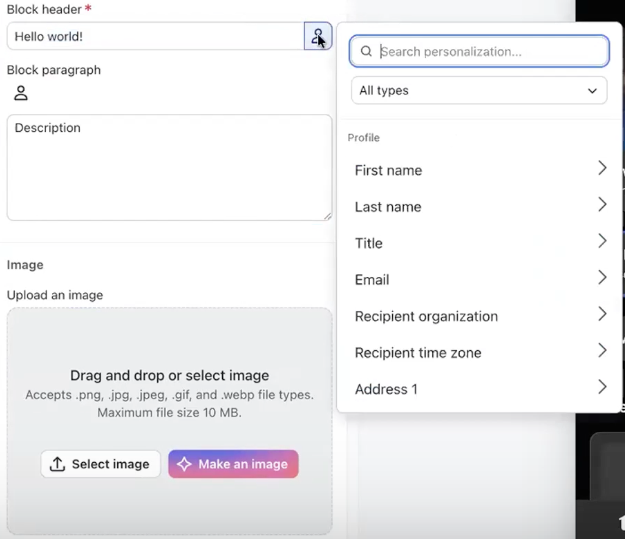
Personalised Content Blocks with Profile Picker

Personalise onsite content more easily — Use the profile picker in Customer Hub to quickly add profile properties to content blocks without manual setup.
Content editor with personalisation dropdown showing fields like First name and Email, alongside an image upload section.

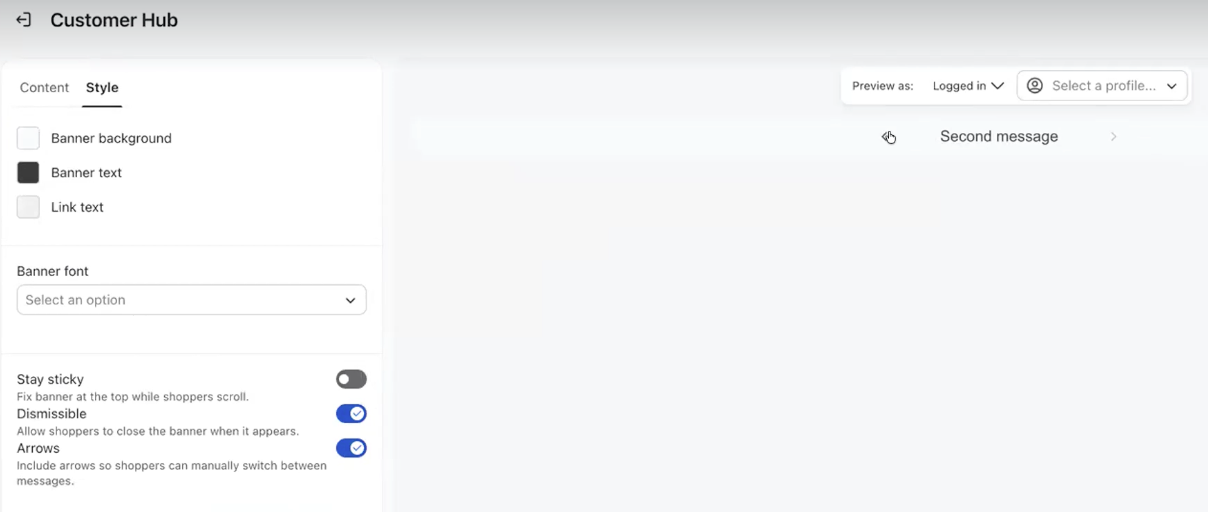
Multi-Message Onsite Banners

Create more engaging onsite experiences — Show multi-scroll personalised banners with deeper targeting to surface more relevant messages to each shopper.
Customer Hub interface showing banner style settings and a preview of a "Second message" banner.

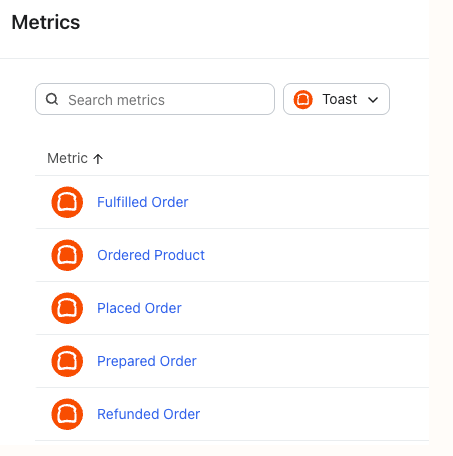
Prepared Order Event - Toast Integration

Send timely food-ready updates that drive more orders — Use Toast’s new Prepared Order event to notify guests when orders are ready and promote relevant add-ons.
A user interface for "Metrics" showing a search bar, a "Toast" filter, and a list of order-related metrics.

In-App Forms Mobile SDK Hooks

Build more flexible in-app experiences for developers — Use native SDK hooks to track when forms are shown, dismissed, or clicked and trigger custom app actions.
Klaviyo "SDK Overview" guide detailing SDKs for server-side languages and mobile platforms.

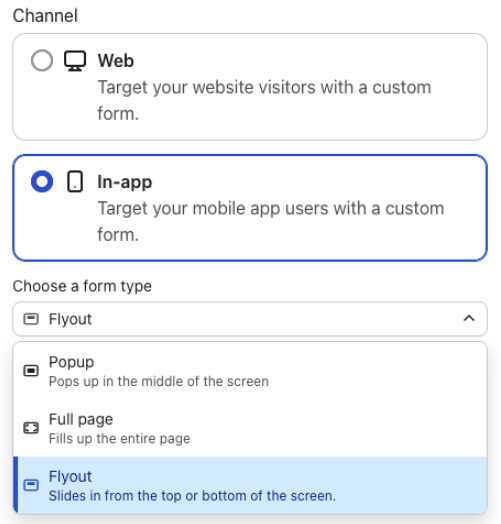
Flyout Forms In-App

Create less disruptive in-app experiences — Use flyout forms to slide messages into mobile apps while keeping the rest of the screen usable.
UI showing "In-app" channel selected and "Flyout" selected as the form type.

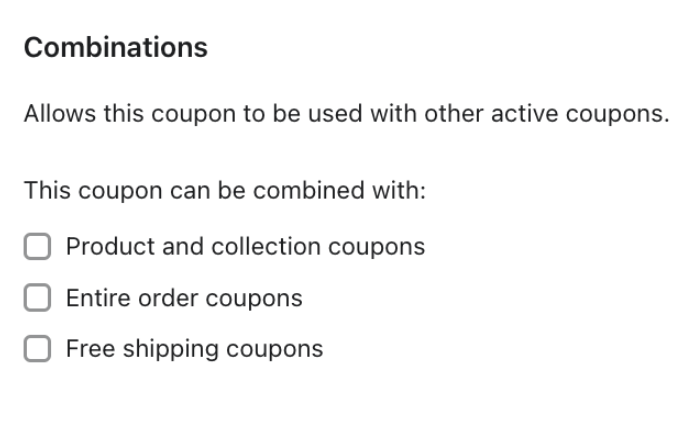
Shopify Coupon Combinations

Build more personalised Shopify promotions — Allow Klaviyo-generated coupons to stack with other discounts at checkout for more flexible, tailored offers.

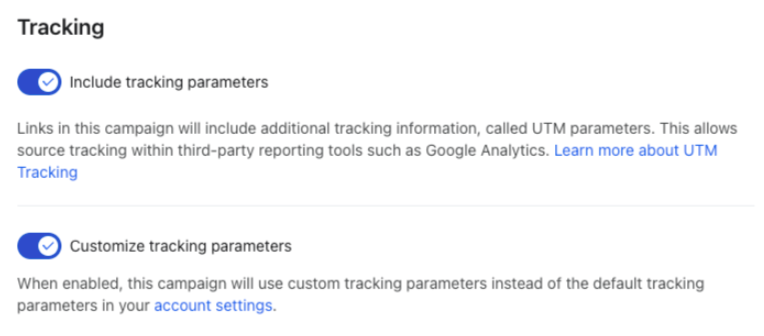
Automatic UTM Parameters For Deep Links

Track push performance more reliably — Automatically add UTM parameters to deep links in new push campaigns and flow messages to reduce errors and improve reporting.

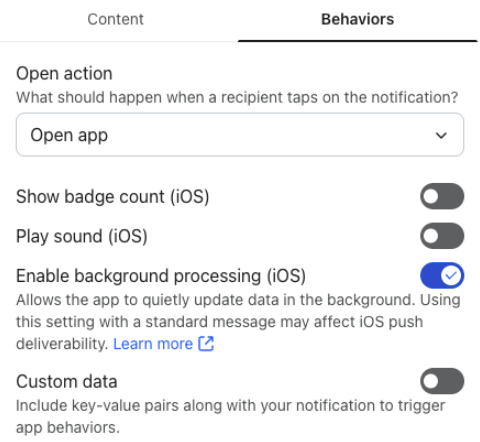
iOS Background Processing / Content Available

Power more custom iOS app experiences — Enable background processing for standard push notifications so your app can refresh data or run tasks when a notification is delivered.
App notification behaviour settings for iOS, showing options for open action, badge count, sound, background processing, and custom data.

Geofencing Enhancements

Scale location-based messaging with less setup — Import, pause, and manage up to 5,000 geofences to speed onboarding and support more retail locations.

Data Warehouse Import: Connection and Command-level Error Visibility

Diagnose warehouse sync issues without support — View in-product logs and run-level errors to identify permissions, schema, firewall, timeout, or data quality problems faster.

Data Warehouse Import: Record-level Error Reporting

Troubleshoot warehouse sync errors faster — Download row-level error reports and view clearer run statuses to fix data quality issues without extra back-and-forth.

Channel Affinity for WhatsApp

Reach every shopper on their preferred channel — Include WhatsApp in Channel Affinity to automatically optimise message delivery across email, SMS, push, and WhatsApp.

Category Analysis Dashboard

Make smarter merchandising decisions faster — Analyse category-level revenue, orders, and engagement trends to spot opportunities without manually aggregating product data.

Folders For Email Templates

Organise email templates faster — Create folders, nest folders, and bulk-move templates to keep your library clean and easy to navigate.

Social Sign-On

Sign up and log in with less friction — Use Google credentials to access Klaviyo securely without creating or managing a separate password.

New API Revision 2026-04-15

Expand what you can build with Klaviyo’s latest APIs — Power geofencing, drag-and-drop templates, two-way conversations, omnichannel campaigns, translations, and custom objects programmatically.

WhatsApp Support for Zendesk

Support shoppers on WhatsApp inside Zendesk — Sync WhatsApp conversations into Zendesk and surface Klaviyo profile details in a sidebar so support teams can resolve issues with more context.

WhatsApp Click to Chat

Start more WhatsApp conversations from anywhere — Generate pre-filled Click to Chat links in Klaviyo so visitors can launch a WhatsApp conversation with a single tap.

Barcodes in Messages

Enable native barcodes across more channels — Generate Code 128 barcodes with the new {% barcode %} tag in email, MMS, RCS, and WhatsApp using profile, event, static, or coupon data.

WhatsApp for Customer Agent
Resolve more WhatsApp conversations with AI — Support automated customer service on WhatsApp with Customer Agent.

Auto-Complete for Custom Objects

Speed up filtering and reduce mistakes with auto-complete — Select recent custom object property values from suggestions in segments, templates, and flows instead of typing them manually.

SFTP & List Import Error Reporting

Fix bulk import issues faster — Download detailed error reports for SFTP uploads and list imports to quickly identify skipped rows, correct problems in bulk, and re-upload with confidence.

Use Favourites in Flows

Turn favourites into more revenue-driving messages — Trigger price drop and low stock flows from favourited products to capture high-intent demand at the right moment.

Onsite JS via Google Tag Manager for Hospitality

Recover more hotel revenue with no-code onsite tracking — Install Klaviyo’s Google Tag Manager template in Guesty, Cloudbeds, or Mews booking engines to capture key browsing and checkout events without custom Javascript.

Scheduleable Content Blocks

Automate onsite campaigns without manual updates — Schedule Customer Hub content blocks to launch, change, or disappear at specific times so messaging stays timely and relevant.

Customer Hub for WooCommerce

Personalise website experiences for every shopper — Surface tailored content, recently viewed products, order history, and AI-powered support in one self-serve hub.

Thanx Offer Management & Reward Object Integration

Drive more personalised loyalty marketing from Klaviyo — Create Thanx offers from lists or segments and sync reward data into profiles in real time to power smarter targeting and expiry-based flows.

WhatsApp Consent on Shopify Checkout

Grow WhatsApp subscribers at checkout — Collect marketing and transactional WhatsApp consent on Shopify checkout, thank you, and order status pages, including alongside text consent in a single form.

Dedicated IP Visibility

Dedicated IP self-serve visibility — View IP addresses and warming progress directly in Klaviyo without needing to contact Support.

Universal Content Blocks in Sign-up Forms

Speed up form creation and keep branding consistent — Save reusable content blocks once and drag them into sign-up forms whenever you need them.

Canva Integration for Emails

Build emails in Canva and send them to Klaviyo in one click — Export Canva email designs directly to your Klaviyo Template Library as HTML templates for a faster creation workflow.

Wix Catalogues V3 Support

Keep Wix catalogue experiences working seamlessly — Support V3 catalogues in Klaviyo so customers can continue using product data in flows and catalogue-driven experiences as Wix migrates sites.

Activity Log

Gain self-serve visibility into account activity — Track actions taken in your account with the new Activity Log to improve control, reduce confusion, and speed up troubleshooting.

Sign-Up Form Scheduling Improvements

Save time while building and scheduling forms — Undo or redo edits instantly and schedule forms directly from the editor without jumping back to the forms list.

Onsite Personalised Banners

Personalise onsite messaging for every shopper — Show dynamic banners based on visitor identity, segment membership, language, and visibility rules to drive more relevant storefront engagement.

Customer Agent Guidance
Make every AI reply sound on-brand and escalate correctly — Set natural-language guidance for brand context, tone, style, and handoff rules so Customer Agent responds more accurately and consistently.
Audience Optimisation for Omnichannel Campaigns

See the impact of audience optimisation more clearly — View removed profiles and measure unsubscribe reduction, recipient removal, and campaign-level performance across optimised sends.

Toast Integration Menu Data

Personalise restaurant messages with richer menu data — Use Toast menu item details like images and SKUs in dynamic messages and updated flow templates to create more relevant customer experiences.

HTML for Table and Split Email Blocks

More flexible email editing — Add pure HTML directly into Table and Split block cells to simplify custom coding and prepare for the move away from Source Code in text-based blocks.

Customer Agent for Email
Handle more support volume with AI on email — Resolve customer questions automatically across the highest-volume service channel, now fully available in GA.

Personalise Send Time New Analytics

Understand Personalised Send Time performance more clearly — View send time distributions, see time window details in analytics, and filter campaigns using Personalised Send Time more easily.

Nano Banana Pro for Image Remix

Get higher-quality image edits with more control — Choose between faster Standard and more powerful Pro models in Image Remix to match speed and output quality to the task.

Profile Suppression Recommendation

Improve list health without risking valuable customers — Review and suppress truly inactive, low-value profiles using proactive recommendations based on sunset flow criteria.

Omnichannel Campaign Cloning

Expand campaigns into omnichannel with less work — Clone any single-channel campaign directly into the omnichannel canvas while preserving key settings and making it easy to add follow-up touchpoints.

Loyalty Skill

Deflect repetitive loyalty tickets automatically — Answer points and rewards questions across webchat, text, email, and WhatsApp while linking customers to their loyalty portal.

Favourites Import

Preserve high-intent shopper data during migration — Import favourites from Swym, Wishlist King, or CSV files so brands can switch to Customer Hub without losing valuable wishlist activity.

Loop Returns Helpdesk Integration

Handle returns without leaving Helpdesk — Initiate and track returns directly in the ticket view to resolve issues faster and reduce tab-switching for agents.

Outbound & Manual Ticket Creation

Capture every support interaction in Helpdesk — Log phone calls and send outbound emails to create tickets, giving merchants a fuller view of the customer journey.

Outbound Media

Support customers better with media sharing — Send images and files across email, webchat, Instagram, text, and WhatsApp to resolve issues faster and more clearly.

App Performance Monitoring

Track app performance — View listing traffic, installs, API health, and active accounts to optimise engagement and troubleshoot faster.

Advanced Helpdesk Routing

Route tickets with precision using customer data — Create custom routing rules based on any profile or issue detail to streamline workflows and support team efficiency.

Content & Favourite Analytics

Optimise Customer Hub performance with new insights — Track content block clicks, CTR, and top favourited products to fine-tune engagement and boost revenue.

Pinned Properties

Give support reps the context they need — Display up to 5 key profile properties on each ticket to personalise responses and resolve issues faster.

Customer Agent Handoff Summaries
Resolve tickets faster — See the customer’s issue, what Customer Agent tried, and next steps—all in one view to save time and avoid duplicate work.
BFCM Unsuppression

Re-engage high-intent buyers for BFCM — Use the new Unsuppression feature to restore consented, active profiles and boost send volume ahead of BFCM 2025.
Segment Library
Build smarter segments faster — Use the new in-app Segment Library to instantly create proven, high-impact segments in just two clicks.
Attach Products to Mobile Messages

Add product links and images with one click — Easily attach products to SMS, RCS, or WhatsApp messages right from the editor—no copy-pasting needed.

ChatGPT MCP Server Connector

Connect Klaviyo to ChatGPT — New Developer Mode connector lets Pro users access Klaviyo data and actions directly in ChatGPT.

Data Warehouse Import (Profiles)

Sync profiles from your data warehouse — Natively import customer data from Snowflake and BigQuery for bi-directional syncing without custom pipelines.

WhatsApp

Reach customers where they chat — Tap into WhatsApp’s 3B+ users with full support for messaging, forms, and replies.

Forms Dual Preview

Optimise forms across devices — No more toggling—preview both views simultaneously in the editor.

Improved API Validation for Phone Numbers

Grow profiles without interruption — Relaxed API validation ensures more emailable profiles are successfully created.

New Klaviyo Navigation

Navigate faster — New layout is now available in every Klaviyo account—check it out today!

View historical attribution changes

See a timeline of changes to your account’s attribution settings.